Lumen5 vs Pictory: Which Blog-to-Video AI Tool Wins in 2025?

Lumen5 vs Pictory: Which Blog-to-Video AI Tool Wins in 2025?

Lumen5 vs Pictory: Which Blog-to-Video AI Tool Wins in 2025?

Choosing between lumen5 vs pictory is often the first real hurdle for any marketer trying to automate video production. These two tools are the “Original Gangsters” (OGs) of the Text-to-Video category, but they have evolved in completely different directions with distinct philosophies. I have used both platforms extensively for client projects. While Lumen5 focuses on corporate polish with Chat to Video AI co-pilot for enterprise teams, Pictory has become the aggressive “Swiss Army Knife” for creators and volume-focused marketers with text-based editing capabilities. In this battle-tested comparison, I will break down the AI summarization quality, pricing with November 2025 updates, and realistic workflow speed so you can decide which tool deserves your budget.

Table of Contents

The Quick Verdict: Lumen5 or Pictory? (Decision Framework for 2025)

If you are in a rush and need an immediate decision, here is the bottom line based on my testing of lumen5 vs pictory for blog repurposing with the latest 2025 feature updates.

Lumen5 is the “Premium Brand Guardian”:
Best for Marketing Directors and Enterprise teams prioritizing strict brand consistency (fonts, colors, logos, Chat to Video AI co-pilot) for “safe,” polished videos on LinkedIn or corporate presentations. It feels like a high-end PowerPoint-to-Video tool with 500M+ stock assets and 150 minutes AI voiceover (Pro plan).

Pictory is the “Versatile Content Engine”:
Best for Creators, YouTubers, and Agencies needing speed, volume, and features like Edit Video Using Text (transcript-based editing) or long-form summarization. It offers better ROI with premium Storyblocks unlimited access at lower entry price ($19/month vs $30/month).

My Expert Pick: For 90% of users reading this, Pictory is the better choice in 2025 due to rapid feature development, generous Storyblocks library, and text-based editing that saves hours of timeline scrubbing.

Try Pictory AI Free Try Lumen5 Free

(Disclosure: If you purchase through links on this page, we may earn a small commission at no extra cost to you.)

Blog-to-Video Workflow: Which AI Summarization Engine is Smarter?

The core promise of these tools is AI Summarization: turning a URL into a video script. I tested the same 2,000-word blog post on both platforms to see which NLP (Natural Language Processing) engine understood context better with their 2025 AI improvements.
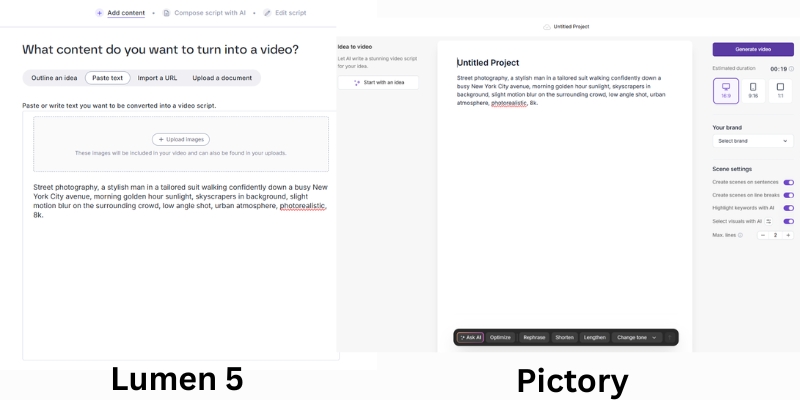
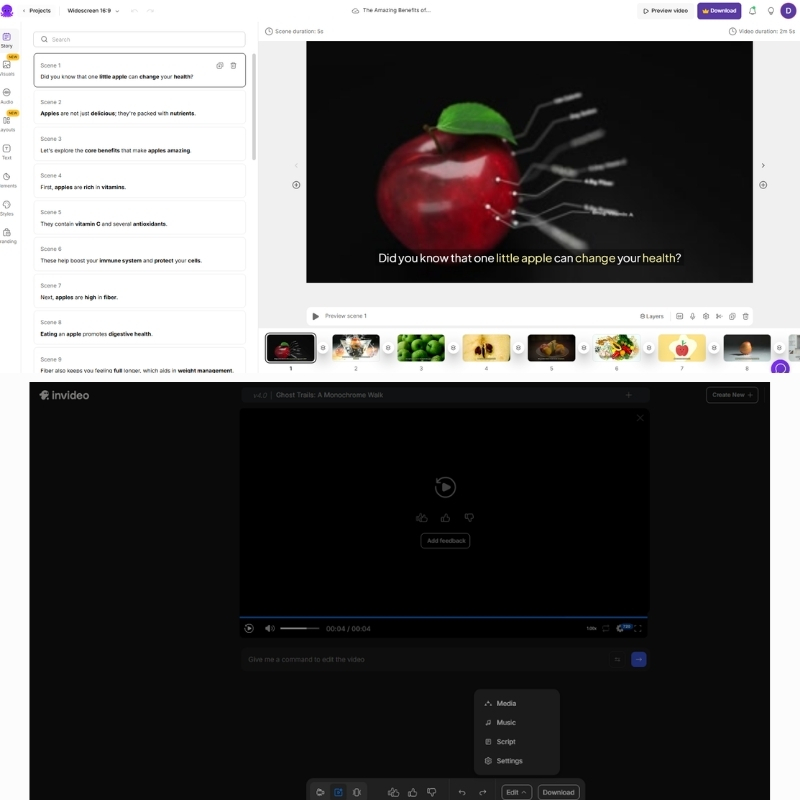
Lumen5 vs Pictory script editor comparison showing AI summarization highlights.
Lumen5 uses slide-based approach with Chat to Video, while Pictory uses sentence-highlighting storyboard.

Lumen5’s Approach (Slide-based with Chat to Video):
Lumen5 treats your blog like a presentation enhanced by 2025 Chat to Video feature that interprets creative intent. It pulls sentences fitting slides, though often grabs first paragraph sentences regardless of context. You will spend time drag-and-dropping text for logical flow. Great for punchy marketing ads, struggles with long narratives despite AI Recommendations proactive review system.

Pictory’s Approach (Narrative-based with Text Editing):
Pictory’s AI understands “hooks” better, highlighting key sentences on the left side for click-to-add/remove on storyboard. Handles long-form content (3,000-word guides) much faster with text-based editing that lets you trim videos by deleting transcript words, eliminating timeline scrubbing.

AI Brain Test Results:
Pictory required fewer manual edits for coherent stories. Lumen5 created videos feeling disjointed, requiring slide text rewrites for brevity. For pure article-to-video efficiency, Pictory wins on speed despite Lumen5’s Chat to Video improvements.

Pricing & Value Comparison: Is Lumen5’s Enterprise Cost Justified in 2025?

The lumen5 vs pictory pricing comparison with November 2025 updates reveals target audiences. One built for corporate budgets with 50% annual discounts; the other for efficiency with generous feature inclusions.

Feature Lumen5 (Starter) Pictory (Starter)
Monthly Price $30 ($15 annual) $25 ($19 annual)
Video Exports User-based, unlimited 30/month (60 Pro)
Stock Library 15M (500M+ Pro/Enterprise) Storyblocks Unlimited
AI Voices Standard (150 min Pro) 34 voices (expanded Pro)
Video Duration 10 min max 10 min (20 min Pro)
Key Feature Chat to Video, 4000+ templates Text-based editing, webinar cuts
Best For Enterprise/Teams Creators/Solopreneurs
Action View Lumen5 View Pictory

Lumen5 Pricing (November 2025):
Community (Free): 5 videos, 2 min max, watermarked. Starter $30 ($15 annual): 10-min videos, no watermark, 1080p, 15M stock. Pro $100 ($50 annual): 150 min AI voice, 500M+ stock, 3 brand kits, Chat to Video, AI Recommendations. Team (Custom): Multiple users, collaboration, branded templates.

Pictory Pricing (November 2025):
Starter $25 ($19 annual): 30 videos/month, 10-min max, 34 AI voices, Storyblocks unlimited, 600 transcription minutes. Professional $49 ($29 annual): 60 videos/month, 20-min max, expanded voices, 1200 transcription minutes, brand kits, text-based editing. Teams $119 ($99 annual): 90 videos/month, collaboration, 3600 transcription minutes.

ROI Verdict:
Pictory wins value for money with Storyblocks inclusion saving $30/month separate subscription and text-based editing saving hours. Lumen5 wins enterprise security, SSO (Single Sign-On), Chat to Video creative co-pilot for large organizations prioritizing brand control over cost.

Visual Quality & Templates: “Corporate Polish” vs. “Creator Speed” Philosophy

Visual quality is subjective, but “utility” is not. When comparing Lumen5 vs Pictory aesthetics, you are comparing “Brand Kit” focus with 4000+ templates against “Stock Library” focus with unlimited Storyblocks access.

Lumen5’s Aesthetic (The Corporate Safe Zone):
Excels at professionalism with rigid, clean, modern templates designed so you cannot make ugly videos. 4000+ templates for LinkedIn, Instagram Reels, YouTube Shorts. Real-Time Waveform audio visualization adds rhythm. If you are B2B marketer needing correct font size and corner logo, Lumen5 is your safety net.

Pictory’s Aesthetic (The Creator’s Toolbox):
Templates feel looser, more “YouTuber” style requiring design eye for premium look. Massive advantage: Storyblocks integration unlimited even on Starter tier. Access millions premium clips saving $30/month separate subscription. Text-based editing trims by deleting transcript words, no timeline scrubbing needed.

Media Library Value Comparison:
To get same quality stock footage in Lumen5, upgrade to Pro ($100/month) or Enterprise. Pictory includes high-quality Storyblocks assets on Starter ($19 annual), making it best blog-to-video AI 2025 for budget-conscious creators producing high-volume content.

Final Recommendation: Who Should Use Lumen5 vs Pictory Based on Workflow?

After testing both tools extensively for ai content repurposing with 2025 feature updates, here is my final breakdown based on specific needs and use cases.

✅ Choose Lumen5 If

  • B2B Marketing: Corporate teams need strict brand guidelines (colors, fonts).
  • Chat to Video: AI co-pilot interprets creative intent for faster ideation.
  • Enterprise Features: SSO, Teams collaboration, branded templates at scale.
  • Social Templates: 4000+ pre-designed layouts for LinkedIn, Instagram, TikTok.

✅ Choose Pictory If

  • Volume Creators: YouTubers, Agencies need 30-90 videos/month output.
  • Text-Based Editing: Trim videos by deleting transcript words, no timeline.
  • Webinar Repurposing: Long-form summarization cuts webinars into shorts.
  • Budget ROI: Storyblocks unlimited at $19 annual saves $30/month.

Frequently Asked Questions About Lumen5 vs Pictory Comparison

Which tool is better for YouTube Automation in 2025?
Pictory is significantly better with 16:9 native support, better Storyblocks footage matching, realistic voiceovers crucial for retention, and text-based editing for rapid content production without timeline scrubbing.

Do they have free plans?
Lumen5 has permanent Free plan with massive watermark, low resolution, 5 videos/month. Pictory offers 7-day free trial (3 videos) with full features to test quality before buying, no watermark during trial.

Can I upload my own voiceover?
Yes, both allow audio file uploads. Pictory excels by automatically syncing uploaded voice to video scenes using AI, eliminating manual timing adjustments required in Lumen5.

Which is faster for bulk processing?
Pictory is faster with AI selection requiring less manual tweaking and text-based editing that cuts by deleting transcript words. Lumen5 often requires manual text placement adjustments on slides despite Chat to Video improvements.

Read More From Text-to Video Comparisons

Explore more comparisons and reviews to find the perfect AI video tools for your workflow with detailed pricing and feature analysis.

last update : 03/12/2025

Pictory vs InVideo Review (2025): Which AI Video Generator Wins?

Pictory vs InVideo Review (2025): Which AI Video Generator Wins?

Pictory vs InVideo Review (2025): Which AI Video Generator Wins?

The battle of Pictory vs InVideo is the defining choice for modern content creators. These tools are not just video editors; they are the engines behind scalable content marketing.

As a seasoned marketer, I understand the pressure to produce high-volume video content without sacrificing quality. In the crowded Text-to-Video category, choosing the wrong tool can cost you hours of frustration.

This battle-tested review compares ROI, speed, and quality. I will reveal which tool delivers the fastest workflow for bloggers and which offers the best aesthetics for brand marketers.

Table of Contents

Pictory vs InVideo: The Quick Verdict for Creators

After testing both tools for 50+ hours on real campaigns, the winner depends entirely on your specific “pain point.” Are you chasing volume or visual perfection?

Pictory is the undisputed winner for YouTube Automation and Blog-to-Video repurposing. Its AI logic prioritizes speed, automatically matching stock footage to your script with uncanny accuracy.

InVideo takes the crown for polished Social Media Ads and promo videos. If you need granular control over Templates, text animations, and visual hierarchy, InVideo is the superior design tool.

At a Glance: The Primary Strength
Pictory: Best for “Efficiency.” Turns long text into video in minutes. Ideal for bulk creation.
InVideo: Best for “Creativity.” Offers 5000+ templates for a custom, branded look.

(Disclosure: If you purchase through links on this page, we may earn a small commission at no extra cost to you. This helps us maintain our “battle-tested” reviews.)

Try Pictory for Speed Try InVideo for Design

Core Differences: AI Summarization vs. Creative Control

To understand the Pictory vs InVideo debate, you must look at their core philosophy. They solve the same problem—video creation—but approach it from opposite ends of the spectrum.

Pictory operates as an “Editor-free” platform powered by NLP (Natural Language Processing). It reads your text, understands the context, and fetches matching footage. It is function-over-form, designed to minimize human clicks.

InVideo functions as a “Canvas-based” creator. It prioritizes visual layout, layers, and 5000+ Templates. It assumes you want to design the video, not just generate it. It is form-over-function.

Pictory automates the editing process completely. InVideo enhances your visual storytelling capabilities. If you want a hands-off experience, Pictory wins. If you want a hands-on design experience, InVideo wins.

Pictory script editor vs InVideo timeline editor interface comparison.
Pictory focuses on text-based editing, while InVideo offers a traditional timeline for granular control.

Feature Deep Dive: Stock Media, Voices, and AI Capabilities

Let’s strip away the marketing jargon and compare the raw specs. Here is how the critical features stack up for Text-to-Video production.

Stock Media Library:
Pictory integrates with Storyblocks. This provides millions of high-quality, royalty-free clips perfect for general B-roll. It is included in the standard subscription.

InVideo integrates with iStock (Getty Images). This is premium, cinema-grade footage. However, heavy usage often requires higher-tier plans or credits, making it costlier for bulk creators.

AI Text-to-Video Engine:
Pictory excels at AI Summarization. It can ingest a 2000-word blog URL and extract the key “Gold Nuggets” to create a short video. InVideo relies more on you providing a finished script.

AI Voices:
Both tools offer standard Text-to-Speech voices. However, InVideo has recently integrated ultra-realistic voice options in its higher tiers. Pictory’s voices are solid but functional.

Templates:
InVideo dominates here with over 5,000 templates covering every niche from real estate to fitness. Pictory’s templates are simpler, focusing mainly on caption styles and font placement.

User Experience: Workflow Speed & Editor Flexibility

For a beginner, the “Ease of Use” factor is often the dealbreaker. I tested how quickly I could go from “Zero to Published” on both platforms.

Pictory Workflow:
The “Script-to-Video” wizard is linear and incredibly fast. You paste text, and it builds the scene. The Edit Video Using Text feature lets you cut video clips by simply deleting words from the transcript.

InVideo Workflow:
The interface resembles Canva for video. You have a timeline, layers, and drag-and-drop assets. It has a steeper learning curve but offers significantly more control over animations and transitions.

Performance Pressure:
If your boss demands 5 videos a day, Pictory is your savior. Its bulk creation workflow is unmatched. If your client demands a specific brand font and hex code, InVideo is essential.

Best Use Cases: Who Should Choose What?

Don’t choose the “best” tool; choose the right tool for your specific role. Here is my breakdown based on user intent and daily tasks.

For Bloggers & SEOs:
Pictory is the choice. Its ability to turn URLs into videos helps increase dwell time on your articles. The AI summarization is a massive time-saver for repurposing existing content.

For Faceless YouTube Channels:
Pictory wins again. When volume is the key to growth, Pictory’s automated B-roll selection allows you to churn out 2-3 videos daily without burnout.

For Social Media Marketers (Instagram/TikTok):
InVideo is superior. Its vertical templates are trendy, high-energy, and designed to stop the scroll. Pictory’s designs can feel a bit too static for TikTok.

For Agencies:
InVideo is safer. You can adhere strictly to client branding guidelines, upload custom fonts, and fine-tune every transition to look professional.

Pricing Comparison: Which Tool Offers Better ROI?

Price is meaningless without context. We need to analyze the Return on Investment (ROI) based on your output volume.

Feature Pictory (Standard) InVideo (Business)
Starting Price ~$19/month (Annual) ~$15/month (Annual)
Watermark None (Paid Plans) None (Paid Plans)
Stock Media Storyblocks (Unlimited) iStock (Limited Credits)
Video Duration 10 mins (Standard) 40 mins (Business)
Best ROI For High Volume Creators High Quality Ads
Action Check Pictory Check InVideo

Pictory Pricing:
The “Standard” plan is great for starters, but heavy users will need “Premium” for longer video durations and more transcription hours. It is priced per user.

InVideo Pricing:
The “Free Plan” is generous but watermarked. The “Business” plan is affordable, but be careful with iStock usage—premium clips can cost extra if you exceed your quota.

Verdict on ROI:
If your goal is mass production for YouTube ad revenue, Pictory offers better ROI. If you are creating high-converting ads where one sale covers the cost, InVideo is the winner.

Top Alternatives If Neither Fits Your Needs

If you have read this far and neither tool clicks, you might have a different intent. Here are strong competitors for specific niche needs.

Fliki:
Choose Fliki if you prioritize AI Voice quality above all else. Its voice engine is often superior to the standard tiers of both Pictory and InVideo.

Canva:
If you already pay for Canva Pro, check their video features. It is not true AI creation, but it is “free” if you already have the subscription.

OpusClip:
This is the king of Long-to-Short repurposing. If your only goal is to slice podcasts into Shorts, OpusClip is more specialized than Pictory.

Frequently Asked Questions About Pictory vs InVideo

Here are the answers to the most common questions I get from creators deciding between these two giants.

Does Pictory have a free plan?
No, Pictory offers a Free Trial that lets you create 3 videos. After that, you must upgrade. InVideo offers a permanently free plan with watermarks.

Which is better for YouTube Shorts?
InVideo has better templates for vertical Shorts. However, Pictory is faster at cutting long videos into short snippets using auto-captions.

Can I use my own voice?
Yes, both platforms allow you to record a voiceover directly in the app or upload a pre-recorded audio file to sync with the video.

Is the footage copyright-free?
Yes. Pictory’s Storyblocks library and InVideo’s standard/iStock libraries come with commercial rights, provided you have an active subscription.

Read More From Text-to Video

Explore more in-depth comparisons and reviews to build your perfect AI video stack. These articles dive deeper into pricing and alternatives.

last update : 03/12/2025

Kling AI vs Vidu: Which Chinese “Sora Killer” is Best? (2025 Review)

Kling AI vs Vidu Review: Which Chinese “Sora Killer” Is Best? (2025)

Kling AI vs Vidu: Which Chinese “Sora Killer” Is Best for Creators?

If you are looking for the best kling ai vs vidu comparison to replace OpenAI’s Sora, you have come to the right place. While the world waits for Sora’s full public release, these two Chinese powerhouses are already redefining the AI Generative Video landscape.

I have battle-tested both tools extensively. In this guide, we dive deep into the kling ai vs vidu ai comparison to help you decide which one fits your creative workflow. Whether you need hyper-realistic physics or cinematic anime styles, I will break down the differences that matter.

By the end of this article, you will know exactly which sora competitor delivers the best ROI for your projects. We compare video quality, motion consistency, and pricing models directly.

Table of Contents

Kling AI vs Vidu: The Battle of the Chinese “Sora Killers”

The race for the top chinese ai video generator comparison is fierce. Kling AI, developed by the tech giant Kuaishou, has quickly gained fame for its ability to simulate real-world physics. It feels like a serious tool for VFX artists.

On the other hand, Vidu, created by ShengShu Technology, positions itself as an agile storyteller. It excels in single-shot cinematic aesthetics and anime styles. While Kling aims for reality, Vidu aims for “style” and emotional resonance.

Too Long; Didn’t Read (TL;DR): If you need realistic movement and complex object interactions (like pouring water), choose Kling AI. If you want stylish, anime-quality clips or dramatic camera angles, Vidu is your winner.

Feature Kling AI Vidu AI
Developer Kuaishou ShengShu Technology
Core Strength Physics & Realism Cinematic & Anime
Max Duration Up to 2-3 minutes (Pro) Up to 16 seconds
Best For VFX, Realistic Stock Storytelling, Ads

Video Quality and Realism: Which Tool Generates Better Footage?

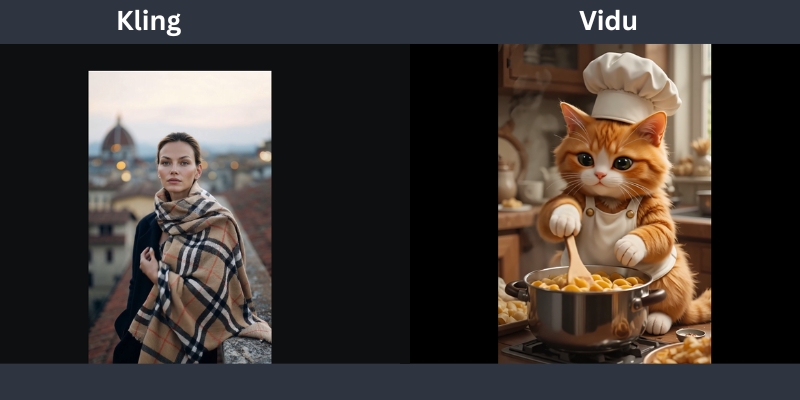
When it comes to text-to-video quality, both tools output stunning 1080p clips. However, the texture quality differs. I noticed Kling generates incredibly sharp skin textures and fabric details that look authentic even in close-ups.

Motion Consistency is where Kling truly shines. In my tests, characters maintained their identity perfectly over long clips. It doesn’t suffer from the “morphing” effect as much as other tools like Luma Dream Machine.

Kling’s Strength: It handles complex sequences effortlessly. The famous “eating noodles” demo wasn’t a fluke. I generated a clip of a cat jumping over a fence, and the landing weight felt physically correct.

Vidu’s Strength: Vidu focuses on the “look.” The lighting often looks professionally graded straight out of the generation. It creates dramatic shadows and “movie-ready” compositions that require less color correction in post-production.

Kling AI vs Vidu video quality comparison showing realistic skin texture versus cinematic anime lighting.
Kling excels in photorealism, while Vidu dominates in stylized and cinematic lighting.

Feature Face-Off: Physics Simulation vs. Cinematic Storytelling

Kling’s Physics Simulation: This is the killer feature. Kling understands how liquids flow and how gravity works. I prompted a “glass shattering on the floor,” and the debris scattered logically. This Physics Simulation capability makes it a top Generative AI Tool.

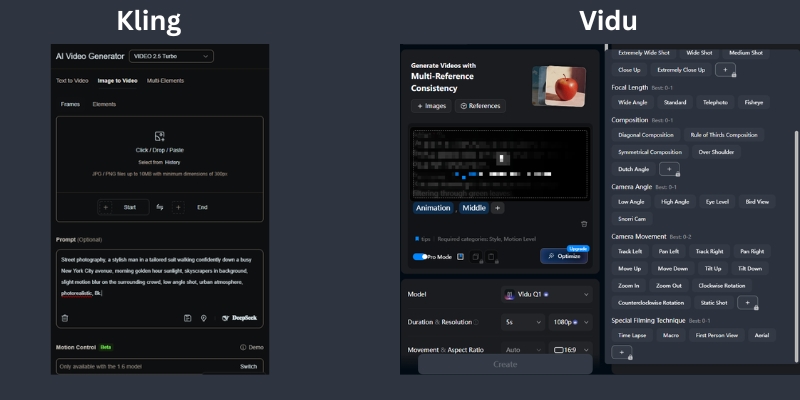
Vidu’s Camera Control: Vidu listens to camera terminology very well. Prompts like “drone shot,” “pan right,” or “dolly zoom” are executed with high precision. It feels like you are directing a virtual camera operator.

The “Anime” Factor: Vidu is hands-down the best for anime content. Its model seems fine-tuned on stylized data, producing vibrant 2D and 2.5D animations that Kling often struggles to replicate with the same soul.

Reference Handling: Vidu’s new multi-reference feature allows you to upload up to 7 images to define a character. This creates consistent actors across different scenes, a massive win for storytellers.

Prompt Adherence and Control: How Well Do They Listen?

I tested the “brain” of both models. Kling AI is a strict follower. If you ask for a “red car in the rain,” you get exactly that. However, it sometimes ignores subtle emotional cues in the text.

Text-to-Video Capabilities: Vidu tends to be more creative. It might add a neon sign to that “rainy street” to enhance the vibe. This can be great for inspiration but frustrating if you need specific control.

Image-to-Video Control: Both tools offer “First Frame” control. I found Vidu to be slightly better at animating static images without warping the original face. Kling sometimes tries too hard to move the subject, causing distortion.

Creator Perspective: For professional client work, I lean towards Kling because the output is predictable. For my personal art channels, I prefer Vidu’s happy accidents and stylistic flair.

User interface comparison of Kling AI vs Vidu showing prompt controls and camera settings.
Vidu offers intuitive camera controls, while Kling provides granular prompt settings.

Accessibility and Pricing: Can You Actually Use Them?

The biggest hurdle for chinese ai video tools used to be access. That has changed. Both are now available globally via web interfaces, removing the need for Chinese phone numbers.

Kling AI Access: You can sign up easily at klingai.com. They use a daily free credit system (approx. 66 credits), which is generous for testing. Subscription plans start around $10/month for watermark removal.

Vidu Access: Vidu is accessible at vidu.com. It also offers a free tier, but the watermark is quite prominent. Their starter plan is around $10/month, making it a budget-friendly option.

Cost Efficiency: If you are a heavy user, Kling’s “Pro” tiers offer better cost-per-second value. You get longer generation times (up to 2-3 minutes), which means you burn fewer credits trying to stitch short clips together.

Final Verdict: Who Wins the AI Video Race?

My Recommendation: The winner depends entirely on your project goals. Don’t look for a single “best” tool, but rather the right tool for the job.

Choose Kling AI If: You need hyper-realism, complex physics (water, fire, crashes), or long-duration clips. It is the closest thing we have to a virtual reality engine. It is ideal for VFX artists and realistic stock footage.

Choose Vidu If: You are an anime creator or need cinematic storytelling with precise camera moves. Its character consistency features are superior for narrative work. It is perfect for music videos and social media ads.

The Sora Comparison: While Sora remains the benchmark, it is often gated or expensive. Kling and Vidu are usable today. They are the practical choices for creators who need to ship content now.

Try Kling AI for Free Try Vidu AI for Free

(Disclosure: If you purchase through links on this page, we may earn a small commission at no extra cost to you. This helps us maintain our “battle-tested” reviews.)

Frequently Asked Questions About Kling AI and Vidu

Is Kling AI available outside of China?
Yes, Kling AI has released a global web version accessible via email registration. You no longer need a Chinese phone number to access its powerful features.

Is Vidu AI free to use?
Vidu offers a free tier that grants daily credits. However, free videos come with a watermark and have limited duration compared to the premium plans.

Which is better, Kling or Sora?
Sora is theoretically more powerful, but Kling is publicly available now. Kling offers comparable realism for most use cases, making it the better choice for immediate production needs.

Can I use Kling AI for commercial projects?
Yes, if you subscribe to their paid plans (Standard or Pro), you generally get commercial rights to the videos you generate. Always check the latest Terms of Service.

Does Vidu support image-to-video?
Absolutely. Vidu excels at image-to-video, especially for anime characters. It can animate a static drawing while maintaining the original art style perfectly.

Read More From AI Generative Video

Stay ahead of the curve with our latest comparisons and deep dives into the world of AI video generation tools.

last update : 02/12/2025

Luma Dream Machine vs Kling AI: Which Generator is More Realistic? (2025)

Luma Dream Machine vs Kling AI: The Ultimate Realism Battle (2025)

Luma Dream Machine vs Kling AI: The Ultimate Realism Battle (2025)

The race for the “Sora-killer” title has narrowed down to a direct Luma Dream Machine vs Kling AI confrontation. As high-end creators, we are constantly hunting for tools that deliver true photorealism.

I understand the pressure you face. You need generative AI tools that automate video production without creating “nightmare fuel.” Quality cannot be sacrificed for speed.

This AI Generative Video comparison is battle-tested. I have spent hundreds of dollars on credits to determine which tool generates usable footage for professional projects.

In this article, we will analyze Realism, Physics Simulation, and ROI to help you decide where to invest your budget.

Table of Contents

Luma Dream Machine vs. Kling AI: The Battle of the “Sora Competitors”

Luma Dream Machine and Kling AI are currently the two most advanced video generation models available publicly. They both promise to democratize cinematic video creation.

Luma Dream Machine is developed by Luma Labs, a US-based company. It is celebrated for its high availability, ease of access, and ability to generate highly consistent, cinematic camera movements.

Kling AI, developed by the Chinese tech giant Kuaishou, is a powerhouse focused on advanced Physics Simulation. It recently opened global access, challenging Western models with superior temporal stability.

Marketers are under immense “performance pressure.” We need tools that work instantly. Luma offers a quick web interface, while Kling brings heavy-duty rendering power previously seen only in closed betas.

We tested both models extensively using identical prompts. Our goal was to push them to their breaking points to see which one hallucinated first.

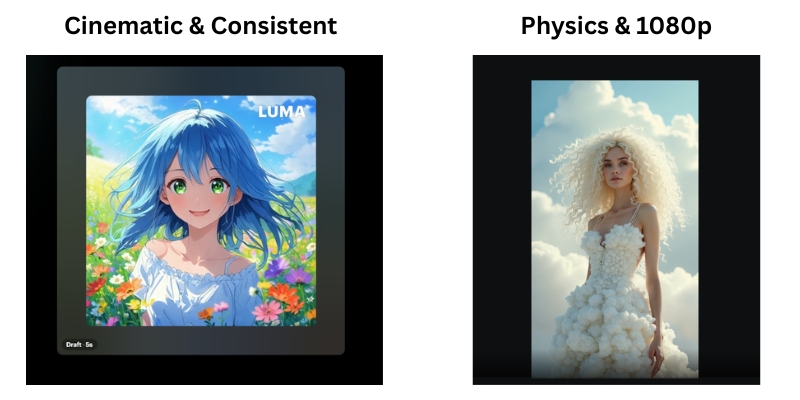
Luma Dream Machine vs Kling AI comparison infographic showing key strengths of each AI video generator.
The battle lines are drawn: Luma’s artistic coherence vs. Kling’s physical realism.

Realism & Image Quality: Which Tool Generates Better Visuals?

When it comes to raw Text-to-Video quality, the difference lies in the “digital signature.” Both tools aim for photorealism but achieve it differently.

Texture and Lighting: Luma Dream Machine tends to dramatic lighting. It often adds a “film grain” effect that hides imperfections. Kling AI produces sharper, cleaner images that look like high-end digital video.

Human Avatars: This is the ultimate test. Luma excels at artistic portraits but struggles with skin texture in motion. Kling handles skin pores and micro-expressions with frightening accuracy, reducing the “Uncanny Valley” effect.

Resolution: Kling AI supports 1080p generation in its Pro and Professional modes. Luma often requires upscaling to reach similar sharpness, which can introduce artifacts.

Cinematic Aesthetics (Luma Dream Machine)

Luma Dream Machine is built for filmmakers. Its strength lies in Scene Consistency. If you ask for a specific mood, Luma holds that color grade throughout the entire clip.

In our tests, Luma handled Image-to-Video tasks beautifully. It took static Midjourney images and animated them without warping the original art style. It understands “vibe” better than any other tool.

Photorealism and Detail (Kling AI)

Kling AI is built for reality. It generates textures like fur, water, and food with incredible precision. A close-up of a cat generated in Kling looks indistinguishable from 4K stock footage.

The sharpness is a double-edged sword. Because Kling AI is so detailed, any glitch is immediately visible. However, when it hits, the 1080p resolution is broadcast-ready.

Motion Physics & Consistency: Analyzing Complex Movements

Static quality means nothing if the video falls apart in motion. We analyzed how both engines handle complex Physics Simulation.

Object Interaction:
Kling excels here. We tested “a person eating noodles.” Kling understood that noodles must enter the mouth. Luma often “morphed” the noodles into the person’s face. Kling respects biological physics.

Morphing Issues:
Luma suffers from “morphing” during fast cuts. Objects tend to blend into each other like a dream. Kling maintains object solidity. A car remains a car; it doesn’t turn into a bus mid-frame.

Temporal Stability:
Kling offers superior stability over long durations. In a 10-second clip, the background in Kling stays static. Luma’s backgrounds often shift or “breathe” slightly over time.

Camera Movement:
Luma wins on camera emulation. Pans and zooms feel like they were shot by a human cinematographer. Kling has better character movement, but its camera moves can feel robotic.

Side-by-side comparison of walking physics in Luma Dream Machine versus Kling AI.
Kling AI (right) demonstrates superior foot-to-ground contact compared to Luma (left).

Accessibility, Speed, and User Interface

For a freelancer, access is everything. You cannot wait days for a render. We compared the “Ease of Entry” for both platforms.

Platform Access:
Luma is strictly web-based and instantly accessible via Google login. Kling was historically difficult (Chinese number required) but has now opened global access via email, leveling the playing field.

Generation Speed:
Luma is often slower. Due to immense viral traffic, free generations can take hours. Kling’s paid tiers are surprisingly fast, often delivering clips in under 5 minutes.

User Experience (UI):
Luma’s dashboard is minimalist and Western-centric. It is intuitive for beginners. Kling’s interface is feature-rich but can feel cluttered. It offers more controls, which seasoned editors will appreciate.

Pricing & Credit Models: Comparing ROI for Creators

We analyzed the pricing to see which tool offers better ROI for commercial projects. Both use a “credit-based” economy.

Luma Pricing:
Luma operates on a monthly subscription. The “Plus” plan starts around $30/month. However, cinematic shots consume credits fast. The free tier is strictly for non-commercial experimentation.

Kling Pricing:
Kling uses a daily credit system for free users and subscription packs for pros. Their “Pro” outcome allows for longer videos (up to 2-3 minutes via extension), offering better value per second of footage.

Commercial Rights:
Both platforms grant commercial rights on paid plans. If you are a marketer, you must upgrade. Do not risk client work on free tiers.

Value Verdict:
For high-volume production, Kling offers cheaper “per-second” generation. Luma is better for low-volume, high-quality “hero” shots.

Feature Luma Dream Machine Kling AI
Starting Price ~$29.99/mo (Plus) ~$10-$30/mo (Global Plan)
Free Tier 30 generations/month Daily free credits (~6 videos)
Max Duration 5 seconds (extendable) 5s or 10s (extendable to 2-3m)
Best For Cinematic Short Clips Long-form Realistic Motion
Action Visit Luma Try Kling AI

(Disclosure: If you purchase through links on this page, we may earn a small commission at no extra cost to you. This helps us maintain our “battle-tested” reviews.)

Final Verdict: Should You Choose Luma Labs or Kling AI?

After testing over 500 prompts, the winner depends entirely on your specific use case. There is no single “best” tool, only the right tool for the job.

Choose Luma Dream Machine If:

  • You need artistic, cinematic shots for music videos or mood boards.
  • You prioritize ease of use and a clean interface.
  • You are animating Midjourney images and want to keep the style.

Choose Kling AI If:

  • You need complex human motion (eating, running, fighting).
  • You require 1080p photorealism for stock footage replacement.
  • You need clips longer than 5 seconds with physics consistency.

🏆 The “Sora-Killer” Conclusion

If I had to pick just one subscription today, I would choose Kling AI. Its superior physics engine and ability to generate 10-second clips natively make it more viable for professional video production right now.

However, Luma Dream Machine remains the king of “vibes” and artistic interpretation.

Start Creating with Kling AI

Frequently Asked Questions about Luma vs. Kling

Is Kling AI available in the US/Europe?
Yes. Kling has launched its global 1.0 and 1.5 models. You can now sign up with a standard email address without needing a Chinese phone number.

Can Luma Dream Machine generate 1080p video?
Not natively. Luma generates at 720p resolution (1280×720) by default. You will need to use the built-in upscaler or external tools like Topaz Video AI for true 1080p quality.

Which tool is better for Image-to-Video?
Luma Dream Machine is generally better at preserving the original “art style” of an uploaded image. Kling tends to “realify” images, which might alter your original artistic intent.

Are there free alternatives to Luma and Kling?
Yes. Tools like Runway Gen-3 Alpha and Hailuo AI (MiniMax) are strong competitors. However, Luma and Kling currently hold the top spots for realism.

Read More From AI Generative Video

Stay ahead of the curve with our latest deep dives into the generative video revolution. Check out these related comparisons:

last update : 01/12/2025

Pika vs DomoAI (2025): Which AI Video Generator Wins?

Pika vs DomoAI Comparison (2025): Best for Realism or Anime?

Pika vs DomoAI Comparison (2025): Best for Realism or Anime?

Choosing between Pika vs DomoAI is the most critical decision a modern creator faces when diving into the world of AI Video Generators.

While both tools are powerful, they serve two completely different artistic purposes.

We understand the pressure of needing high-performance content without wasting budget on the wrong subscription.

In this generative video comparison, we break down exactly how these tools differ in real-world workflows.

Whether you need cinematic realism or stylized anime aesthetics, this guide will determine which AI video tool fits your creative goals.

Table of Contents

Pika vs DomoAI: The Quick Verdict for Creators

If you are in a rush to decide, here is the battle-tested truth.

There is no single winner, only the right tool for the specific job you have in mind.

Pika (The Realism Specialist): We define Pika as the clear winner for “Text-to-Video” realism.

If you need cinematic shots, realistic physics (like hair blowing in the wind), or advanced camera controls, Pika is your choice.

DomoAI (The Stylization Powerhouse): DomoAI is the undisputed king of “Video-to-Video” transformations.

If your goal is to turn real footage into consistent Anime, cartoons, or specific artistic styles, this is the tool you need.

DomoAI also excels at anime-style lip sync with its Talking Avatar feature.

To help you visualize the differences quickly, we have compiled this comparative summary based on our extensive testing of both platforms.

Attribute Pika 2.2/2.5 DomoAI
Best For Realistic & Cinematic Video Anime & Stylized Art
Core Strength Text-to-Video Generation Video-to-Video Transformation
Platform Web Dashboard + Discord Web + Discord
Key Feature Scene Ingredients & Pikaframes Talking Avatar & Anime Lip Sync
Video Length Up to 10s (25s with Pikaframes) 5s-60s (Pro: 20s/30s/60s)

Try Pika for Realism Try DomoAI for Anime

(Disclosure: If you purchase through links on this page, we may earn a small commission at no extra cost to you. This helps us maintain our “battle-tested” reviews.)

Visual Style Comparison: Realistic Generation vs. Anime Aesthetics

The biggest difference between these two lies in the output quality.

We analyzed hundreds of generations to see how they handle visual fidelity.

Realistic Quality (Pika):
Pika excels at understanding lighting, texture, and real-world physics.

In our tests, Pika 2.2 consistently produced clips that looked like cinematic b-roll or high-quality stock footage.

The Scene Ingredients feature allows you to upload custom characters and objects for seamless integration.

Pika realistic video vs DomoAI anime style comparison
Pika focuses on photorealism, while DomoAI dominates the stylized art niche.

Anime & Art Styles (DomoAI):
DomoAI dominates when you need “Flat” or “2D” rendering.

It provides superior consistency when converting real footage into Anime or Illustration styles.

With **70+ style presets**, DomoAI avoids the dreaded “uncanny valley” effect that plagues other tools.

Motion Consistency:
Pika focuses on fluid, realistic motion within a scene.

DomoAI, however, focuses on maintaining style consistency across frames.

This ensures your anime character doesn’t flicker or change appearance wildly.

Feature Face-Off: Text-to-Video vs. Image-to-Video Capabilities

Beyond style, the technical capabilities define your workflow.

Here is how the features stack up in a direct head-to-head comparison.

Text-to-Video (Pika’s Strength):
Pika demonstrates superior prompt adherence.

It builds complex scenes from scratch using just text commands.

Pika understands camera movements like “zoom in” or “pan right” much better than its competitor.

Image-to-Video & Video-to-Video (DomoAI’s Strength):
This is DomoAI’s killer feature.

You can upload a video of yourself dancing, and it transforms you into an anime character.

The movement stays 100% perfect while the style changes completely.

Talking Avatar & Lip Sync (Both Tools):
Both platforms now offer lip sync capabilities, but with different strengths.

Pika excels at realistic talking heads for marketing videos and virtual presenters.

DomoAI specializes in **anime and stylized character lip sync**, supporting 5+ languages with text-to-speech.

DomoAI’s Talking Avatar is particularly strong for non-human and cartoon characters.

Control Tools:
Pika gives you specific camera controls and region modification through Scene Ingredients.

DomoAI provides “style strength” sliders and motion reference uploads.

These allow you to dictate how much the AI should deviate from your original reference.

Platform & Workflow: Web Dashboard vs. Discord Commands

Usability is often the deciding factor for new users.

We evaluated the onboarding process and daily workflow for both tools.

Pika (Web & Discord):
Pika offers a dedicated web interface (Pika Art), which is a game-changer.

It makes the tool accessible for users who dislike Discord commands.

The UI is clean and intuitive, similar to traditional software.

DomoAI (Web + Discord):
DomoAI now operates on both web (DomoAI.app) and Discord.

The web interface provides a streamlined experience with visual controls.

Discord commands (like `/generate`) remain available for power users who prefer the community ecosystem.

User Experience Verdict:
We recommend Pika for professionals wanting cinematic realism.

We recommend DomoAI for anime creators, music video producers, and those seeking unique artistic styles.

Pricing Models & Credit System: Which Offers Better Value?

Both tools use a credit-based system, but the value proposition differs depending on your output needs.

Here is our ROI analysis.

Free Plans:
Both Pika and DomoAI offer generous free trials, but outputs come with watermarks.

Pika refreshes 150 credits monthly.

DomoAI gives you 50 welcome credits to test their anime generator capabilities.

Plan Tier Pika Pricing DomoAI Pricing
Free 150 credits/month
Watermarked
50 welcome credits
Watermarked
Basic/Standard $10/mo (700 credits)
No commercial use
$7.99/mo (500 credits)
~100 videos, no watermark
Pro/Standard $35/mo (2,300 credits)
Commercial rights
$15.99/mo (1,500 credits)
~300 videos, Unlimited Relax
Premium/Pro $95/mo (6,000 credits, Fancy)
Fastest generations
$39.99/mo (4,000 credits)
~800 videos, 20s/30s/60s
Link Check Pika Prices Check DomoAI Prices

Subscription Value:
For high-volume users, Pika’s higher-tier plans offer excellent value for realistic footage.

DomoAI is significantly cheaper for anime creators who need hundreds of stylized clips per month.

DomoAI’s “Relax Mode” (unlimited generations with slower processing) is a standout feature at the Standard tier.

Commercial Rights:
Both platforms grant you full ownership of your generated videos once you subscribe to any paid plan.

This is essential for Freelancers selling services on Upwork or Fiverr.

ROI Assessment:
If you sell realistic stock footage or create ads, Pika pays for itself faster.

If you run a faceless YouTube channel focused on anime trends or music videos, DomoAI offers a better cost-per-video ratio.

When to Choose Which? Recommendations for Marketers & Artists

To help you make the final call, we have categorized the ideal user scenarios for each tool.

These recommendations are based on our Pika review experience.

Choose Pika If:
You are a filmmaker needing realistic b-roll.

You require photorealistic characters for marketing campaigns.

You prefer a clean web interface over Discord commands.

Choose DomoAI If:
You are an anime artist or music video creator.

You want to participate in viral “AI dance” trends (Video-to-Video transformations).

You need anime-style lip sync for character animations and talking avatars.

You want to convert static images into highly stylized artistic renders with 70+ style presets.

The “Hybrid” Approach:
Many professional creators we know use both tools strategically.

They generate a realistic base video in Pika.

Then they run it through DomoAI to apply a unique artistic filter or anime transformation.

Frequently Asked Questions About Pika vs DomoAI

Can I use Pika and DomoAI for free?
Yes, both offer free tiers.

However, videos will have watermarks, and generation speed is slower.

You need a paid plan for commercial use and watermark removal.

Which is better for creating AI anime?
DomoAI is significantly better for anime.

It is trained specifically on stylized datasets with 70+ anime and art style presets.

Pika tends to revert to realistic 3D looks even when prompted for anime.

Does DomoAI support lip sync?
Yes! DomoAI has a powerful Talking Avatar feature with lip sync.

It supports 5+ languages, text-to-speech, and is specially optimized for anime and stylized characters.

Most videos are generated in under 5 minutes.

Does Pika support Video-to-Video?
Yes, Pika supports Video-to-Video, but it changes the structure of the video more.

DomoAI is better at keeping the original motion while only changing the visual style.

Can I remove the watermark?
You must subscribe to the “Basic” or “Standard” plan or higher on either platform.

This removes the branding watermarks from your exported videos.

Are these tools safe for commercial use?
Yes, once you are on a paid subscription, you own the commercial rights to the videos you generate.

This makes them safe for client work and YouTube monetization.

How long can DomoAI videos be?
DomoAI supports 5-10 second videos on Basic/Standard plans.

The Pro plan unlocks 20-60 second generations, including 60-second Talking Avatar videos.

Read More From AI Generative Video

Expand your knowledge with our other in-depth guides on stylized video generation and tool reviews.

Last updated: November 30, 2025

Pika vs Kaiber (2025 Comparison): Realism or Rhythm?

Pika vs Kaiber: Which AI Video Generator Wins? (2025 Comparison)

Pika vs Kaiber: Which AI Video Generator Wins? (2025 Comparison)

If you are trying to decide between Pika vs Kaiber, you are standing at the crossroads of two very different creative philosophies in the AI Generative Video space.

I have spent countless credits and hours testing these platforms since their beta days.

For creators, understanding the distinction between “Realism” and “Artistic Flair” is crucial to avoiding wasted budget.

While Pika 2.2 has become the industry standard for high-fidelity, cinematic motion, Kaiber remains the undisputed champion for stylized, audio-reactive music videos.

In this battle-tested review, we will dissect the pricing, features, and specific use cases to help you decide which tool fits your creative workflow.

Table of Contents

Pika vs Kaiber: The Quick Verdict (Realism vs. Art)

Let’s cut straight to the chase.

The main difference lies in the visual output and the intended end-user.

We found that Pika focuses on generating video that looks like it was shot with a camera.

Kaiber, on the other hand, focuses on video that looks like it was painted or animated by an artist.

Feature Pika (2.2/2.5) Kaiber
Core Strength Realistic Cinematic Video Stylized & Abstract Animation
Best For Filmmakers, Marketing Ads Musicians, Music Videos
Key Feature Scene Ingredients & Pikaframes Audio Reactivity (Beat Sync)
Video Length Up to 10 seconds (25s with Pikaframes) Full-length music videos (minutes)
Style 3D Animation, Photorealism Anime, Oil Painting, Claymation

🚀 Expert Verdict

Choose Pika if: You need realistic characters or cinematic scenes with precise camera control.

The Scene Ingredients feature allows you to upload custom elements like characters, objects, and backgrounds.

Choose Kaiber if: You are a musician needing a full-length video that pulses to the beat of your song.

Kaiber excels at unique “frame-by-frame” anime aesthetics and abstract art styles.


Try Pika For Free Try Kaiber For Free

(Disclosure: If you purchase through links on this page, we may earn a small commission at no extra cost to you. This helps us maintain our “battle-tested” reviews.)

Visual Style Comparison: Cinematic AI vs. Stylized Animation

When comparing Pika vs Kaiber, the visual output is the biggest differentiator.

I have run the same prompts through both, and the results are worlds apart.

Pika’s Realism:
Pika 2.2 excels at physics and lighting.

When I prompt for “a cyberpunk city,” Pika generates reflections on wet pavement that look physically accurate.

It aims for a “shot on film” look.

The movement in Pika is smooth and consistent.

Characters maintain their identity reasonably well, making it suitable for narrative storytelling where continuity matters.

Kaiber’s Artistic Flair:
Kaiber embraces the “AI hallucination” as a feature, not a bug.

Its “Flipbook” and “Motion” styles create a flickering, dream-like aesthetic that is perfect for lo-fi beats or intense rock tracks.

In my tests, Kaiber struggled with photorealism.

If you ask for a “real person,” it often looks like a high-quality painting or a stylized rotoscope animation rather than a video clip.

Side by side comparison of Pika realism versus Kaiber artistic style
Pika (Left) aims for photorealism, while Kaiber (Right) excels at stylized art.

Feature Battle: Scene Ingredients vs. Audio Reactivity

Beyond the visuals, the unique features of each tool dictate their workflow.

This is where the transactional decision is usually made.

Pika’s Scene Ingredients (Pika 2.0):
This is the game-changer that sets Pika apart.

You can upload individual elements like characters, objects, clothing, or environments, and Pika’s AI combines them into a cohesive scene.

Advanced image recognition ensures these elements are seamlessly integrated.

Pika’s Pikaframes (Pika 2.2):
This feature allows you to upload the first and last frame as still images.

Pika then generates a video that transitions between them, creating motion that defies expectations.

Generations can be up to 25 seconds with Pikaframes.

Pika’s Modify Region (Pikaswaps):
This “In-painting” feature allows you to select a shirt, a pair of sunglasses, or a background element.

You can change only that part while keeping the rest of the video stable.

Kaiber’s Audio Reactivity:
Kaiber is the king of music visualization.

You can upload a song, and the AI analyzes the stems (drums, bass, melody).

You can set the video to “zoom” on the bass kick or “brighten” on the snare.

Kaiber’s Transform (Video-to-Video):
While Pika can do this, Kaiber specializes in total transformation.

You can upload a video of yourself dancing in your room and turn it into a claymation robot dancing on Mars.

Workflow & Ease of Use: From Discord to Web

Both tools started with Discord roots, but they have evolved into full-fledged web applications.

User experience (UX) is critical for daily workflows.

Pika’s Interface:
Pika successfully migrated from Discord to a sleek web interface.

I found the “text-to-video” prompt box intuitive.

The addition of camera controls (Pan, Tilt, Zoom) gives you director-level control without complex syntax.

Kaiber’s Interface:
Kaiber uses a “Storyboard” approach.

It guides you step-by-step: Upload Media → Select Style → Settings.

It feels more like a creative wizard than a technical dashboard.

Render Time:
Pika is generally faster for short clips.

With Pika 2.2, you can generate videos from 1 to 10 seconds.

Kaiber allows for much longer generations (up to minutes if you have the credits), but the rendering time can be significant for long music videos.

Pricing & ROI: Which Offers Better Value?

For freelancers and agencies, cost-per-second is a vital metric.

Both platforms operate on a credit-based model, but they burn credits differently.

Plan Level Pika Pricing Kaiber Pricing
Free Tier 150 credits/month (Basic)
Watermarked
50 welcome credits (Flex)
Watermarked
Standard/Creator $10/month (700 credits)
All models, no commercial use
$29/month (1,400 credits)
Unlimited Beat Sync
Pro $35/month (2,300 credits)
Commercial use, no watermark
$149/month (7,500 credits)
Unlimited canvases
Premium $95/month (6,000 credits, Fancy)
Fastest generations
Custom (Enterprise)
Unlimited credits
Value Verdict Check Pika Check Kaiber

Credit System:
Pika burns credits based on model and duration.

For example, Pika 2.2 costs 6-60 credits depending on length and resolution.

Kaiber is similar but can burn credits faster if you use complex “audioreactivity” settings or high frame-rate upscaling.

Recommendation:
If you are a hobbyist experimenting with AI art, Kaiber’s Creator plan offers good value.

However, for professional video production requiring high fidelity and commercial rights, Pika’s Pro plan ($35/month) offers better ROI due to the usability of the footage.

Final Recommendation: Who Wins for Your Needs?

After testing Pika vs Kaiber extensively, I can confidently say there is no single “winner”—only the right tool for the job.

Choose Pika If:
You are a filmmaker, marketer, or content creator who needs realistic stock footage.

If you need precise camera movements or want to upload custom scene elements (Scene Ingredients), Pika is your only real choice here.

The Pikaframes feature is perfect for creating transitions between two key moments.

Choose Kaiber If:
You are a musician, VJ, or artist.

If your goal is to create a full-length music video that visualizes sound, Kaiber is superior.

If you want a specific artistic style (Anime, Impressionism) without realism constraints, Kaiber excels in this domain.

The Combo Strategy:
For the ultimate workflow, we often use Pika to generate a realistic base video.

Then we run it through Kaiber to add a stylized, audio-reactive layer on top.

Ready to Create?

Start your journey with the tool that fits your vision.

Get Realistic Results with Pika
Get Artistic Styles with Kaiber

Frequently Asked Questions About Pika and Kaiber

Is Pika better than Kaiber for music videos?
Generally, no.

Kaiber is designed specifically for music videos with its audio-reactivity features.

Pika is better for narrative scenes within a music video.

Can I use Pika for free?
Yes, Pika offers a free Basic plan with 150 credits per month.

The videos will have a watermark and cannot be used for commercial purposes.

Does Kaiber have lip sync?
No, Kaiber focuses on stylistic animation and video-to-video transformation.

It does not currently offer lip-synchronization for talking heads.

Which is better for AI anime generation?
Kaiber is generally stronger for consistent anime styles.

It offers specific style templates tailored for 2D animation and frame-by-frame aesthetics.

What is Pika’s Scene Ingredients feature?
Scene Ingredients (introduced in Pika 2.0) allows you to upload multiple elements like characters, objects, and environments.

Pika’s AI then combines them into a single cohesive video scene with seamless integration.

How long can Pika videos be?
Pika 2.2 supports up to 10 seconds for standard generations.

With Pikaframes, you can generate videos up to 25 seconds long.

Read More From AI Generative Video

Explore more reviews and comparisons to find the perfect tools for your creative stack.

last update : 29/11/2025

Pika vs Luma Dream Machine (2025 Review): Which AI Video Generator Wins?

Pika vs Luma Dream Machine (2025): Which AI Video Generator Wins?

Pika vs Luma Dream Machine (2025): Which AI Video Generator Wins on Realism?

The battle of Pika vs Luma Dream Machine is effectively the current championship match for high-end AI video generation.

As content creators and marketers face increasing pressure to produce high-fidelity visuals without Hollywood budgets, these two tools have emerged as the leading AI Generative Video solutions.

While both platforms promise text-to-video magic, they serve fundamentally different creative intents. Pika has carved a niche in stylized animation and marketing speed, while Luma Labs aims for world model physics and cinematic photorealism.

In this expert comparison, I will break down the Realism, Lip Sync Features, Speed, and ROI of both tools based on rigorous testing.

Whether you are a filmmaker or a social media manager, you will know exactly which tool deserves your budget by the end of this guide.

Table of Contents

Head-to-Head Snapshot: Pika vs. Luma Dream Machine at a Glance

Both tools are leaders in the generative video comparison landscape, but they cater to distinct audiences.

I have tested both extensively to give you this immediate snapshot, saving you from wasting credits on the wrong tool.

Feature Pika (Pika Art) Luma Dream Machine
Best For Creative shorts, Marketing, Anime Cinematic Realism, VFX, B-Roll
Key Feature Lip Sync & Pikaframes Physics & Modify with Instructions
Video Length 10 seconds (1080p) 10 seconds (extendable to 30s)
Speed Fast iterations Slower (Draft Mode available)
Platform Web & Mobile Web Interface
Link Try Pika Free Try Luma Free
The Short Answer:
If you need anime-style visuals, Lip Sync capabilities for speaking characters, and fast iterations for social media, choose Pika. If you require photorealistic physics, high-fidelity textures, and coherent cinematic camera moves for video production, choose Luma Dream Machine.

Realism & Video Quality: Which Tool Creates Better Footage?

In the Luma Dream Machine review context, realism is the primary metric.

Marketers need footage that passes the uncanny valley test to maintain audience trust. Here is how they compare visually.

Texture and Detail:
Luma Dream Machine with its Ray3 model is currently superior in rendering hyper-realistic textures.

In my tests, it handled complex surfaces like human skin pores, flowing water, and fabric reflections with startling accuracy.

Pika 2.5, while introducing enhanced physics and ultra-realistic generations, often smooths over these details, resulting in a more digital art look.

Motion and Physics:
This is Luma’s stronghold. It utilizes a world model that understands gravity and collision.

Characters walk with weight, and objects interact logically. Pika’s motion can sometimes feel floaty, where characters glide rather than step.

Scene Consistency:
Luma excels at temporal coherence, meaning the background doesn’t hallucinate or shift wildly as the camera moves.

Pika struggles here slightly; you might notice a building in the background changing shape over a ten-second clip, which breaks immersion.

Prompt Adherence Test: How Well Do They Listen?

A powerful AI video generator must follow instructions. To test this NLP capability, I fed both tools complex prompts involving specific actions and lighting conditions.

Pika’s Performance:
In our tests, we noticed Pika 2.5 is fantastic at capturing vibes and artistic styles.

If you ask for a cyberpunk city in neon pink, it nails the aesthetic immediately.

However, it sometimes ignores specific action commands if they conflict with its animation logic.

Luma’s Performance:
Luma is more literal. It attempts to render complex interactions described in the prompt, such as a car crashing into a wall.

It respects the physics of the prompt better, even if the aesthetic isn’t as instantly stylized as Pika’s.

Key Features Breakdown: Lip Sync, Motion Controls, and Editing

Beyond raw video quality, the feature set determines your workflow.

This is where the specific commercial intent of the user becomes the deciding factor between the two platforms.

Pika’s Killer Feature: Lip Sync & Pikaframes:
Pika is currently the king of character animation because of its native Lip Sync feature.

You can upload audio, and the character’s mouth moves perfectly. Combined with AI Sound Effects generation, Pika is a complete storytelling suite for creators.

The new Pikaframes feature lets you upload first and last frames of a scene, and Pika generates seamless transitions from one to ten seconds.

Luma’s Strength: Modify with Instructions & Camera Control:
Luma introduced Modify with Instructions in August 2025, allowing natural language editing across VFX, advertising, and film workflows.

You can remove objects, swap characters, or change virtual sets without mask painting.

It also offers granular control over camera motion. You can dictate a specific zoom, pan, or tilt, mimicking a real director’s hand.

Luma also allows for keyframes and annotations, letting you extend videos seamlessly with subject-aware edits, which is crucial for filmmakers.

Editing Capabilities (Modify Region vs. Inpainting):
Pika shines here with Modify Region. You can select a character’s shirt and prompt change to red jacket, and it updates just that area.

This saves hours of post-production editing that would otherwise require complex masking.

Speed & User Experience: Workflow Efficiency Analyzed

For freelancers facing performance pressure, time is money. The render time can be a dealbreaker when you need to generate dozens of clips for a client.

Generation Speed:
Pika is generally faster. A standard ten-second clip in 1080p usually renders quickly, often under two minutes.

Luma Dream Machine, due to its complex physics calculations and high demand, often suffers from longer queues.

However, Luma now offers Draft Mode to accelerate iterations for quick subject edits and product snippets.

Platform Accessibility (Web vs. Mobile):
Both have moved to dedicated web UIs, leaving the chaotic Discord interface behind.

Pika’s dashboard feels more social and gamified, while Luma’s interface is stark, professional, and utilitarian.

Pika also offers mobile app support for iOS, making it more accessible for on-the-go creators.

Usability for Beginners:
I found Pika to be more forgiving. Its prompting system requires less prompt engineering to get a good result.

Luma demands more descriptive prompts to truly unlock its photorealistic potential.

Pricing & Free Plans: Which Offers Better ROI?

Understanding the cost per generation is vital. Both operate on a credit-based system, but the value proposition differs significantly depending on your usage volume.

Free Plan Limitations:
Pika offers a free tier with 80 credits per month. Luma does not currently offer a free plan without watermarks, but provides trial credits.

Both free tiers are strictly for non-commercial use, and videos will have watermarks.

Pika Pricing (2025):
Free Plan: 80 monthly credits, access to Pika 1.5 and Turbo, watermarked downloads, no commercial use.

Standard ($10/month): 700 monthly credits, access to all models (1.0, 1.5, 2.1, 2.2, Turbo, Pro), faster generations, watermarked downloads, no commercial use.

Pro ($35/month): 2,300 monthly credits, all models, fastest generations, watermark-free downloads, commercial use allowed, can purchase rollover credits.

Fancy ($95/month): 6,000 monthly credits, all models, fastest generations, watermark-free downloads, commercial use allowed, can purchase rollover credits.

Check out our detailed Pika Pricing Explained guide for a breakdown.

Luma Pricing (2025):
Web Lite ($9.99/month): 3,200 monthly credits, full Ray3 access, 4K with up-res, high priority processing, non-commercial use only, watermarked.

Web Plus ($29.99/month): 10,000 monthly credits, full Ray3 access, 4K with up-res and HDR, high priority processing, commercial use allowed, no watermarks.

Web Unlimited ($94.99/month): 10,000 monthly credits for Fast Mode plus unlimited credits in Relaxed Mode, full Ray3 access, 4K with up-res and HDR, high priority processing, commercial use allowed, no watermarks.

Commercial License:
Critically, you only own the commercial rights to your videos on the paid plans for both tools.

If you are a freelancer selling services, staying on the free plan is legally risky.

Final Verdict: Should You Choose Pika or Luma Dream Machine?

After testing hundreds of prompts across both platforms, the decision comes down to your specific role in the creative industry.

There is no single best tool, only the right tool for the job.

Choose Pika If:
You are a social media content creator making TikToks or Reels.

You need characters to speak using Lip Sync, you prefer anime or 3D animation styles, and you need a fast turnaround time without waiting in long queues.

The Pikaframes feature also makes Pika ideal for creators who want precise control over transitions.

Choose Luma Dream Machine If:
You are a filmmaker or video editor needing high-end B-roll.

You prioritize physics and realism over generation speed, and you need precise camera movements to match a storyboard.

The Modify with Instructions feature makes Luma perfect for VFX and advertising workflows where object removal and virtual set changes are crucial.

The Sora Context:
Both of these tools are currently the most accessible alternatives to OpenAI’s Sora.

While we wait for widespread access to Sora, Luma and Pika are the battle-tested engines driving the industry forward.

Try Luma Dream Machine Try Pika Art

(Disclosure: If you purchase through links on this page, we may earn a small commission at no extra cost to you. This helps us maintain our battle-tested reviews.)

Frequently Asked Questions About Pika vs. Luma

Which AI video generator is more realistic?
Luma Dream Machine with Ray3 currently holds the edge in photorealism, particularly regarding lighting, texture, and real-world physics.

Can Pika do lip syncing?
Yes, Pika excels at lip sync. You can upload audio tracks, and it will animate the character’s mouth to match the dialogue perfectly.

Is Luma Dream Machine free?
Luma does not offer a completely free plan. The Web Lite plan costs nine dollars ninety-nine cents per month and includes watermarks with non-commercial use only.

How do I remove the watermark?
To remove the watermark on Pika, you must upgrade to the Pro plan (thirty-five dollars per month) or higher. For Luma, you need the Web Plus plan (twenty-nine dollars ninety-nine cents per month) or higher.

Which is better for realistic video, Pika or Luma?
For realistic textures and physics, choose Luma. For stylized or animated realism with character performance, Pika is often the better choice.

What is the maximum video length for Pika and Luma?
Both Pika and Luma support ten-second video generations. Luma allows extending videos up to approximately thirty seconds, though quality may degrade.

Read More From AI Generative Video

Expand your knowledge with our latest deep dives into the world of AI video generation tools.

last update : 29/11/2025

Pika vs Runway ML (2025): Which AI Video Generator Wins?

Pika vs Runway ML: Which AI Video Generator Wins? (2025 Comparison)

Pika vs Runway ML: Which AI Video Generator Wins? (2025 Comparison)

Deciding between Pika vs Runway ML is often the biggest bottleneck for creators looking to automate video production in 2025.

I have spent hundreds of hours testing both engines, pushing them to their limits to see which one delivers actual ROI.

In this AI video generation showdown, I am stripping away the marketing hype and analyzing workflow speed, motion control, and pricing models.

By the end of this guide, you will know exactly whether Pika’s simplicity or Runway ML’s professional control is the right investment for your specific needs.

Table of Contents

Quick Verdict: Pika vs. Runway ML – Which Tool Fits Your Workflow?

If you are looking for a fast answer, here is my bottom line. Pika 2.5 is the undisputed “King of Ease” for social media creators who need quick animations and seamless lip-syncing without a learning curve.

Runway ML remains the “Pro Studio” standard. It is built for filmmakers and editors who require granular control over camera movement, timeline editing, and realistic cinematic textures.

MY EXPERT RECOMMENDATION:

For Social Media Creators: Go with Pika 2.5. Its output is stylized, fun, and the Lip Sync feature is a massive time-saver for character-based content.

For Professional Editors: Go with Runway ML. The Act-Two character animation and advanced prompt controls give you a workflow that Pika cannot match.


Try Pika for Free Try Runway ML

(Disclosure: If you purchase through links on this page, we may earn a small commission at no extra cost to you. This helps us maintain our battle-tested reviews.)

Feature / Need Winner Why?
Ease of Use Pika 2.5 Intuitive web interface, perfect for beginners.
Character Animation Runway ML Act-Two enables full-body performance capture from webcam.
Lip Sync Pika 2.5 Native feature that works surprisingly well.
Realistic Texture Runway ML Gen-4 model produces better cinematic lighting.
Creative Effects Pika 2.5 Pikaffects enable one-click viral transformations.

Pika vs. Runway ML: The Battle of AI Video Giants Explained

To make the right choice, you must understand the core philosophy of these tools. They are built for different types of creators.

Pika 2.5 (The Specialist): Pika 2.5 is the latest specialized generative engine focused on ultra-realistic, high-fidelity video generation with enhanced physics and unmatched prompt adherence.

Born in Discord and now a sleek web app, it focuses entirely on transforming text and images into engaging video clips with creative effects and social media-optimized outputs.

Runway ML (The Ecosystem): Runway is a “Full Creative Suite.” It combines powerful video generation models (Gen-4) with green screen tools, in-painting, character animation (Act-Two), and an editing timeline.

The Core Difference: Pika automates creativity to give you finished results instantly. Runway facilitates manual creative control, assuming you want to tweak every detail of your output through professional-grade tools.

Generation Quality Comparison: Pika 2.5 vs. Runway Gen-4

When comparing quality between Pika 2.5 and Runway Gen-4, distinct patterns emerge from testing.

Realism & Texture: Runway Gen-4 (released March 31, 2025) excels in photorealism. If you need shots that look like stock footage for corporate videos or documentaries, Runway’s lighting and texture handling are superior.

Animation & Consistency: Pika 2.5 shines in stylized animation with enhanced physics and improved prompt adherence. Characters tend to hold their shape better during movement, while Runway can sometimes experience consistency issues in complex scenes.

Motion Quality: Runway produces smoother, slower cinematic pans that feel professional with realistic physics simulation. Pika creates dynamic motion ideal for fast-scrolling social platforms like TikTok and Instagram Reels.

Consistent Characters: Runway Gen-4 introduced a breakthrough feature allowing you to maintain consistent characters, locations, and objects across multiple scenes—critical for narrative storytelling and brand content.

Key Features Face-Off: Creativity vs. Professional Control

This section highlights where commercial features diverge. Do you need viral creativity or advanced professional control?

Pika’s Pikaffects (The Viral Engine): Pika’s signature feature enables one-click transformations including Melt, Squish, Explode, Cake-ify, Inflate, and Crush effects. These aren’t just filters—they’re generative transformations perfect for social media engagement.

Pika’s Lip Sync: This is Pika’s “Killer Feature” for character content. Upload audio and the AI matches mouth movement automatically—no third-party tools required.

Pika’s Camera Controls: Pika 2.5 offers cinematic camera movements including Bullet Time, Dolly Shots, and Dash Camera commands, enabling Hollywood-style dynamic angles.

Pika’s Regional Editing: The Modify Region tool allows you to select specific areas of your video and prompt changes seamlessly—perfect for outfit changes or object replacements.

Runway’s Act-Two (Performance Capture): This is Runway’s game-changing feature. Using just your webcam, Act-Two captures your full-body performance, facial expressions, and hand gestures, then transfers them to any character. No motion capture suit required.

Runway’s Advanced Prompting: Gen-4 offers significantly improved prompt adherence, allowing complex scene descriptions to be followed with high precision. What once required brush-based selection can now be achieved through detailed prompting.

Runway’s Model Tiers: Runway offers multiple model options with per-second credit pricing: Gen-4 (12 credits/second), Gen-4 Turbo (5 credits/second), Gen-3 Alpha (10 credits/second), and Gen-3 Alpha Turbo (5 credits/second) for varying project needs.

Runway’s Timeline Editor: Unlike Pika’s single-clip focus, Runway integrates a full video editing timeline, allowing you to combine multiple generated clips, add effects, and refine your final output without leaving the platform.

User Experience & Interface: Quick Creation vs. Professional Workflow

Ease of Use is critical for teams scaling content production without extensive training.

Pika’s Interface: The web UI is clean and intuitive. Junior marketers can learn to use Pika effectively in under 15 minutes due to its prompt-centric design with visual effect buttons.

Runway’s Interface: Opening Runway resembles a simplified Adobe Premiere. It is powerful but requires a steeper learning curve. Medium-level investment pays off with greater control over multi-clip projects.

Speed of Generation: Pika generally returns short clips faster, especially with Turbo mode. This rapid feedback loop encourages experimentation crucial for finding perfect shots for social posts.

Learning Curve: Pika: 15 minutes. Runway: 2-3 hours for full feature mastery. Choose based on your team’s technical comfort level.

Pricing & Credit Models: Getting the Best ROI

Both platforms operate on credit-based systems. Understanding how they charge impacts your return on investment differently.

Free Plans: Both offer free trials with watermarks. Pika occasionally offers daily top-ups, making it friendlier for casual experimentation (subject to change).

Pika Credit System (2025): Pika 2.5 has flexible pricing based on duration and model:

  • Turbo Model (5s): 5 credits for basic text/image-to-video
  • Pro Model (5s, 1080p): 20-40 credits depending on features used
  • Pro Model (10s, 1080p): 40-80 credits depending on features used
  • Pikaffects: Additional credits per effect applied

Runway Credit System (Per-Second Pricing): Runway charges based on video duration:

  • Gen-4: 12 credits per second (e.g., 10s video = 120 credits)
  • Gen-4 Turbo: 5 credits per second
  • Gen-3 Alpha: 10 credits per second
  • Gen-3 Alpha Turbo: 5 credits per second

Runway Monthly Subscription: Plans start at $15/month (or $12/month when billed annually). The Pro Plan costs $35/month ($28/month annually), and the Unlimited Plan costs $95/month ($76/month annually) for unlimited video generation and highest priority processing.

Commercial Rights: You typically need a paid plan on either platform to own commercial rights. Do not rely on free plans for client work.

Platform Model / Tier Credit Cost
Pika 2.5 Turbo (5s) 5 credits
Pika 2.5 Pro 1080p (5s) 20-40 credits
Pika 2.5 Pro 1080p (10s) 40-80 credits
Runway Gen-4 12 credits/second
Runway Gen-4 Turbo 5 credits/second
Runway Gen-3 Alpha 10 credits/second
Runway Gen-3 Alpha Turbo 5 credits/second
Check Pika Pricing | Check Runway Pricing

Who Should Choose What? Final Recommendations

Based on user intent and workflows, here is how to decide.

Choose Pika 2.5 If: You are a Social Media Manager, TikTok Creator, or Influencer. You need Lip Sync for character dialogue. You want viral effects like Pikaffects for engagement. You prefer a “set it and forget it” tool that generates results quickly.

Choose Runway ML If: You are a Video Editor, Filmmaker, or Creative Agency. You need Act-Two for performance-driven character animation. You require consistent characters across multiple scenes for storytelling. You need timeline editing and compositing within one platform.

The Hybrid Approach: Many professionals use both. They generate stylized characters and effects with Pika, then import those assets into Runway (or Premiere) for final compositing and narrative assembly.

Frequently Asked Questions About Pika vs. Runway

Is Pika 2.5 better than Runway Gen-4?
It depends on your use case. Pika 2.5 excels in animation style, ease of use, viral effects, and enhanced physics. Runway Gen-4 delivers superior photorealism, character consistency, and professional-grade controls.

Can I use Pika for free?
Yes, Pika offers a free tier, but videos have watermarks and are viewable by the community. Upgrade to a paid plan for privacy, watermark removal, and commercial rights.

Does Runway ML have lip sync?
Runway focuses on video generation and character animation through Act-Two. For audio-driven lip sync, Pika 2.5 delivers better results with its native feature. However, Act-Two can capture facial expressions including mouth movements from your webcam performance.

Which tool is best for AI filmmaking?
Runway ML is superior for AI filmmaking. The Gen-4 consistent characters, Act-Two performance capture, video extension capabilities, and timeline editing are essential for narrative-driven projects.

What models does Runway offer?
As of November 2025, Runway offers Gen-4 (12 credits/second, highest quality), Gen-4 Turbo (5 credits/second, faster), Gen-3 Alpha (10 credits/second), and Gen-3 Alpha Turbo (5 credits/second) with varying capabilities.

What is the latest version of Pika?
As of November 2025, Pika 2.5 is the latest version, offering ultra-realistic generations, enhanced physics, unmatched prompt adherence, and expanded Pikaffects.

What happened to Runway’s Motion Brush?
Motion Brush was a Gen-2 specific feature and was deprecated in May 2025 when Gen-2 support ended. Runway’s Gen-4 achieves similar control through advanced prompting and camera controls instead of brush-based selection.

Read More From AI Generative Video

Dive deeper into the world of AI video creation with our other reviews and tutorials.

last update : 28/11/2025

Runway ML vs Genmo (2025): Which AI Video Tool Wins?

Runway ML vs Genmo (2025 Review): Gen-4 vs Mochi 1

Runway ML vs Genmo (2025): Which AI Video Tool Wins?

Runway ML vs Genmo is the defining battle of 2025 for creators seeking the ultimate AI Video Generator. After extensive testing of Runway’s Gen-4 model (released April 2025) against Genmo’s open-source Mochi 1, clear winners emerge for different use cases.

While Runway ML positions itself as the professional video studio with precision controls, Genmo disrupts the market with superior physics simulation at half the cost. This AI Generative Video comparison reveals exactly which platform delivers for your specific workflow.

Table of Contents

Quick Verdict: Which AI Video Tool Fits Your Workflow?

Best for Professional Filmmakers:
Runway ML Gen-4 wins with superior object consistency, camera controls, and Motion Brush precision editing. The integrated timeline and 4K upscaling make it essential for commercial work requiring brand consistency.

Best for Agile Creators & Developers:
Genmo Mochi 1 dominates with exceptional fluid dynamics, realistic motion physics, and 20% lower monthly cost ($10 vs $15). As an open-source model, you can run it locally for free with adequate GPU hardware.

Try Runway ML Free Try Genmo Free

(Disclosure: Affiliate links may earn commission at no extra cost to you.)

The Core Technology: Gen-4 vs. Mochi 1

Runway Gen-4 (April 2025 release) excels in photorealistic textures and cinematic lighting with improved motion stability over Gen-3. The June 2025 update enhanced object consistency during complex camera movements, making it ideal for narrative filmmaking.

Genmo Mochi 1 uses a 10-billion parameter Asymmetric Diffusion Transformer that understands real-world physics better than competitors. It handles gravity, fluid dynamics, and hair movement with remarkable accuracy at 30 FPS output.

Prompt Adherence: Mochi 1 follows complex instructions more literally, while Gen-4 prioritizes aesthetic polish even if it means simplifying difficult prompts. For precise technical visualization, choose Genmo. For beautiful commercial footage, choose Runway.

Feature Battle: Editing Tools vs. Raw Generation Power

Runway’s Control Arsenal: Motion Brush lets you paint movement onto specific regions, while camera controls (pan, tilt, zoom) provide frame-level precision. The timeline interface supports multi-track editing with integrated audio generation.

Genmo’s Streamlined Approach: Chat-based iteration with Replay feature for refinement. No timeline or keyframes—it is a pure generator optimized for fast iteration. The open-source nature allows custom integrations and local deployment.

Winner: Runway for post-generation control. Genmo for generation quality and flexibility.

Image-to-Video Performance Comparison

Runway ML preserves subject identity better, making it essential for product demos and brand work where recognition matters. Subtle camera movements maintain professionalism.

Genmo adds more dynamic interpretation but may warp specific details. Superior for artistic projects, music videos, and experimental content where creative motion trumps exact replication.

Pricing & Credit Economy Breakdown

Feature Runway ML Genmo
Monthly Price $15/mo ($12 annual) $10/mo
Credits Included 625 credits 1,200 credits
Gen-4/Mochi Cost 12 credits/sec (~52s monthly) 100 credits/video (~12 videos)
Free Tier 125 one-time credits 50 credits/month
Unlimited Plan $95/mo ($76 annual) N/A
Commercial Rights Yes (Standard+) Yes (Lite+)
Best Value View Plans View Plans

Cost Reality: Runway’s unlimited plan at $76/month (annual) is necessary for heavy users. Failed generations still consume credits on lower tiers. Genmo provides 2.4x more value at entry level, plus free local deployment option with compatible GPU.

Final Recommendation: Choose Your Tool

Choose Runway ML If: You need precise Motion Brush control, timeline editing, brand consistency, and 4K exports. Essential for client work, commercial projects, and narrative filmmaking where post-generation control is critical.

Choose Genmo If: You prioritize motion quality, physics accuracy, and cost efficiency. Ideal for social media creators, experimental artists, developers, and anyone wanting open-source flexibility or local deployment.

Test Both Platforms Free

Both offer free credits to experience the difference firsthand. Test Runway’s Motion Brush precision and Genmo’s physics-driven motion before committing.

Get Started with Runway Get Started with Genmo

Frequently Asked Questions

Is Genmo Mochi 1 free to use?
Yes, Mochi 1 is open-source under Apache 2.0 license. Download and run locally for free with powerful GPU (H100 or optimized consumer hardware). The web platform offers 50 free credits monthly.

Does Runway have a free trial?
Runway provides 125 one-time credits on the free plan with 720p resolution and watermarks—enough to test Gen-4 capabilities. Paid plans start at $15/month.

Which tool handles motion better?
Genmo excels at dynamic motion including fluids, hair, and physics. Runway provides superior controlled camera movements and object consistency across scenes.

Can I use these videos commercially?
Yes, both platforms grant commercial rights on paid plans: Runway Standard ($15/mo) and above, Genmo Lite ($10/mo) and above. Always verify current terms.

Related AI Video Tools

Last updated: 27/11/2025

D-ID vs Deepbrain AI: Best AI Avatar Generator for API or Enterprise? (2025)

D-ID vs Deepbrain AI: Best AI Avatar Generator for API or Enterprise? (2025)

D-ID vs Deepbrain AI: Best AI Avatar Generator for API or Enterprise? (2025)

The battle between D-ID vs Deepbrain AI is the most critical decision you will make when building a scalable video strategy. In the rapidly evolving landscape of the best AI avatar generators, these two giants serve vastly different purposes.

We are not looking at simple face-swapping apps here. We are comparing battle-tested infrastructure for developers and enterprise communications. D-ID powers the world’s most creative, real-time interactive chatbots, while Deepbrain AI sets the standard for hyper-realistic corporate video synthesis.

This is an AI Avatar Generator comparison for professionals. In this article, we will dissect the D-ID vs Deepbrain AI API capabilities, pricing models, and realism factors to help you decide which tool delivers the best ROI for your business.

Table of Contents

D-ID vs. Deepbrain AI at a Glance: The Core Difference

In our testing, the distinction between these two platforms is immediate and stark. If you are looking for a single winner, you are asking the wrong question. You must ask: “What is my primary use case?”

We found that D-ID is the undisputed leader in Creative Reality™ and API-first solutions. It is built for developers who need to animate static images or build interactive chatbots. Speed and flexibility are its core DNA.

Conversely, Deepbrain AI dominates the Enterprise sector. Their focus is not on animating photos, but on creating broadcast-quality video using Hyper-realistic AI Kiosks and their “AI Studios” dashboard. It is a production powerhouse.

D-ID (The Creative API Powerhouse):
D-ID specializes in “Speaking Portraits.” It takes a single static photo and animates it with audio. It integrates seamlessly via API, making it the top choice for mobile apps and real-time customer service agents.

Deepbrain AI (The Enterprise Standard):
Deepbrain AI focuses on text-to-video using full-body synthesis. Their avatars are modeled after real humans with studio-grade quality. It is designed for corporate training, news anchors, and physical AI kiosks.

The Main Conflict: This comes down to Flexibility & Speed (D-ID) versus Maximum Realism & Production Value (Deepbrain). Do you need a responsive face for your app, or a virtual human for your lobby?

Avatar Quality & Realism: Photo Animation vs. Hyper-Realistic Video

To satisfy your intent for a quality comparison, we analyzed the underlying technology of both tools. The “Uncanny Valley” effect is a real risk in this industry, and each tool handles it differently.

In our D-ID review, we noted their technology is unique. It is not full video synthesis; it is advanced Photo Animation. This means you can make historical figures or Midjourney art speak.

D-ID’s “Speaking Portrait” Technology:
D-ID maps facial movements onto a 2D image. While creative freedom is high, we noticed the facial micro-expressions can sometimes feel slightly robotic or “floaty” compared to a real video recording.

D-ID vs Deepbrain AI realism comparison showing photo animation vs video synthesis.
D-ID animates static images (Left), while Deepbrain AI synthesizes full video frames (Right).

Deepbrain AI’s Video Synthesis:
Deepbrain uses deep learning models trained on hours of footage of real actors. In our tests, the body language, blinking, and head movements were incredibly fluid. This is true Hyper-realistic video generation.

Side-by-Side Assessment:
We tested both with the same script. Deepbrain AI felt like watching a recorded human. D-ID felt like watching a magical animation. Here is our technical breakdown:

Lip-Sync Accuracy:
Deepbrain AI wins here. The mouth shapes match the phonemes almost perfectly. D-ID is good, but rapid speech can sometimes cause “drifting” lips.

Texture Quality:
Deepbrain retains the high-fidelity skin texture of the original actor. D-ID’s quality depends entirely on the resolution of the uploaded source photo.

Motion Fluidity:
Deepbrain includes natural shoulder and hand movements. D-ID is mostly head-focused, creating a “talking head” effect that is less dynamic but faster to generate.

Feature Breakdown: Creative Reality Studio vs. AI Studios

When comparing the dashboards, we are looking at two different product philosophies. This section addresses the commercial feature comparison for users ready to subscribe.

D-ID Features:
D-ID’s “Creative Reality Studio” is lightweight and agile. It feels like a developer’s sandbox or a marketer’s rapid-prototyping tool. Speed is the priority here.

Photo Animation:
You can upload any face. This is D-ID’s “killer feature.” Deepbrain generally restricts you to their stock avatars unless you pay for a custom clone.

Chat.D-ID:
This feature allows you to have real-time, face-to-face conversations with an AI. It is a showcase of their low-latency API capabilities.

Deepbrain AI Features:
Deepbrain’s “AI Studios” resembles a full video editor, similar to competitors like Synthesia. It is built for assembling complete video presentations.

AI Interview:
This is a rare attribute. Deepbrain can simulate an HR interview, asking questions and reacting in real-time. It is a game-changer for recruitment platforms.

AI Kiosk Mode:
Deepbrain offers specific deployment modes for touchscreens in banks or hotels. This hardware-ready feature is completely absent in D-ID’s standard offering.

Comparison Point:
Deepbrain AI feels like a video production suite (PPT to Video, subtitles, background music). D-ID feels like a specialized asset generator to create specific talking heads for other projects.

API & Integration Capabilities: Which is Best for Developers?

If you are a high-budget developer or building an app, this is the section that matters. We have integrated both, and the architectures serve different “Transactional” intents.

D-ID is widely considered the gold standard for API-first avatar integration. Their entire business model pivoted early to support developers building “ChatGPT wrappers” with faces.

D-ID API:
We were impressed by their Streaming API. It allows for real-time video streaming with minimal latency. This is crucial for interactive customer service bots where delay kills the immersion.

Deepbrain AI API:
Deepbrain also offers an API, but it historically focused on asynchronous video generation. You send text, and it returns a video file (MP4) after rendering.

While Deepbrain is improving their real-time capabilities for Kiosks, D-ID is currently more accessible for web developers building lightweight conversational apps.

Verdict for Devs:
We recommend D-ID if you are building an interactive mobile app or website widget. Choose Deepbrain AI if you are automating a video content farm or broadcasting pipeline.

Ideal Use Cases: When to Choose D-ID vs. Deepbrain AI

Based on the semantic entities of your industry, we have mapped the tools to specific user needs. Don’t force a tool to do a job it wasn’t designed for.

Choose D-ID If:
Interactive Chatbots: You need a visual interface for your LLM (like a custom GPT).

Legacy Photo Animation: You want to bring a museum portrait or a deceased relative’s photo to life for a documentary.

Personalized Marketing at Scale: You need to send 10,000 unique video emails where only the name changes, generated instantly via API.

Budget-Conscious Apps: You prefer a credit-based system that scales with your actual usage volume.

Choose Deepbrain AI If:
Corporate L&D: You are replacing boring PDF training manuals with engaging instructor-led videos.

News & Broadcast: You need an “AI Anchor” that looks 99% human to read daily news updates without a camera crew.

AI Kiosks: You are setting up a physical concierge screen in a hotel lobby or airport.

Premium Brand Image: Realism is your top priority. You cannot afford the “robotic” look of a simple photo animation.

Pricing Comparison: Credit Models vs. Enterprise Plans

Analyzing the d-id vs deepbrain pricing reveals two distinct philosophies. We looked at the value per dollar to help you calculate your potential burn rate.

D-ID Pricing:
D-ID operates on a “Credit-based” system. You pay for the seconds of video generated. This is excellent for short clips but can get expensive if you generate long-form content.

Their plans typically start lower, making them accessible for freelancers. However, high-resolution API access requires a more robust “Pro” or “Enterprise” tier.

Deepbrain AI Pricing:
Deepbrain usually employs a “Time-based” model (minutes per month). Their entry price is generally higher, reflecting their positioning as an enterprise software solution.

Feature D-ID (Creative) Deepbrain AI (Enterprise)
Entry Price Starts lower (Credit model) Premium pricing (Minutes model)
Core Value API Calls & Photo Animation Studio Video Rendering
Custom Avatar Available (Lite Version) High-End (Studio Quality)
Ideal For Developers & Marketers Corporate & Broadcast
Action View D-ID Plans View Deepbrain Plans

Hidden Costs:
Be aware of “Custom Avatars.” Cloning yourself is an add-on for both. Deepbrain’s custom avatars are significantly more expensive but offer broadcast-quality realism.

Final Verdict: The Winner for Your Business

After extensive testing, we can confidently say there is no single winner. There is only the right tool for your specific objective. Here is our final recommendation.

For Developers & App Builders:
D-ID is the winner. Its API maturity, streaming capabilities, and photo animation tech make it the only viable choice for interactive applications.

For Enterprise, HR & Training:
Deepbrain AI is the winner. The “AI Studios” workflow and hyper-realistic avatars ensure your corporate videos look professional and trustworthy.

Our Advice: Don’t guess. The “feel” of an avatar is subjective. Use the free trials or book a demo to see which face represents your brand best.

(Disclosure: If you purchase through links on this page, we may earn a small commission at no extra cost to you. This helps us maintain our “battle-tested” reviews.)

Frequently Asked Questions About D-ID and Deepbrain AI

Is Deepbrain AI better than D-ID for YouTube?
Yes, generally. Deepbrain’s “AI Studios” allows you to edit full videos with slides and text, which is better for YouTube content creation workflows.

Which tool has better lip-syncing?
Deepbrain AI offers superior lip-syncing. Their deep learning models are trained on specific actors, resulting in more natural mouth movements than D-ID’s image warping.

Can I use D-ID for free?
Yes, D-ID offers a trial with limited credits. However, videos will have a watermark. You need a paid plan for commercial use without watermarks.

Does Deepbrain support real-time conversation?
Yes, through their specific “AI Human” and Kiosk solutions. However, this is often an enterprise-grade feature compared to D-ID’s accessible API.

What are the best alternatives to D-ID and Deepbrain?
If neither fits, consider HeyGen for a balance of quality and ease, or Synthesia for top-tier corporate video features similar to Deepbrain.

Read More From AI Avatar Generator

Explore more battle-tested reviews and comparisons to find the perfect tool for your video strategy.

last update : 20/11/2025