A photo of Jun Pham, AI Tools Strategist at Aibrainjet

About the Author

Jun Pham

Jun Pham is an AI tools strategist, a video creator and tech writer passionate about the future of AI in editing video. As the face of a dedicated team of creators and researchers, Jamie leads hands-on testing of the latest AI video tools. Together, they share honest reviews, workflow insights, and practical tips to help creators turn ideas into cinematic videos with minimal effort.

Latest Posts

Onepage Website Builder Review: Features, Pros, Cons, and Use Cases

Onepage Website Builder Review: Features, Pros, Cons, and Use Cases
Jun Pham

SendShort AI Review (2025): The Best AI Clipper for Agencies?

Our SendShort AI review tests its white-label features for agencies. Discover how it automates viral shorts, enhances client perception. Try now!
Jun Pham

Zebracat Review (2025): Is This Hybrid AI Ad Generator Worth It?

Our Zebracat review (2025) assesses this hybrid AI video tool for marketers. Is it worth it for generating ads & repurposing content fast? See it now!
Jun Pham

Vizard Review (2025): Is This Hybrid AI Clipper & Editor Better Than OpusClip?

Our expert vizard review reveals if this AI video clipper & editor beats OpusClip for control. Get superior editing & branding for viral shorts. Try now!
Jun Pham

Klap Review (2025): The Best 4K AI Clipper for High-Quality Shorts?

Klap Review (2025): The Best AI Clipper for High-Quality Shorts? Klap Review (2025): The Best 4K AI Clipper for High-Quality Shorts? I have spent ...
Jun Pham

Submagic Review (2025): Is It The Best AI Tool For Hormozi Captions?

This Submagic review (2025) reveals if it's the ultimate AI tool for "Hormozi-style" viral video captions & B-roll. We battle-tested its features, speed, and ROI!
Jun Pham

How To Use Synthesia: A Step-by-Step Guide For Marketers (2025)

How To Use Synthesia: A Step-by-Step Guide For Marketers (2025)

How To Use Synthesia: A Step-by-Step Guide For Marketers (2025)

If you are figuring out how to use Synthesia, you are likely feeling the pressure to produce more video content in less time. Marketers and freelancers today are constantly battling the bottleneck of traditional video production.

Synthesia is an AI Video Generator that solves this by replacing cameras and actors with code. By mastering this tool, you can scale your AI Avatar Generator workflows and reduce production costs significantly.

In this guide, I will walk you through exactly how to use Synthesia from your first login to exporting a professional video, focusing on practical steps that save you hours of work.

Table of Contents

Understanding the Tool: What Is Synthesia & How Does It Work?

Before we dive into the tutorial, it is crucial to understand that Synthesia is an AI Video Generator platform. It does not require you to film anything. It converts text into professional video content.
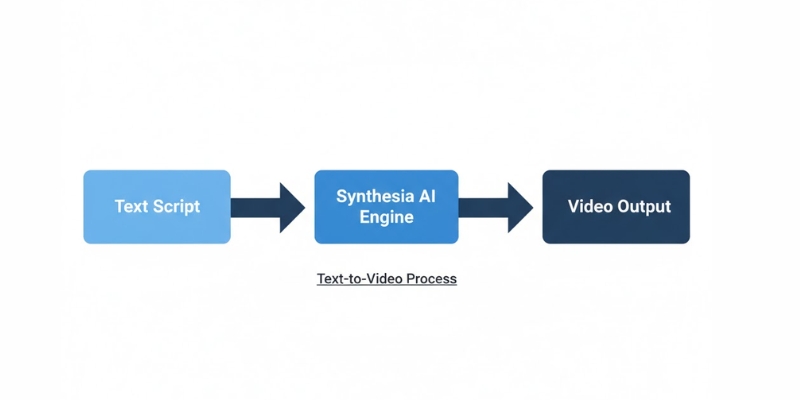
Diagram showing how Synthesia converts text to AI video using avatars.
The core mechanism of Synthesia transforms simple text into a fully produced video.

The core technology relies on Text-to-Speech and deep learning algorithms. When you type a script, the AI engine analyzes the phonemes and animates the AI Avatar to sync its lips and facial expressions perfectly.

For us marketers, this means we can bypass the expensive “Video Production” phase entirely. You don’t need a studio, lighting gear, or a microphone. The input is a simple script, and the output is a high-definition video.

I use this tool because it validates the shift from manual labor to automation. The speed is unmatched; what used to take me three days of filming and editing now takes 15 minutes on my laptop.

Getting Started: Navigating the Synthesia Studio Dashboard

When you first log in to the platform, you land on the Studio Dashboard. As a beginner, the interface is clean and intuitive, designed to get you to the “Create Video” stage immediately.

I noticed that the layout is very similar to presentation tools like PowerPoint. This familiarity lowers the learning curve significantly. You don’t need to be a video editor to understand where things are.

The Dashboard Home:
Here you will see your recent videos. At the top right, the most important button is Create Video. This is where your workflow begins.

The Sidebar:
On the left, you have tabs for Templates, Avatars, and your specific Brand Kit. I recommend exploring the Templates tab first to see what is possible.
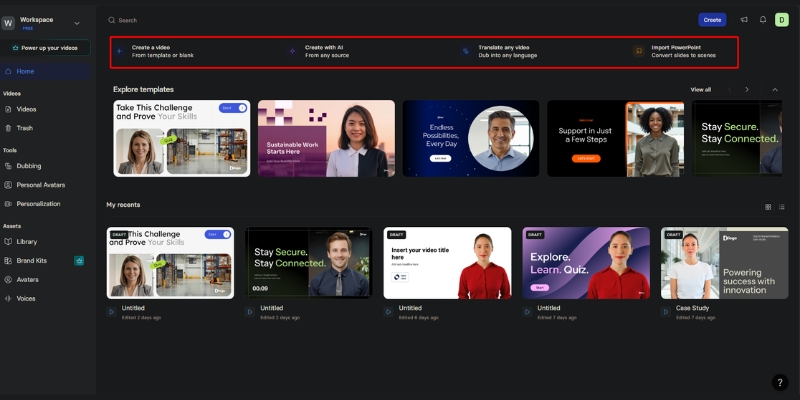
Synthesia Studio dashboard showing the main interface and navigation sidebar.
The Synthesia Studio interface is designed for ease of use, similar to slide deck builders.

The Canvas:
Once you start a project, the center screen is your visual canvas. Below it is the script box where you will type your content. It is a drag-and-drop environment that feels very responsive.

The Core Workflow: How to Use Synthesia to Create a Video in 5 Steps

This is the meat of the process. I have used this exact workflow to generate hundreds of videos for clients. Follow these steps to ensure you get a high-quality result every time.

Step 1: Choose a Professional Template
Never start from scratch if you are new. Click on “Templates” and select a category like “Corporate Training” or “Sales Pitch”. These templates have pre-designed layouts that look professional instantly.

Step 2: Select Your AI Avatar
Click on the avatar in the canvas to swap it. Choose a Stock Avatar that fits your brand’s tone. I usually pick an avatar with “Business Casual” attire for B2B content to build trust.

Step 3: Input Your Script & Select Language
Type or paste your text into the script box at the bottom. Synthesia supports 140+ languages and accents. If you are targeting a global audience, this is where you switch from English to Spanish or French instantly.
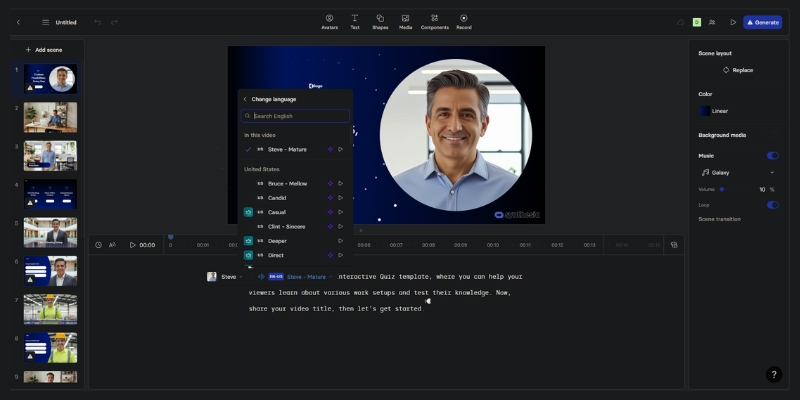
Entering a script into Synthesia and selecting a language for the AI voice.
The script box is where you control exactly what the AI avatar will say

Step 4: Customize Voice & Add Media
Next to the script, select a Voiceover. You can filter by accent and style (e.g., “Calm” or “Energetic”). I always listen to the voice preview to ensure it matches the avatar’s face.

Step 5: Generate & Export Video
Once you are happy with the scenes, click “Generate”. The AI will render the lip-syncing. After a few minutes, you can Export the video as an MP4 or share a link directly.

Pro Tip: I recommend creating a Short AI Video (under 30 seconds) for your first attempt to understand the rendering speed without using too many credits.

Start Creating Videos Free

(Disclosure: If you purchase through links on this page, we may earn a small commission at no extra cost to you. This helps us maintain our “battle-tested” reviews.)

Mastering the Script: How to Write for AI Avatars

An AI video is only as good as the Script you feed it. If your text is robotic, the avatar will sound robotic. I have learned that writing for the ear is different from writing for reading.

Control the Pacing:
Use punctuation strategically. Commas create short pauses, and periods create longer stops. If the avatar speaks too fast, I add more commas to slow down the delivery.

Use Phonetic Spelling:
Sometimes the AI mispronounces brand names or acronyms. In these cases, I use phonetic spelling. For example, I might type “Syn-thee-zia” instead of “Synthesia” to get the pronunciation perfect.

Add Gestures:
You can command the avatar to move. In the script editor, you can insert “Gestures” like head nods or eyebrow raises. I use these to emphasize key points in the message.

Beyond the Basics: Using Personal & Studio Custom Avatars

If you are investigating Synthesia for a large brand or personal use, you might want more than stock options. This is where the Custom Avatar features shine, offering two distinct options for different needs.

Creating a Personal Avatar (Quick & Easy):
You can create a Personal Avatar with just 2-3 minutes of webcam footage. No green screen required. Simply record yourself speaking naturally, and the AI will generate your digital twin. This is perfect for individuals and small teams wanting a personalized touch without professional filming equipment.

Studio Avatar (Enterprise-Grade):
For brands requiring the highest quality, Studio Avatars offer professional-grade results. This involves filming with professional equipment and lighting. Studio Avatars cost an additional $1,000 per year and take up to 10 days to process, but deliver unmatched realism and polish for corporate communications.

Voice Cloning Technology (Enterprise Feature):
Paired with custom avatars, Voice Cloning allows the AI to speak with your actual voice in 32 supported languages. This Enterprise-only feature is powerful for maintaining brand consistency across thousands of videos without you recording a single word. The AI can generate new scripts in your voice, perfect for scaling CEO messages or personal brand content globally.

For more details on the costs involved, check out our breakdown of Synthesia Pricing Explained.

Real-World Applications: When Should You Use Synthesia?

Synthesia is not just a cool toy; it is a business tool. I primarily see Marketers and Freelancers achieving high ROI in three specific areas where traditional video fails.

Corporate Training & Onboarding:
Replace boring PDF manuals with engaging videos. Employees retain information better from video. You can update the script and re-generate the video whenever policies change.

Explainer Videos:
For SaaS companies, creating product demos is tedious. Synthesia allows you to screen record your software and overlay an avatar to explain the features clearly and consistently.

Personalized Sales Outreach:
Sales teams use this to send unique videos to leads. Mentioning a prospect’s name and company in a video dramatically increases response rates compared to cold emails.

Expert Tips: Making Your AI Video Look Less “Robotic”

A common fear is that AI videos look fake. While the tech isn’t 100% human yet, there are expert tricks I use to make the Natural Flow much more convincing.

Add Background Music:
Silence highlights the artificial nature of the voice. Always add a low-volume background track. It fills the “dead air” and adds emotion to the video.

Break Up Long Scenes:
Don’t let the avatar talk for 2 minutes straight in one shot. I use Scene Editing to switch between the avatar and full-screen images or text slides. This keeps the viewer’s eye moving.

Match Voice to Avatar:
Ensure the voice fits the face. A deep, authoritative voice on a young, casual avatar feels jarring. I spend time auditioning voices to find the perfect “Realistic” match.
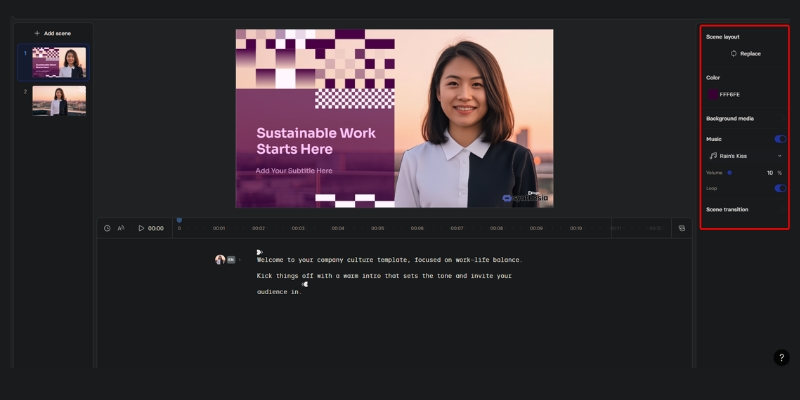
Editing timeline in Synthesia showing scene breaks and background music track.
Breaking up your video into shorter scenes makes the content more engaging and less robotic.

Frequently Asked Questions About Using Synthesia

Is Synthesia hard to learn for beginners?
No, it is designed for non-technical users. If you can use PowerPoint or Canva, you can use Synthesia. The drag-and-drop interface is very forgiving.

Can I use my own voice in Synthesia?
Yes. You can either upload a pre-recorded audio file (and the avatar will lip-sync to it) or use the Voice Cloning feature (Enterprise-only) to generate new audio from text using your voice replica in 32 languages.

How long does it take to render a video?
It depends on your plan and video length. Enterprise users typically see renders under 5 minutes, Creator plans average 8-12 minutes, and Free plans use background processing with no guaranteed timeframe.

Does Synthesia integrate with PowerPoint?
Yes, there is a direct import feature. You can upload a PowerPoint file, and Synthesia will convert the slides into video scenes, placing the avatar automatically.

Is there a free trial?
Yes, Synthesia offers a free plan with 36 minutes per year (3 minutes per month), giving you access to 9 avatars, 140+ languages, and professional templates to fully test the platform. Check our Synthesia Review for the latest details.

Final Verdict

Synthesia is the most robust tool for scaling video production without a camera. It’s perfect for training, explainers, and personalized sales.

Try Synthesia Now

Read More From AI Avatar Generator

If you found this guide helpful, explore our other deep dives into the world of AI avatars and video generation to stay ahead of the curve.

last update : 20/11/2025

A photo of Jun Pham, AI Tools Strategist at Aibrainjet

About the Author

Jun Pham

Jun Pham is an AI tools strategist, a video creator and tech writer passionate about the future of AI in editing video. As the face of a dedicated team of creators and researchers, Jamie leads hands-on testing of the latest AI video tools. Together, they share honest reviews, workflow insights, and practical tips to help creators turn ideas into cinematic videos with minimal effort.

Latest Posts

Onepage Website Builder Review: Features, Pros, Cons, and Use Cases

Onepage Website Builder Review: Features, Pros, Cons, and Use Cases
Jun Pham

SendShort AI Review (2025): The Best AI Clipper for Agencies?

Our SendShort AI review tests its white-label features for agencies. Discover how it automates viral shorts, enhances client perception. Try now!
Jun Pham

Zebracat Review (2025): Is This Hybrid AI Ad Generator Worth It?

Our Zebracat review (2025) assesses this hybrid AI video tool for marketers. Is it worth it for generating ads & repurposing content fast? See it now!
Jun Pham

Vizard Review (2025): Is This Hybrid AI Clipper & Editor Better Than OpusClip?

Our expert vizard review reveals if this AI video clipper & editor beats OpusClip for control. Get superior editing & branding for viral shorts. Try now!
Jun Pham

Klap Review (2025): The Best 4K AI Clipper for High-Quality Shorts?

Klap Review (2025): The Best AI Clipper for High-Quality Shorts? Klap Review (2025): The Best 4K AI Clipper for High-Quality Shorts? I have spent ...
Jun Pham

Submagic Review (2025): Is It The Best AI Tool For Hormozi Captions?

This Submagic review (2025) reveals if it's the ultimate AI tool for "Hormozi-style" viral video captions & B-roll. We battle-tested its features, speed, and ROI!
Jun Pham

D-ID vs Deepbrain AI: Best AI Avatar Generator for API or Enterprise? (2025)

D-ID vs Deepbrain AI: Best AI Avatar Generator for API or Enterprise? (2025)

D-ID vs Deepbrain AI: Best AI Avatar Generator for API or Enterprise? (2025)

The battle between D-ID vs Deepbrain AI is the most critical decision you will make when building a scalable video strategy. In the rapidly evolving landscape of the best AI avatar generators, these two giants serve vastly different purposes.

We are not looking at simple face-swapping apps here. We are comparing battle-tested infrastructure for developers and enterprise communications. D-ID powers the world’s most creative, real-time interactive chatbots, while Deepbrain AI sets the standard for hyper-realistic corporate video synthesis.

This is an AI Avatar Generator comparison for professionals. In this article, we will dissect the D-ID vs Deepbrain AI API capabilities, pricing models, and realism factors to help you decide which tool delivers the best ROI for your business.

Table of Contents

D-ID vs. Deepbrain AI at a Glance: The Core Difference

In our testing, the distinction between these two platforms is immediate and stark. If you are looking for a single winner, you are asking the wrong question. You must ask: “What is my primary use case?”

We found that D-ID is the undisputed leader in Creative Reality™ and API-first solutions. It is built for developers who need to animate static images or build interactive chatbots. Speed and flexibility are its core DNA.

Conversely, Deepbrain AI dominates the Enterprise sector. Their focus is not on animating photos, but on creating broadcast-quality video using Hyper-realistic AI Kiosks and their “AI Studios” dashboard. It is a production powerhouse.

D-ID (The Creative API Powerhouse):
D-ID specializes in “Speaking Portraits.” It takes a single static photo and animates it with audio. It integrates seamlessly via API, making it the top choice for mobile apps and real-time customer service agents.

Deepbrain AI (The Enterprise Standard):
Deepbrain AI focuses on text-to-video using full-body synthesis. Their avatars are modeled after real humans with studio-grade quality. It is designed for corporate training, news anchors, and physical AI kiosks.

The Main Conflict: This comes down to Flexibility & Speed (D-ID) versus Maximum Realism & Production Value (Deepbrain). Do you need a responsive face for your app, or a virtual human for your lobby?

Avatar Quality & Realism: Photo Animation vs. Hyper-Realistic Video

To satisfy your intent for a quality comparison, we analyzed the underlying technology of both tools. The “Uncanny Valley” effect is a real risk in this industry, and each tool handles it differently.

In our D-ID review, we noted their technology is unique. It is not full video synthesis; it is advanced Photo Animation. This means you can make historical figures or Midjourney art speak.

D-ID’s “Speaking Portrait” Technology:
D-ID maps facial movements onto a 2D image. While creative freedom is high, we noticed the facial micro-expressions can sometimes feel slightly robotic or “floaty” compared to a real video recording.

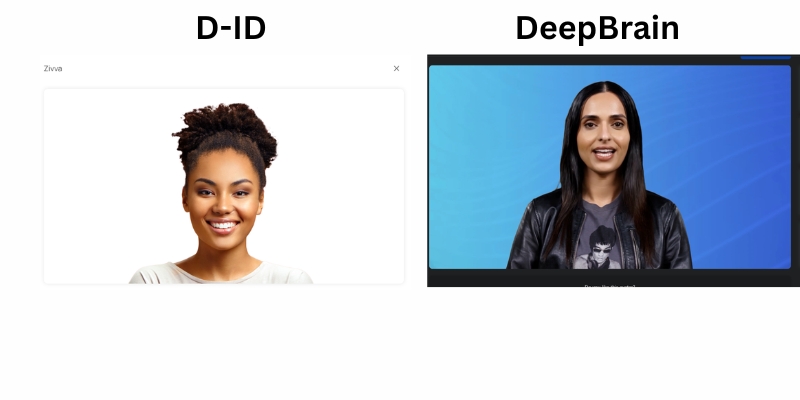
D-ID vs Deepbrain AI realism comparison showing photo animation vs video synthesis.
D-ID animates static images (Left), while Deepbrain AI synthesizes full video frames (Right).

Deepbrain AI’s Video Synthesis:
Deepbrain uses deep learning models trained on hours of footage of real actors. In our tests, the body language, blinking, and head movements were incredibly fluid. This is true Hyper-realistic video generation.

Side-by-Side Assessment:
We tested both with the same script. Deepbrain AI felt like watching a recorded human. D-ID felt like watching a magical animation. Here is our technical breakdown:

Lip-Sync Accuracy:
Deepbrain AI wins here. The mouth shapes match the phonemes almost perfectly. D-ID is good, but rapid speech can sometimes cause “drifting” lips.

Texture Quality:
Deepbrain retains the high-fidelity skin texture of the original actor. D-ID’s quality depends entirely on the resolution of the uploaded source photo.

Motion Fluidity:
Deepbrain includes natural shoulder and hand movements. D-ID is mostly head-focused, creating a “talking head” effect that is less dynamic but faster to generate.

Feature Breakdown: Creative Reality Studio vs. AI Studios

When comparing the dashboards, we are looking at two different product philosophies. This section addresses the commercial feature comparison for users ready to subscribe.

D-ID Features:
D-ID’s “Creative Reality Studio” is lightweight and agile. It feels like a developer’s sandbox or a marketer’s rapid-prototyping tool. Speed is the priority here.

Photo Animation:
You can upload any face. This is D-ID’s “killer feature.” Deepbrain generally restricts you to their stock avatars unless you pay for a custom clone.

Chat.D-ID:
This feature allows you to have real-time, face-to-face conversations with an AI. It is a showcase of their low-latency API capabilities.

Deepbrain AI Features:
Deepbrain’s “AI Studios” resembles a full video editor, similar to competitors like Synthesia. It is built for assembling complete video presentations.

AI Interview:
This is a rare attribute. Deepbrain can simulate an HR interview, asking questions and reacting in real-time. It is a game-changer for recruitment platforms.

AI Kiosk Mode:
Deepbrain offers specific deployment modes for touchscreens in banks or hotels. This hardware-ready feature is completely absent in D-ID’s standard offering.

Comparison Point:
Deepbrain AI feels like a video production suite (PPT to Video, subtitles, background music). D-ID feels like a specialized asset generator to create specific talking heads for other projects.

API & Integration Capabilities: Which is Best for Developers?

If you are a high-budget developer or building an app, this is the section that matters. We have integrated both, and the architectures serve different “Transactional” intents.

D-ID is widely considered the gold standard for API-first avatar integration. Their entire business model pivoted early to support developers building “ChatGPT wrappers” with faces.

D-ID API:
We were impressed by their Streaming API. It allows for real-time video streaming with minimal latency. This is crucial for interactive customer service bots where delay kills the immersion.

Deepbrain AI API:
Deepbrain also offers an API, but it historically focused on asynchronous video generation. You send text, and it returns a video file (MP4) after rendering.

While Deepbrain is improving their real-time capabilities for Kiosks, D-ID is currently more accessible for web developers building lightweight conversational apps.

Verdict for Devs:
We recommend D-ID if you are building an interactive mobile app or website widget. Choose Deepbrain AI if you are automating a video content farm or broadcasting pipeline.

Ideal Use Cases: When to Choose D-ID vs. Deepbrain AI

Based on the semantic entities of your industry, we have mapped the tools to specific user needs. Don’t force a tool to do a job it wasn’t designed for.

Choose D-ID If:
Interactive Chatbots: You need a visual interface for your LLM (like a custom GPT).

Legacy Photo Animation: You want to bring a museum portrait or a deceased relative’s photo to life for a documentary.

Personalized Marketing at Scale: You need to send 10,000 unique video emails where only the name changes, generated instantly via API.

Budget-Conscious Apps: You prefer a credit-based system that scales with your actual usage volume.

Choose Deepbrain AI If:
Corporate L&D: You are replacing boring PDF training manuals with engaging instructor-led videos.

News & Broadcast: You need an “AI Anchor” that looks 99% human to read daily news updates without a camera crew.

AI Kiosks: You are setting up a physical concierge screen in a hotel lobby or airport.

Premium Brand Image: Realism is your top priority. You cannot afford the “robotic” look of a simple photo animation.

Pricing Comparison: Credit Models vs. Enterprise Plans

Analyzing the d-id vs deepbrain pricing reveals two distinct philosophies. We looked at the value per dollar to help you calculate your potential burn rate.

D-ID Pricing:
D-ID operates on a “Credit-based” system. You pay for the seconds of video generated. This is excellent for short clips but can get expensive if you generate long-form content.

Their plans typically start lower, making them accessible for freelancers. However, high-resolution API access requires a more robust “Pro” or “Enterprise” tier.

Deepbrain AI Pricing:
Deepbrain usually employs a “Time-based” model (minutes per month). Their entry price is generally higher, reflecting their positioning as an enterprise software solution.

Feature D-ID (Creative) Deepbrain AI (Enterprise)
Entry Price Starts lower (Credit model) Premium pricing (Minutes model)
Core Value API Calls & Photo Animation Studio Video Rendering
Custom Avatar Available (Lite Version) High-End (Studio Quality)
Ideal For Developers & Marketers Corporate & Broadcast
Action View D-ID Plans View Deepbrain Plans

Hidden Costs:
Be aware of “Custom Avatars.” Cloning yourself is an add-on for both. Deepbrain’s custom avatars are significantly more expensive but offer broadcast-quality realism.

Final Verdict: The Winner for Your Business

After extensive testing, we can confidently say there is no single winner. There is only the right tool for your specific objective. Here is our final recommendation.

For Developers & App Builders:
D-ID is the winner. Its API maturity, streaming capabilities, and photo animation tech make it the only viable choice for interactive applications.

For Enterprise, HR & Training:
Deepbrain AI is the winner. The “AI Studios” workflow and hyper-realistic avatars ensure your corporate videos look professional and trustworthy.

Our Advice: Don’t guess. The “feel” of an avatar is subjective. Use the free trials or book a demo to see which face represents your brand best.

(Disclosure: If you purchase through links on this page, we may earn a small commission at no extra cost to you. This helps us maintain our “battle-tested” reviews.)

Frequently Asked Questions About D-ID and Deepbrain AI

Is Deepbrain AI better than D-ID for YouTube?
Yes, generally. Deepbrain’s “AI Studios” allows you to edit full videos with slides and text, which is better for YouTube content creation workflows.

Which tool has better lip-syncing?
Deepbrain AI offers superior lip-syncing. Their deep learning models are trained on specific actors, resulting in more natural mouth movements than D-ID’s image warping.

Can I use D-ID for free?
Yes, D-ID offers a trial with limited credits. However, videos will have a watermark. You need a paid plan for commercial use without watermarks.

Does Deepbrain support real-time conversation?
Yes, through their specific “AI Human” and Kiosk solutions. However, this is often an enterprise-grade feature compared to D-ID’s accessible API.

What are the best alternatives to D-ID and Deepbrain?
If neither fits, consider HeyGen for a balance of quality and ease, or Synthesia for top-tier corporate video features similar to Deepbrain.

Read More From AI Avatar Generator

Explore more battle-tested reviews and comparisons to find the perfect tool for your video strategy.

last update : 20/11/2025

A photo of Jun Pham, AI Tools Strategist at Aibrainjet

About the Author

Jun Pham

Jun Pham is an AI tools strategist, a video creator and tech writer passionate about the future of AI in editing video. As the face of a dedicated team of creators and researchers, Jamie leads hands-on testing of the latest AI video tools. Together, they share honest reviews, workflow insights, and practical tips to help creators turn ideas into cinematic videos with minimal effort.

Latest Posts

Onepage Website Builder Review: Features, Pros, Cons, and Use Cases

Onepage Website Builder Review: Features, Pros, Cons, and Use Cases
Jun Pham

SendShort AI Review (2025): The Best AI Clipper for Agencies?

Our SendShort AI review tests its white-label features for agencies. Discover how it automates viral shorts, enhances client perception. Try now!
Jun Pham

Zebracat Review (2025): Is This Hybrid AI Ad Generator Worth It?

Our Zebracat review (2025) assesses this hybrid AI video tool for marketers. Is it worth it for generating ads & repurposing content fast? See it now!
Jun Pham

Vizard Review (2025): Is This Hybrid AI Clipper & Editor Better Than OpusClip?

Our expert vizard review reveals if this AI video clipper & editor beats OpusClip for control. Get superior editing & branding for viral shorts. Try now!
Jun Pham

Klap Review (2025): The Best 4K AI Clipper for High-Quality Shorts?

Klap Review (2025): The Best AI Clipper for High-Quality Shorts? Klap Review (2025): The Best 4K AI Clipper for High-Quality Shorts? I have spent ...
Jun Pham

Submagic Review (2025): Is It The Best AI Tool For Hormozi Captions?

This Submagic review (2025) reveals if it's the ultimate AI tool for "Hormozi-style" viral video captions & B-roll. We battle-tested its features, speed, and ROI!
Jun Pham

Colossyan vs Elai.io Review (2025): Which AI Avatar Tool Fits Your Business?

Colossyan vs Elai.io Review (2025): Which AI Avatar Tool Fits Your Business?

Colossyan vs Elai.io Review (2025): Which AI Avatar Tool Fits Your Business?

I have spent weeks testing the nuances of colossyan vs elai-io to understand how they handle real-world corporate video workflows. Unlike generalist tools that try to do everything, these two platforms have carved out very specific niches in the AI video landscape.

While both serve as powerful AI Avatar Generator platforms, they solve completely different problems for different teams. One is a powerhouse for Learning & Development (L&D), while the other is a speed demon for content marketing.

If you are struggling to choose between Colossyan’s corporate training features and Elai.io’s blog-to-video automation, this guide is for you. I will break down the specific use cases, pricing models, and workflow differences to help you decide.

Table of Contents

Colossyan vs. Elai.io: The Quick Verdict for Busy Professionals

I know that B2B buyers do not have time to waste. After rigorous testing of both platforms, the distinction is crystal clear. Your choice depends entirely on your primary Use Case.

Winner for Corporate Training (L&D): Colossyan

We tested Colossyan extensively for employee onboarding. It is the superior choice for L&D departments because of its Scenario-Based Learning mode and direct SCORM export. If you need to simulate workplace conversations, pick Colossyan.

Winner for Content Marketing: Elai.io

We tested Elai.io for scaling SEO content. It wins easily for marketers due to its robust URL-to-Video feature. You can turn a blog post into a narrated video in minutes. If you need speed and volume, pick Elai.

Try Colossyan for Free Try Elai.io for Free

(Disclosure: If you purchase through links on this page, we may earn a small commission at no extra cost to you. This helps us maintain our “battle-tested” reviews.)

Comparison Table: Features, Pricing & Best Use Cases

To help you visualize the colossyan vs elai.io comparison, I have compiled this data-rich matrix. This highlights the fundamental architectural differences between the two platforms.

Feature Colossyan (L&D Specialist) Elai.io (Repurposing Specialist)
Primary Use Case Corporate Training & Onboarding Content Marketing & Repurposing
Top USP Scenario-Based Learning (Multi-Avatar) URL-to-Video Automation
Interactivity High (Quizzes, SCORM Export) Basic (MP4 Output focus)
Avatar Type Side-view & Conversational Avatars Standard & Custom “Selfie” Avatars
Output Format MP4, SCORM (for LMS), PDF MP4, API Integration
Pricing Model Enterprise-focused (Security/SSO) Business-focused (Flexible Minutes)
Best For… Visit Colossyan Visit Elai.io

Why Colossyan Creator is the “Gold Standard” for Corporate Training (L&D)

When I analyzed the Corporate Training (L&D) capabilities, Colossyan stood out immediately. It is built by people who understand instructional design. The features go far beyond just making a talking head.

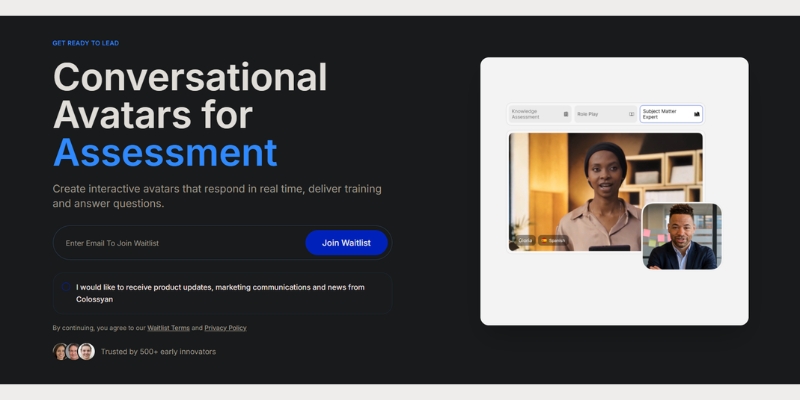
The most impressive feature is Scenario-Based Learning. You can place up to four avatars in a single scene. We used this to simulate a conflict resolution dialogue between an HR manager and an employee.

This is critical for soft-skills training. Unlike other tools that only offer front-facing avatars, Colossyan provides Side-View Avatars. This makes conversations look natural rather than like two people talking to a camera.

Colossyan editor showing scenario-based learning with two AI avatars conversing/
Colossyan allows you to create realistic role-play scenarios for workplace training.

Furthermore, the SCORM Export functionality is a game-changer. You can export your interactive video directly into a package that uploads to your Learning Management System (LMS). This tracks learner progress automatically.

For detailed insights on their enterprise security features, read our full Colossyan Review.

Why Elai.io is the “Speed King” for Content Repurposing & Marketing

If Colossyan is the professor, Elai.io is the digital marketer. My testing showed that Elai excels at Content Repurposing. It is designed to turn text assets into video content at scale.

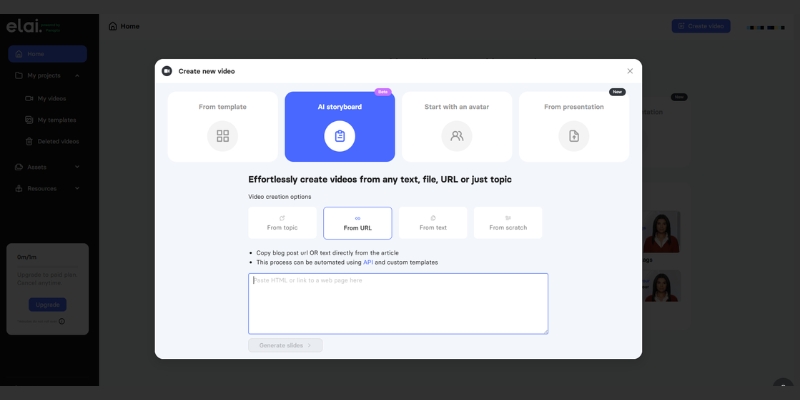
The standout feature here is the URL-to-Video converter. I pasted a link to a blog post, and Elai automatically summarized the text, generated a script, and matched stock footage to the keywords.

This Blog-to-Video workflow is invaluable for SEO agencies. It allows you to create a video version of every article you write, increasing dwell time on your website without hiring a video editor.

Elai.io interface showing the URL to video generation feature.
Elai.io automates the video creation process by converting web URLs directly into video drafts.

Elai also offers a robust API, which appeals to businesses wanting to generate personalized videos programmatically. For more on how this fits into a viral strategy, check our guide on Best AI Short-form & Repurposing Tools.

Feature Battle: Avatar Realism, Voice Quality & Lip-Sync

In the world of AI Avatar comparison, realism is the barrier to entry. If the avatar looks fake, your audience tunes out. We scrutinized the “Uncanny Valley” effect on both platforms.

Colossyan’s Realism:
In our tests, Colossyan’s gestures felt more natural for professional settings. Their “Conversational Avatars” interact with each other convincingly. The lip-sync is tight, specifically optimized for English and major European languages.

Elai.io’s Realism:
Elai offers high-quality custom avatars. Their “Selfie Avatar” feature allows you to create a digital twin from a smartphone camera. While the stock avatars are good, their voice cloning technology adds a layer of personalization that is excellent for marketing.

Voice Quality Verdict:
Both use top-tier TTS engines (likely ElevenLabs integration). However, Colossyan allows for more granular control over pauses and pronunciation, which is essential for technical L&D scripts.

Workflow Comparison: PPT-to-Video (Colossyan) vs. Blog-to-Video (Elai)

Understanding the input method helps you choose the right tool. Colossyan vs Elai.io differ significantly in where they expect your content to start.

Colossyan (PPT Import):
Colossyan integrates deeply with PowerPoint and PDF. You can upload an old training deck, and it will convert the speaker notes into the avatar’s script. This is perfect for modernizing legacy training materials.

Elai (Article Import):
Elai’s engine is built for web content. You paste a URL, and it scrapes the headers and images. It is perfect for turning WordPress articles into TikToks, YouTube Shorts, or LinkedIn videos.

If you have a folder of PowerPoints, choose Colossyan. If you have a blog full of articles, choose Elai. For a deeper look at the article-to-video workflow, see our Elai.io Review.

Pricing & ROI Analysis: Which Offers Better Value?

Making a purchasing decision requires looking beyond the monthly fee. We analyzed the value per dollar for both the “Business” and “Enterprise” tiers.

Colossyan Pricing Strategy:
Colossyan is priced as an enterprise software. The ROI comes from saving thousands on filming crews and actors for training videos. The value is in the SCORM export and translation features, not just video minutes.

Elai.io Pricing Strategy:
Elai offers better value for SMBs and agencies. Their plans often include more video minutes per dollar compared to Colossyan. If you need bulk video generation for social media, Elai’s cost-per-minute is lower.

Hidden Costs:
Be aware that both platforms charge extra for “Custom Avatars” (creating a digital twin of yourself). This is usually a one-time yearly fee ranging from $500 to $1000, separate from the subscription.

The Alternatives: When to Choose Synthesia or HeyGen Instead

While comparing Colossyan vs Elai.io, we must acknowledge the other players. Sometimes neither of these niche tools is the right fit for your specific need.

Synthesia: The Premium Generalist
If budget is no issue and you need the absolute highest visual fidelity, Synthesia is the market leader. However, it lacks the specific scenario-based learning features that make Colossyan superior for L&D.

HeyGen: The Social Media Star
If your goal is purely viral social media content, HeyGen offers better templates for Instagram and TikTok. But for corporate training or long-form blog repurposing, Colossyan and Elai are more specialized.

Frequently Asked Questions About Colossyan and Elai.io

To wrap up this enterprise AI avatar comparison, here are the answers to the most common questions we receive from our B2B clients.

Does Colossyan integrate with LMS?
Yes. Colossyan allows you to export videos as SCORM packages, which can be uploaded directly to tools like Canvas, Blackboard, or corporate LMS platforms.

Can Elai.io auto-translate videos?
Yes. Elai has a powerful one-click translation feature that translates both the voice (dubbing) and the on-screen text, supporting over 75 languages.

Which is better for YouTube automation?
Elai.io is better for YouTube automation because of its URL-to-Video feature, which speeds up scriptwriting and visual asset gathering.

Is there a free trial?
Yes, both platforms offer free trials. However, export times are usually limited, and watermarks are applied until you upgrade to a paid plan.

Read More From AI Avatar Generator

If you found this comparison helpful, check out our other in-depth guides to master your AI video strategy.

last update : 20/11/2025

A photo of Jun Pham, AI Tools Strategist at Aibrainjet

About the Author

Jun Pham

Jun Pham is an AI tools strategist, a video creator and tech writer passionate about the future of AI in editing video. As the face of a dedicated team of creators and researchers, Jamie leads hands-on testing of the latest AI video tools. Together, they share honest reviews, workflow insights, and practical tips to help creators turn ideas into cinematic videos with minimal effort.

Latest Posts

Onepage Website Builder Review: Features, Pros, Cons, and Use Cases

Onepage Website Builder Review: Features, Pros, Cons, and Use Cases
Jun Pham

SendShort AI Review (2025): The Best AI Clipper for Agencies?

Our SendShort AI review tests its white-label features for agencies. Discover how it automates viral shorts, enhances client perception. Try now!
Jun Pham

Zebracat Review (2025): Is This Hybrid AI Ad Generator Worth It?

Our Zebracat review (2025) assesses this hybrid AI video tool for marketers. Is it worth it for generating ads & repurposing content fast? See it now!
Jun Pham

Vizard Review (2025): Is This Hybrid AI Clipper & Editor Better Than OpusClip?

Our expert vizard review reveals if this AI video clipper & editor beats OpusClip for control. Get superior editing & branding for viral shorts. Try now!
Jun Pham

Klap Review (2025): The Best 4K AI Clipper for High-Quality Shorts?

Klap Review (2025): The Best AI Clipper for High-Quality Shorts? Klap Review (2025): The Best 4K AI Clipper for High-Quality Shorts? I have spent ...
Jun Pham

Submagic Review (2025): Is It The Best AI Tool For Hormozi Captions?

This Submagic review (2025) reveals if it's the ultimate AI tool for "Hormozi-style" viral video captions & B-roll. We battle-tested its features, speed, and ROI!
Jun Pham

HeyGen vs Kreado AI: Which Avatar Generator Wins for Marketing Ads in 2025?

HeyGen vs Kreado AI: Which Avatar Generator Wins for Marketing Ads in 2025?

HeyGen vs Kreado AI: Which Avatar Generator Wins for Marketing Ads in 2025?

The battle of heygen vs kreado ai is effectively a choice between a premium studio powerhouse and a specialized e-commerce ad factory. As marketers and creators face increasing performance pressure to produce high-volume content, choosing the right AI Video Generator is no longer just about novelty—it’s about ROI and scalability.

While HeyGen has established itself as the market leader for realistic corporate avatars with its revolutionary Avatar IV model (launched June 2025), Kreado AI has carved out a unique niche specifically for dropshipping and global marketing ads. In this AI Avatar Generator comparison, I will strip away the marketing hype to analyze the real-world avatar realism, rendering speed, and ad-specific features of both tools.

Table of Contents

Quick Verdict: Is HeyGen or Kreado AI Better for Marketers?

For most professionals, HeyGen is the superior tool due to its unmatched Avatar IV realism and polished interface. However, if you are strictly running high-volume social media ads (TikTok/Reels) for e-commerce and need aggressive multilingual support on a budget, Kreado AI is a tactical weapon worth considering.

The Short Answer:

Choose HeyGen If: You need “broadcast-quality” videos for brand awareness, training, or sales pitches where trust is paramount. The Avatar IV lip-sync and full-body micro-expressions are currently unbeatable. Plus, 4K resolution and video translation across 175+ languages are game-changers for global enterprises.

Choose Kreado AI If: You are an e-commerce marketer needing to scale marketing ads across 40+ languages rapidly with 40,000+ voices. Its niche templates are designed for “hard selling” rather than corporate polish, and pricing starts at just $10/month.

Feature HeyGen (The Generalist) Kreado AI (The Ad Specialist)
Best For Corporate, Training, High-End Marketing E-commerce Ads, Social Media Scaling
Avatar Realism ⭐⭐⭐⭐⭐ (Avatar IV – Studio Quality) ⭐⭐⭐ (Good for Mobile/Social)
Key Strength Custom Video Avatar & 175+ Language Support 40,000+ Voices & Ad Templates
Resolution 1080p (Creator) / 4K (Team+) 1080p
Starting Price $24/mo (annual) / $29/mo (monthly) $10/mo (Premium) / $91/mo (Pro)
Action Try HeyGen Free Visit Kreado AI

(Disclosure: If you purchase through links on this page, we may earn a small commission at no extra cost to you. This helps us maintain our “battle-tested” reviews.)

Platform Positioning: Generalist vs. Niche Ad Specialist

Understanding the core philosophy of heygen vs kreado ai is crucial before looking at features. HeyGen positions itself as a “Premium All-Rounder” designed to replace traditional video production crews. Its ecosystem includes Custom Video Avatar and Photo Avatar technology aimed at enterprise users, educators, and serious content creators who demand consistency and high fidelity.

The launch of Avatar IV in June 2025 marked a revolutionary shift, introducing full-body avatars with natural hand gestures, expressive face dynamics, and billions of parameters in the rendering model. This positions HeyGen firmly in the “studio-quality” category, competing with traditional video production rather than just other AI tools.

In contrast, Kreado AI operates as a “Niche Ad Specialist.” It doesn’t try to be a general video editor; instead, it focuses intensely on AI Ad Generator Templates and workflows optimized for e-commerce. If HeyGen is a Hollywood studio, Kreado AI is a rapid-response digital marketing agency. For marketers under “performance pressure,” Kreado offers shortcuts specifically for product showcases that general tools often miss.

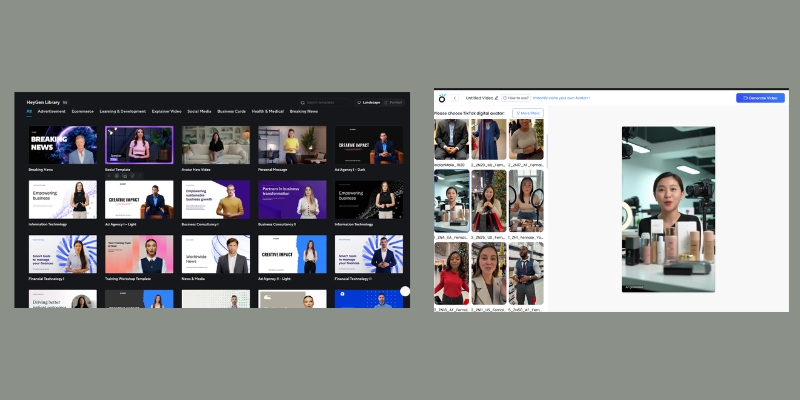
HeyGen vs Kreado AI dashboard comparison showing corporate vs ad-focused interfaces.
HeyGen (left) focuses on Avatar IV studio quality, while Kreado AI (right) prioritizes ad templates.

Avatar Quality Comparison: Avatar IV vs. Standard Realism

When comparing AI avatar for marketing, the “uncanny valley” effect can kill conversion rates. If the avatar looks fake, the trust is gone.

HeyGen’s Avatar IV Realism:
In my tests, HeyGen’s Avatar IV model is currently the gold standard. Launched in June 2025 as their “most advanced model ever,” Avatar IV exhibits natural eye movements, full-body hand gestures, blinking patterns, and micro-expressions that are frighteningly real. The model uses billions of parameters (compared to millions in previous generations) to create avatars that mimic professional speakers.

The 4K resolution support on Team and Enterprise plans means you can project these videos on large screens without pixelation. The critical “Lip-Sync Latency” is virtually non-existent; the mouth shapes match complex phonemes perfectly across 175+ languages, making it ideal for serious brand representation and global campaigns.

Kreado AI’s Visuals:
Kreado AI’s avatars are visually impressive but lean slightly towards a “perfected” digital human look—great for beauty and fashion ads, but slightly less natural for corporate communications. While they might struggle on a 4K monitor, on a mobile screen (TikTok/Instagram Reels), they are more than sufficient for stopping the scroll.

The lip-sync is decent but can occasionally drift out of sync with fast-paced audio or non-English languages, which is acceptable for quick social ads but not for a 10-minute training video or professional presentation.

Voice Cloning and Multilingual Support for Global Ads

For global campaigns, the multilingual ai video capabilities are a deciding factor. Both platforms have made significant strides here.

HeyGen’s Language Dominance:
HeyGen supports an impressive 175+ languages with advanced Video Translation capabilities that preserve voice cloning across languages. You can create a video in English, then translate it to Spanish, Japanese, or Vietnamese while maintaining your original voice characteristics—a feature that’s revolutionary for global brands.

Their Voice Cloning feature is superior, allowing you to clone your own voice with just a few minutes of audio. It captures the cadence, emotion, and personality of the speaker better than most competitors, creating authentic connections with audiences.

Kreado’s Voice Library (Updated August 2025):
Kreado AI recently upgraded its voice capabilities with a massive library of 40,000+ voices and HD voice cloning supporting 40+ languages. This update specifically tuned for cross-border e-commerce makes Kreado competitive for regional marketing campaigns.

If you are dropshipping to Brazil, Thailand, and Germany, Kreado’s Text-to-Speech engine offers accents that feel “native” to those commercial markets. The tool allows you to input a script and auto-translate it, significantly speeding up the Localization process for ads. However, for purely generating 50 variations of an ad in 50 languages, the workflow is more geared toward volume than perfect fidelity.

Template Library: Corporate Polish vs. Hard-Selling Ads

Time is money. The pre-made assets in these tools dictate how fast you can go from “idea” to “published ad.”

HeyGen’s Library (The Corporate Suite):
HeyGen offers a vast library of clean, professional templates. These are dominated by horizontal (16:9) layouts suitable for YouTube, onboarding, and presentations. While they have vertical templates, the aesthetic is “safe” and “premium.” The templates are designed for brand trust and long-term viewer engagement.

Kreado AI’s Library (The Ad Factory):
Kreado understands the Social Media Ads game. Their library is dominated by 9:16 vertical templates featuring “hard-sell” elements like discount badges, countdown timers, and product overlays. These templates are specifically designed to stop the scroll and drive immediate action—perfect for performance marketing campaigns with tight budgets and aggressive ROI targets.

Best Templates for Marketers:

HeyGen: Newsletters, Explainers, CEO Updates, B2B Sales Outreach, Training Videos, Product Demos.
Kreado AI: Fashion Lookbooks, App Installs, Dropshipping Promos, Flash Sales, TikTok Ads, Instagram Reels.

User Experience and Creation Speed

I have spent hours on both platforms, and the user experience varies significantly based on your technical comfort and workflow needs.

Interface Walkthrough:
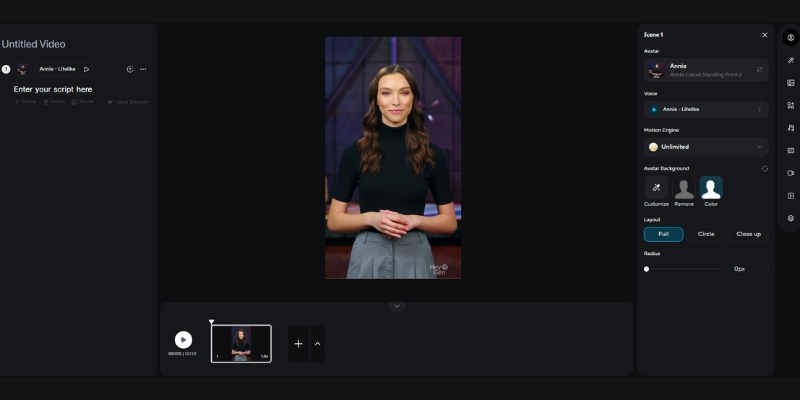
HeyGen feels like a modern SaaS product—sleek, drag-and-drop, and intuitive. It resembles Canva for video. I found the Script-to-Video feature in HeyGen to be robust, allowing me to visualize the scene breakdown easily. The platform guides you through avatar selection, script input, voice configuration, and rendering with minimal friction.

The Learning Curve:
Kreado AI is slightly more utilitarian. It feels like a tool built by engineers for marketers who know exactly what they need. While functional, it lacks the “polish” of HeyGen. However, its rendering speed for short clips is impressive. If you need to churn out 10 variants of a 15-second ad for A/B testing, Kreado feels faster because it cuts out the “cinematic” fluff and focuses on conversion-focused elements.

HeyGen video editor timeline interface.
HeyGen’s timeline is intuitive and resembles standard video editing software.

Pricing Wars: Cost-Per-Minute and ROI Analysis

When analyzing kreado ai vs heygen pricing, look beyond the monthly fee to the actual ROI and production volume you need.

HeyGen Pricing (November 2025):

  • Creator Plan: $24/mo (annual) or $29/mo (monthly) – Includes 10 Avatar IV minutes, 1 Custom Video Avatar, 1080p resolution, unlimited standard videos
  • Team Plan: $30/seat/mo (annual) or $39/seat/mo (monthly) – Includes 4K resolution, 2 Custom Video Avatars, team collaboration, priority processing
  • Value Proposition: High quality justifies premium pricing. You pay for “studio-grade” content that builds trust and drives higher engagement rates.

Kreado AI Pricing (2025):

  • Free Plan: $0 – 3 minutes video monthly, watermarked, 720p
  • Premium Plan: $10/mo – 10 minutes video, no watermark, 1080p
  • Pro Plan: $91/mo – 70 minutes video, advanced features
  • Special Offer: Video creation as low as $0.71/minute with membership perks

Hidden Costs & ROI:
If you are an agency serving premium clients, HeyGen is the safer bet. A client will spot a low-quality avatar instantly, and the higher cost of HeyGen is offset by the client retention rate and brand perception. The 4K capability on Team plans justifies the $30/seat investment for professional work.

Kreado AI is better for “churn and burn” ad testing where the lifespan of a video is only 48-72 hours before ad fatigue sets in. At $10/month for 10 minutes, you can test multiple ad variations without breaking the budget. For e-commerce brands running 20+ ad variations weekly, Kreado’s cost-per-minute advantage is significant.

Pros and Cons Breakdown (Battle-Tested)

Based on my direct comparison of HeyGen vs Kreado AI, here is the breakdown of strengths and weaknesses.

HeyGen Pros

  • Avatar IV Model: Best-in-class full-body realism with hand gestures.
  • 175+ Languages: Industry-leading multilingual support with video translation.
  • Custom Video Avatar: Create a digital twin of yourself in minutes.
  • 4K Resolution: Available on Team/Enterprise plans for premium content.
  • Polished UI: Extremely easy to use for beginners and professionals.
  • Integration: Connects with Zapier, Canva, and ChatGPT easily.

Kreado AI Pros

  • 40,000+ Voices: Massive voice library with HD cloning (August 2025 update).
  • Ad-Centric: Templates designed specifically for e-commerce conversion.
  • Multilingual Power: Strong localization for 40+ languages.
  • Cost-Effective: Starting at just $10/month ($0.71/min with membership).
  • Digital Human Types: Diverse range of “fashion-model” style avatars.
  • Fast Rendering: Optimized for high-volume short-form content.

HeyGen Cons

  • Higher Price: $24-30/seat monthly can add up for teams.
  • 4K Limited: Only available on Team/Enterprise plans (not Creator).
  • Strict Moderation: Content guidelines are more restrictive.

Kreado AI Cons

  • Lower Realism: Can look slightly “game-like” compared to Avatar IV.
  • UX Polish: Interface can feel clunky and less intuitive.
  • Lip-Sync Latency: Occasional drift in non-English languages.
  • No 4K Support: Maxes out at 1080p resolution.

Final Recommendation: When to Choose Which Tool?

The choice between HeyGen vs Kreado AI comes down to your “Distribution Channel” and budget constraints. Where will this video live, and what’s your quality bar?

The “Marketer’s Choice” for 2025:
If I am building a personal brand, a B2B agency, or creating training content, I am using HeyGen. The trust factor from Avatar IV quality is too important to risk with a robotic-looking avatar. The Custom Video Avatar feature, 175+ language support, and 4K resolution (on Team plans) justify the premium price.

However, if I am running a dropshipping store and need to test 20 different ad hooks on TikTok for a beauty product or fashion item, I am using Kreado AI. It is the specialized tool for that specific trench warfare of performance marketing. At $10/month, the barrier to entry is low enough to experiment aggressively, and the 40,000+ voice library provides enough variety to avoid ad fatigue.

For those who are still undecided or want to explore other options, check out our deep dive into the Best AI Ad & UGC Video Generators hub for more alternatives.

Frequently Asked Questions about HeyGen vs Kreado AI

Is Kreado AI completely free?
No. While Kreado AI offers a free plan with 3 minutes monthly (watermarked, 720p), sustainable commercial use requires a paid subscription. The Premium plan starts at $10/month for 10 minutes of content.

Can I use HeyGen avatars for Facebook Ads?
Yes, absolutely. In fact, HeyGen’s Avatar IV quality often results in lower CPMs (Cost Per 1000 Impressions) because users engage with the content longer, signaling quality to the Facebook algorithm and reducing ad costs over time.

Which tool supports more languages?
HeyGen wins decisively with 175+ languages versus Kreado AI’s 40+ languages. However, Kreado AI places heavier emphasis on the nuance of localized marketing accents for specific e-commerce regions like Southeast Asia and South America.

Does HeyGen have 4K resolution?
Yes, but only on Team and Enterprise plans (starting at $30/seat/mo annual). The Creator plan is limited to 1080p resolution.

Does Kreado AI have an API?
Yes, both platforms offer API access, but HeyGen’s API is generally more documented and developer-friendly for integrating into custom apps and automation workflows.

What is Avatar IV?
Avatar IV is HeyGen’s most advanced AI model launched in June 2025. It features full-body avatars with natural hand gestures, billions of rendering parameters, and the most realistic facial expressions available in the market today.

Read More From AI Avatar Generator

Expand your knowledge with our related comparisons and guides in the AI video space.

last update : 20/11/2025

A photo of Jun Pham, AI Tools Strategist at Aibrainjet

About the Author

Jun Pham

Jun Pham is an AI tools strategist, a video creator and tech writer passionate about the future of AI in editing video. As the face of a dedicated team of creators and researchers, Jamie leads hands-on testing of the latest AI video tools. Together, they share honest reviews, workflow insights, and practical tips to help creators turn ideas into cinematic videos with minimal effort.

Latest Posts

Onepage Website Builder Review: Features, Pros, Cons, and Use Cases

Onepage Website Builder Review: Features, Pros, Cons, and Use Cases
Jun Pham

SendShort AI Review (2025): The Best AI Clipper for Agencies?

Our SendShort AI review tests its white-label features for agencies. Discover how it automates viral shorts, enhances client perception. Try now!
Jun Pham

Zebracat Review (2025): Is This Hybrid AI Ad Generator Worth It?

Our Zebracat review (2025) assesses this hybrid AI video tool for marketers. Is it worth it for generating ads & repurposing content fast? See it now!
Jun Pham

Vizard Review (2025): Is This Hybrid AI Clipper & Editor Better Than OpusClip?

Our expert vizard review reveals if this AI video clipper & editor beats OpusClip for control. Get superior editing & branding for viral shorts. Try now!
Jun Pham

Klap Review (2025): The Best 4K AI Clipper for High-Quality Shorts?

Klap Review (2025): The Best AI Clipper for High-Quality Shorts? Klap Review (2025): The Best 4K AI Clipper for High-Quality Shorts? I have spent ...
Jun Pham

Submagic Review (2025): Is It The Best AI Tool For Hormozi Captions?

This Submagic review (2025) reveals if it's the ultimate AI tool for "Hormozi-style" viral video captions & B-roll. We battle-tested its features, speed, and ROI!
Jun Pham

HeyGen vs D-ID: Which AI Video Generator Is Better? (2025 Comparison)

HeyGen vs D-ID Comparison: Which AI Video Generator Wins in 2025?

HeyGen vs D-ID: Which AI Video Generator Is Better? (2025 Comparison)

If you are looking for the ultimate showdown between HeyGen vs D-ID, you are likely standing at a crossroads between marketing efficiency and developer control. In the rapidly evolving landscape of AI Avatar Generator tools, choosing the wrong platform can mean wasted budget on features you don’t need or getting stuck with robotic avatars that hurt your brand.

I have spent the last few years testing dozens of generative AI video tools for my own campaigns and client projects. I know the pressure of needing a “battle-tested” solution that delivers real results, not just hype. In this comprehensive guide, I will dissect the core differences in quality, platform capabilities, API flexibility, and pricing to help you decide exactly which tool deserves your investment.

Table of Contents

HeyGen vs D-ID: At a Glance (The Short Answer)

Let’s cut straight to the chase. While both tools are leaders in the AI video space, they serve fundamentally different “masters” in the digital ecosystem.

HeyGen is the undisputed powerhouse for Marketers and Content Creators. It functions like a complete video studio (think Canva for video), allowing you to produce polished, high-quality marketing videos, training materials, and social media clips with minimal effort. Its strength lies in realism and ease of use.

D-ID, on the other hand, is the go-to engine for Developers and Creative Innovators. Its “Creative Reality Studio” is famous for animating static images (making the Mona Lisa talk), and its API-first approach makes it the industry standard for building interactive AI agents and chatbots. It sacrifices some video polish for incredible flexibility in integration.

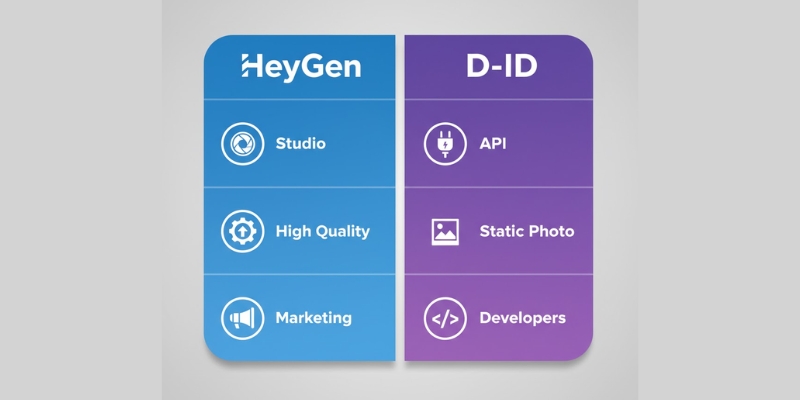
HeyGen vs D-ID comparison chart highlighting target audiences.
The core difference: HeyGen is for video production, D-ID is for application integration.
Feature HeyGen (The Studio) D-ID (The Engine)
Best For Marketers, Corporate Training, YouTubers Developers, App Builders, Creative Projects
Core Tech Instant Avatar (2-min Webcam Clone) Photo Animation (Still Images)
Ease of Use Drag-and-drop (Very Easy) Functional / Developer-centric
Lip-Sync High (Near-perfect) Medium-High (Good for photos)
API Focus Available (Enterprise) API-First (Core Product)

Avatar Quality & Realism: Instant Avatar vs. Photo Animation

When evaluating an AI Avatar Generator, the “uncanny valley” effect is your biggest enemy. I have tested the output of both tools extensively, and the difference in their underlying technology dictates the quality you get.

HeyGen: The Winner for Realism
HeyGen utilizes a video-based approach, particularly with their flagship Instant Avatar feature. You can upload a 2-minute webcam video of yourself, and the AI creates a digital twin that mimics your natural head movements and micro-expressions. The lip-sync accuracy here is currently the best in the market. It matches phonemes to lip movements so precisely that for HeyGen reviews, it’s often indistinguishable from the real footage.

D-ID: The Winner for Static Creativity
D-ID’s “Creative Reality™” technology works differently. It specializes in Photo Animation. You can take a single still image—whether it’s a historical figure, a painting, or a generated Midjourney character—and make it speak. While this is technically impressive and perfect for creative apps (like a museum guide), the head movements can feel slightly more “floating” or robotic compared to HeyGen’s video-based fluidity.

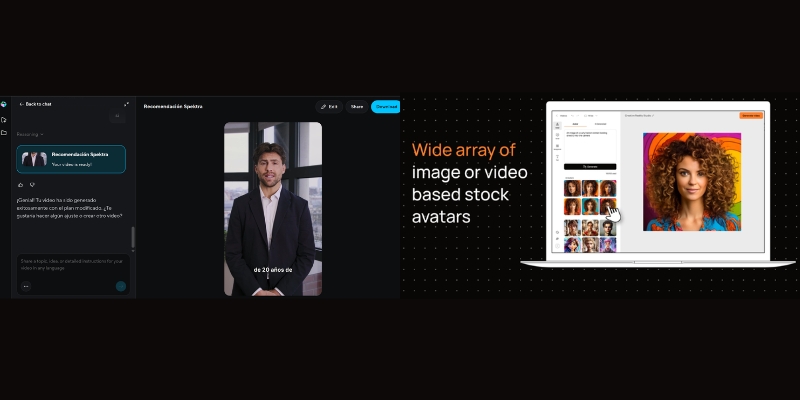
Visual quality comparison of HeyGen video avatar vs D-ID photo animation.
HeyGen (Left) offers superior video realism, while D-ID (Right) excels at animating static images.

My Take: If you need a credible spokesperson for a sales video, go with HeyGen. If you want to bring a static NFT or character to life, D-ID is your tool.

Platform Capabilities: Marketing Studio vs. Creative API

Beyond just the face, what can you actually do inside these platforms? This is where the “Use Case” divides sharply.

HeyGen: The All-in-One Video Studio
HeyGen feels like a modern video editor. It comes packed with features designed to help you finish a video project without leaving the tab:

  • 700+ Stock Avatars: From diverse characters to professional presenters.
  • Video Translate: A killer feature that translates your video into 175+ languages and dialects while re-syncing the lips of the avatar to the new language. This is huge for localization.
  • AI Script Writer: Built-in ChatGPT integration to help you draft your content immediately.
  • Generative Outfit: Change avatar clothing with text prompts (Note: This is a paid add-on feature, sold separately from base plans).

D-ID: The Interactive & API Engine
D-ID is less about “video editing” and more about “interaction.” Their platform highlights include:

  • Live Streaming API: This is D-ID’s ace. It allows developers to stream a face that speaks in real-time with 100 FPS rendering (4X faster than real-time), enabling the creation of “conversational AI agents” (chatbots with faces).
  • Agents: A newer feature focused on “UI-less” interactions, where the avatar is embedded directly into your customer support interface. Over 150,000 agents have been created with 99.5% uptime.
  • Canva Integration: While Synthesia vs D-ID is a common debate, D-ID was one of the first to launch a popular app within Canva to generate talking heads directly in your designs.

Workflow & Ease of Use: The “Canva” Experience vs. Developer Control

As someone who values time efficiency, I pay close attention to how many clicks it takes to get a result.

The HeyGen Workflow (Beginner Friendly)
Using HeyGen is remarkably similar to using PowerPoint or Canva. You select an avatar, drop it onto a canvas, add a background, and type your script. The platform creates avatars in approximately 5 minutes, making it one of the fastest in the industry. It is designed for non-techies who need to churn out content fast with up to 30 minutes per video on paid plans.

The D-ID Workflow (Functional)
The D-ID Creative Reality Studio is more utilitarian. It gets the job done—upload audio + image = video—but it lacks a timeline editor. You won’t find advanced transitions or multi-scene editing capabilities here. However, for Developers, D-ID is a dream. Their documentation for the API (Python/JS SDKs) is often cited as more robust for building custom applications, acting almost like the “Stripe for Avatars.”

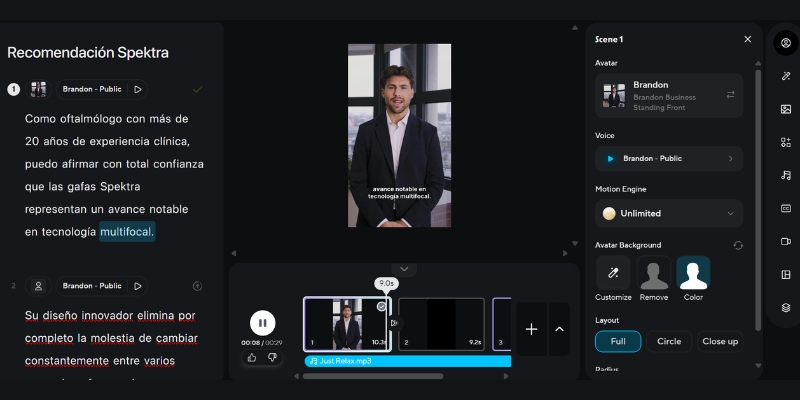
HeyGen video editing interface with timeline and drag-and-drop features.
HeyGen’s interface resembles a full video editor, making it intuitive for marketers.

Pricing Comparison: Analyzing Cost Per Minute & Hidden Limits

Both platforms use a “Credit System,” but how they define a credit and what you get for it varies. Let’s break down the ROI.

HeyGen Pricing (Updated November 2025)
HeyGen positions itself as a premium SaaS tool.
Free Plan: Offers up to 3 videos per month (3 minutes each, watermarked) for testing the platform.
Creator Plan: $29/month (or $24/month billed annually at $279/year). This is where the real value starts. You get unlimited videos (up to 30 min each), 1080p HD export, fast processing, auto-captions, voice cloning, and 175+ languages. For businesses, the ability to create custom “Instant Avatars” is included in paid tiers, which significantly boosts value.
Team Plan: $39/month per seat with 4K video export and collaboration tools.

D-ID Pricing (Updated November 2025)
D-ID often has a lower barrier to entry for “Lite” users.
Free Trial: 14-day trial with 20 free credits to test all features.
Lite Plan: Starting at $5.99/month for basic usage, which is great if you just want to animate a few photos for fun.
Pro Plan: $29/month for more credits and features.
Advanced Plan: $196/month for high-volume users.
API Pricing: This is billed differently, often strictly per usage/stream. If you are building an app, you will need to look at their specific developer enterprise tiers.

💰 Expert Tip on Credits: Be careful with “Credits.” Usually, 1 Credit = 1 Minute of video. However, D-ID’s API calls might consume credits differently based on resolution. HeyGen allows longer single-video durations (up to 30 mins on Creator/Team plans), whereas D-ID basic plans often limit you to shorter clips. Note that HeyGen’s Generative Outfit feature is a paid add-on not included in standard plan credits.

Final Verdict: Which AI Video Tool Should You Choose?

After comparing HeyGen vs D-ID across every meaningful metric, here is my definitive recommendation based on who you are.

🚀 Choose HeyGen If:

  • You are a Marketer, YouTuber, or Course Creator.
  • You need hyper-realistic avatars that can replace a human camera crew.
  • You want an all-in-one editor to add text, music, and backgrounds effortlessly.
  • You require Video Translation to scale your content globally (175+ languages).
  • You value fast avatar creation (5 minutes) and longer video durations (up to 30 min).
Try HeyGen for Free

🛠️ Choose D-ID If:

  • You are a Developer building an AI assistant app or chatbot.
  • You want to animate Static Photos (historical figures, art, mascots).
  • You need Real-time Streaming API for live interactions (100 FPS, 4X faster).
  • You have a tighter budget and just need raw “talking head” files to edit elsewhere.
  • You want to test with a generous 14-day trial and 20 free credits.
Explore D-ID API

(Disclosure: If you purchase through links on this page, we may earn a small commission at no extra cost to you. This helps us maintain our “battle-tested” reviews.)

Frequently Asked Questions About HeyGen vs D-ID

Which tool has better lip-sync quality?
HeyGen generally offers tighter, more natural lip-syncing, especially for their Instant Avatars, as they use video footage as the source material rather than static images.

Can I use D-ID for full-body avatars?
D-ID primarily focuses on “Talking Heads” or shoulder-up views. HeyGen offers more diverse framing options, including avatars standing at desks or presenting in a newsroom setting.

Is there a free alternative to HeyGen or D-ID?
Both offer free trials. D-ID provides a 14-day trial with 20 free credits, while HeyGen offers 3 free videos per month (3 minutes each). Completely free open-source alternatives like “SadTalker” exist but require technical know-how (Python/GPU) and offer significantly lower quality than these enterprise tools. If you need professional results, the paid plans are necessary.

Do they support custom voices?
Yes, both platforms integrate with voice cloning technology (like ElevenLabs) or have their own internal voice cloning features, allowing your avatar to speak with your real voice.

Read More From AI Avatar Generator

Expand your knowledge on AI video creation with our related deep-dive guides and comparisons:

last update : 20/11/2025

A photo of Jun Pham, AI Tools Strategist at Aibrainjet

About the Author

Jun Pham

Jun Pham is an AI tools strategist, a video creator and tech writer passionate about the future of AI in editing video. As the face of a dedicated team of creators and researchers, Jamie leads hands-on testing of the latest AI video tools. Together, they share honest reviews, workflow insights, and practical tips to help creators turn ideas into cinematic videos with minimal effort.

Latest Posts

Onepage Website Builder Review: Features, Pros, Cons, and Use Cases

Onepage Website Builder Review: Features, Pros, Cons, and Use Cases
Jun Pham

SendShort AI Review (2025): The Best AI Clipper for Agencies?

Our SendShort AI review tests its white-label features for agencies. Discover how it automates viral shorts, enhances client perception. Try now!
Jun Pham

Zebracat Review (2025): Is This Hybrid AI Ad Generator Worth It?

Our Zebracat review (2025) assesses this hybrid AI video tool for marketers. Is it worth it for generating ads & repurposing content fast? See it now!
Jun Pham

Vizard Review (2025): Is This Hybrid AI Clipper & Editor Better Than OpusClip?

Our expert vizard review reveals if this AI video clipper & editor beats OpusClip for control. Get superior editing & branding for viral shorts. Try now!
Jun Pham

Klap Review (2025): The Best 4K AI Clipper for High-Quality Shorts?

Klap Review (2025): The Best AI Clipper for High-Quality Shorts? Klap Review (2025): The Best 4K AI Clipper for High-Quality Shorts? I have spent ...
Jun Pham

Submagic Review (2025): Is It The Best AI Tool For Hormozi Captions?

This Submagic review (2025) reveals if it's the ultimate AI tool for "Hormozi-style" viral video captions & B-roll. We battle-tested its features, speed, and ROI!
Jun Pham

HeyGen vs Vidnoz: Which AI Avatar Generator Wins? (2025 Battle-Tested)

HeyGen vs Vidnoz: Which AI Avatar Generator Wins? (2025 Battle-Tested)

HeyGen vs Vidnoz: Which AI Avatar Generator Wins? (2025 Battle-Tested)

If you are stuck choosing between heygen vs vidnoz to scale your video production, you are not alone in this dilemma. In the rapidly evolving world of AI Avatar Generator tools, deciding between a premium powerhouse and a generous free alternative can directly impact your content ROI and workflow efficiency.

After 10 years of testing marketing technology and producing hundreds of AI-generated videos, we have put these two giants head-to-head. Whether you are looking for a free HeyGen alternative or wondering if HeyGen’s “Instant Avatar” is worth the price tag, this guide covers it all.

In this battle-tested comparison, we will dissect their pricing models, lip-sync accuracy, unique features like Face Swap, and output quality to help you make the final decision.

Table of Contents

Quick Verdict: HeyGen vs. Vidnoz – Which AI Video Generator Wins?

If you are in a rush and need a decisive answer, here is the bottom line based on our extensive testing of both platforms.

For Professional Marketers & Agencies:
The clear winner is HeyGen. Its unmatched lip-sync accuracy, 4K resolution support, and professional “Instant Avatar” capabilities make it the gold standard for high-stakes business communications. If your goal is to build trust and brand authority, HeyGen’s output is virtually indistinguishable from reality.

For Beginners & Budget-Conscious Creators:
Vidnoz takes the crown as the best free AI video generator. While the lip-sync and voice quality are a tier below HeyGen, Vidnoz offers a generous free plan with daily credits and unique viral features like Face Swap. It is the perfect entry point for social media creators who prioritize volume and entertainment over studio-level perfection.

The Core Difference: HeyGen is built for “Premium Professionalism” (think sales pitches, training videos), while Vidnoz excels at “Budget Accessibility” (think TikToks, memes, and quick social posts).

(Disclosure: If you purchase through links on this page, we may earn a small commission at no extra cost to you. This helps us maintain our “battle-tested” reviews.)

HeyGen Review: The Gold Standard for AI Avatars (But at a Price)

When discussing the HeyGen review, we are talking about the tool that currently defines the “state of the art” in this industry. We have tested it extensively for client deliverables, and the results are often shocking in their realism.

Visual Quality & Realism:
The standout feature of HeyGen is the total absence of the “uncanny valley” effect. The avatars feature realistic skin texture, natural lighting, and micro-gestures (like slight head nods or eyebrow raises) that sync perfectly with the speech. In our tests, audiences often couldn’t tell the avatar was AI-generated.

The “Instant Avatar” Feature:
This is HeyGen’s killer entity. You can upload a 2-minute video of yourself recorded on a smartphone, and within minutes, HeyGen creates a digital twin. Unlike older tech, this Instant Avatar allows you to produce unlimited content without ever filming again. It is a game-changer for CEOs and course creators.

Video Translation Capabilities:
HeyGen doesn’t just dub audio; it modifies the lip movements of the avatar to match the new language. This “Video Translate” feature allows a marketing video in English to be effortlessly localized into Spanish, Japanese, or German with perfect lip-sync.

The Downside:
Quality comes at a cost. HeyGen operates on a strict credit-based system. One credit equals one minute of video, and these credits can burn fast if you are iterating. It is a premium tool positioned against competitors like Synthesia, not free mobile apps.

HeyGen Instant Avatar interface showing how to clone yourself with AI.
HeyGen’s Instant Avatar feature allows you to create a digital twin in minutes.

Vidnoz AI Review: Is It the Best Free HeyGen Alternative?

Moving on to our Vidnoz review, this tool positions itself aggressively as the “free AI video generator” for the masses. If HeyGen is the expensive studio, Vidnoz is the bustling, accessible creative workshop.

The Free Plan Advantage:
Vidnoz understands its users perfectly. They offer a “daily free credit” system, meaning you can come back every day to generate short videos without ever pulling out a credit card. For students or freelancers with zero budget, this makes Vidnoz the ultimate free HeyGen alternative.

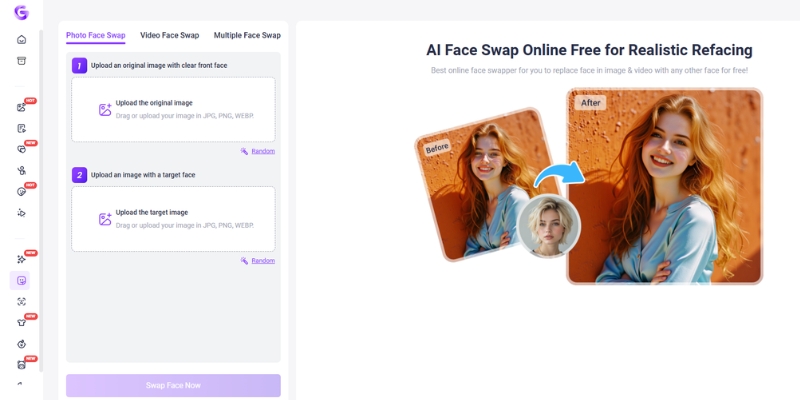
Unique Feature – AI Face Swap:
This is a feature HeyGen explicitly avoids. Vidnoz allows you to take any photo or video and swap faces with another character. It is incredibly popular for creating viral memes or entertaining social media content. While less “corporate,” it is a powerful tool for engagement.

Ease of Use & Templates:
The platform is gamified and intuitive. Vidnoz provides hundreds of pre-made templates specifically designed for vertical formats like TikTok and Instagram Reels. You don’t need to be a video editor; you just drag, drop, and type your script.

The Trade-off:
We must be honest: the output quality is lower than HeyGen. The avatars can feel slightly “floaty,” and the voices may sound a bit more robotic. Also, the free plan stamps a Vidnoz watermark on your videos, which might be a dealbreaker for professional client work.

Vidnoz AI dashboard showing Face Swap feature and free credits.
Vidnoz offers unique creative tools like Face Swap and daily free credits for users.

Head-to-Head Feature Comparison: Capabilities & Output Quality

Let’s break down the technical specifications. We analyzed heygen vs vidnoz across four critical performance metrics.

Avatar Realism (Lip-Sync):
HeyGen: Offers near-perfect lip synchronization. The mouth movements match phonemes accurately, even with fast-paced speech.
Vidnoz: Good, but looser. You might notice a slight delay or “mouthing” effect where the lips move generically rather than precisely matching the words.

Voice Quality (TTS Engines):
HeyGen: Integrates top-tier voice engines (including ElevenLabs technology), resulting in warm, breathing, and emotionally resonant voices.
Vidnoz: Offers a wide variety of voices, but they tend to sound flatter. They are perfectly functional for tutorials but lack the emotional nuance for storytelling.

Video Customization:
HeyGen: The editor feels like “Canva for Pros.” You have granular control over layers, assets, and even script timing. It supports 4K resolution export.
Vidnoz: A simpler, more streamlined editor. It focuses on speed. You have fewer fine-tuning options, but it’s faster to slap together a quick video.

Processing Speed:
HeyGen: Slower rendering times (approx. 1-2 minutes for a 1-minute video) due to high-fidelity processing.
Vidnoz: Faster rendering for standard quality, making it ideal for quick iterations.

The “Face Swap” vs. “Instant Avatar” Battle: Which Feature Do You Need?

Understanding the difference between these two core entities is crucial for choosing the right tool. They serve entirely different user intents.

HeyGen’s Instant Avatar (For Personal Branding):
This feature is about identity extension. It is designed for you to clone yourself. It requires strict consent (you must record a video statement granting permission). This is for scaling a founder’s presence, automating sales outreach, or creating consistent educational content.

Vidnoz’s Face Swap (For Content Creation):
This feature is about entertainment and creativity. It allows you to swap faces onto other bodies or existing videos. It is less about “identity” and more about “virality.” You use this to create funny clips, parody videos, or dynamic social media posts that grab attention quickly.

Use Case Scenarios:
Use HeyGen if you need to send a personalized video email to 100 prospects appearing to be recorded by you.
Use Vidnoz if you want to put your friend’s face on a superhero body for a funny birthday greeting video.

Pricing Analysis: Credits, Plans, and Hidden Costs

Price is often the deciding factor. Here is how the heygen vs vidnoz free plan comparison stacks up financially.

Feature HeyGen (Paid Focus) Vidnoz (Free Focus)
Free Plan Limited Trial (1 credit, non-renewable) Daily Free Credits (Renewable)
Starting Price ~$24/month (15 credits) ~$19.99/month (Higher limits)
Watermark None on Paid Plans Yes (Removable on Paid)
Video Resolution Up to 4K 1080p (720p on Free)
Best For ROI-focused Businesses Budget-conscious Creators
Link View Pricing View Pricing

HeyGen Pricing Structure:
HeyGen uses a credit system where 1 credit = 1 minute of video. The credits reset monthly. It is an investment. If you are a business, the ROI comes from the time saved not filming. However, if you run out of credits, you must upgrade or wait.

Vidnoz Pricing Structure:
Vidnoz is cheaper per minute. Their “Generous Free Plan” is their biggest hook, allowing you to use the tool indefinitely with limitations. Upgrading removes the watermark and unlocks better processing, but the gap between free and paid is smaller than HeyGen.

The “Free” Reality:
Don’t be fooled. HeyGen’s free plan is a “Demo” – it’s there to test the tech. Vidnoz’s free plan is a “Tier” – it’s a usable product for hobbyists. If you need a free HeyGen alternative for the long term, Vidnoz is the only viable option here.

Who Should Choose What? Final Recommendations

To wrap up this comparison, let’s simplify your decision based on who you are.

Choose HeyGen If:
You are a business owner, marketing agency, or educator. You need content that builds trust. You cannot afford low-resolution video or mismatched lip-sync. You view the monthly subscription as a production cost that replaces a camera crew.

Choose Vidnoz If:
You are a freelancer, student, or social media manager starting with zero budget. You need to pump out content for TikTok or Shorts where “perfect quality” matters less than “entertainment value.” You specifically want to use the Face Swap feature for creative projects.

The “Hybrid” Approach:
We often recommend using Vidnoz to draft ideas and storyboard concepts because it’s free. Once the script and flow are approved, use HeyGen to render the final high-quality version for your client or website.

Frequently Asked Questions About HeyGen vs Vidnoz

Is Vidnoz completely free?
Vidnoz offers a “forever free” plan that provides free credits daily. However, these videos will have a watermark, lower resolution, and shorter duration limits compared to the paid plans.

Can I use HeyGen avatars in Vidnoz?
No, the platforms are not compatible. You cannot export a custom avatar from HeyGen and import it into Vidnoz. You must choose one ecosystem for your avatar assets.

Which tool is better for YouTube automation?
For long-form YouTube content (faceless channels), HeyGen is superior. The viewer retention will be higher due to the natural voice and non-robotic movements, which prevents viewers from clicking away.

Does Vidnoz have a watermark?
Yes, the free plan includes a visible watermark. You must upgrade to a paid subscription to remove it.

What is the best free HeyGen alternative?
Based on our testing, Vidnoz is the top free contender due to its renewable daily credits. Other options exist, but they often have stricter limits or lower quality.

Read More From AI Avatar Generator

If you found this comparison helpful, dive deeper into our other battle-tested reviews and guides to master your AI video production workflow.

last update : 19/11/2025

A photo of Jun Pham, AI Tools Strategist at Aibrainjet

About the Author

Jun Pham

Jun Pham is an AI tools strategist, a video creator and tech writer passionate about the future of AI in editing video. As the face of a dedicated team of creators and researchers, Jamie leads hands-on testing of the latest AI video tools. Together, they share honest reviews, workflow insights, and practical tips to help creators turn ideas into cinematic videos with minimal effort.

Latest Posts

Onepage Website Builder Review: Features, Pros, Cons, and Use Cases

Onepage Website Builder Review: Features, Pros, Cons, and Use Cases
Jun Pham

SendShort AI Review (2025): The Best AI Clipper for Agencies?

Our SendShort AI review tests its white-label features for agencies. Discover how it automates viral shorts, enhances client perception. Try now!
Jun Pham

Zebracat Review (2025): Is This Hybrid AI Ad Generator Worth It?

Our Zebracat review (2025) assesses this hybrid AI video tool for marketers. Is it worth it for generating ads & repurposing content fast? See it now!
Jun Pham

Vizard Review (2025): Is This Hybrid AI Clipper & Editor Better Than OpusClip?

Our expert vizard review reveals if this AI video clipper & editor beats OpusClip for control. Get superior editing & branding for viral shorts. Try now!
Jun Pham

Klap Review (2025): The Best 4K AI Clipper for High-Quality Shorts?

Klap Review (2025): The Best AI Clipper for High-Quality Shorts? Klap Review (2025): The Best 4K AI Clipper for High-Quality Shorts? I have spent ...
Jun Pham

Submagic Review (2025): Is It The Best AI Tool For Hormozi Captions?

This Submagic review (2025) reveals if it's the ultimate AI tool for "Hormozi-style" viral video captions & B-roll. We battle-tested its features, speed, and ROI!
Jun Pham

Synthesia vs Deepbrain AI (2025 Review): Which Enterprise Tool Wins?

Synthesia vs Deepbrain AI (2025): Which Enterprise Tool Wins?

Synthesia vs Deepbrain AI (2025): Which Enterprise Video Tool Wins?

When evaluating the premium tier of the Synthesia vs Deepbrain AI landscape, the choice isn’t just about creating videos—it’s about choosing between scale and hyper-realism. As a specialist in AI Video Generator tools, I have pushed both platforms to their absolute limits.

Marketers and enterprise leaders often feel the pressure to produce high-quality content faster than humanly possible. You need a solution that removes the bottleneck of traditional filming while maintaining brand integrity.

In this battle-tested comparison, I will break down the avatar quality, unique enterprise features, and ROI to help you decide. We are determining which tool delivers the best AI Avatar experience for your specific business needs.

Table of Contents

Quick Verdict: Synthesia vs Deepbrain AI – Which Fits Your Business?

After extensively testing both platforms for corporate clients, my verdict is clear based on use case. Synthesia is the “Apple” of this industry—polished, intuitive, and designed for mass adoption.

Deepbrain AI, however, is the specialized “broadcast station” focused on visual fidelity. If your priority is scalability across a large team, Synthesia wins. If you need an avatar that can fool a news audience, Deepbrain leads.

Choose Synthesia if:
  • You need a polished, easy-to-use interface for a large marketing team.
  • You require massive language support (140+) for global localization.
  • You value collaboration tools like workspaces and commenting.
Choose Deepbrain AI if:
  • You demand “Hyper-realistic” avatars (broadcast grade) to minimize the uncanny valley.
  • You need the specific AI Interview feature for HR and recruitment.
  • You plan to deploy interactive AI Kiosks for customer service.

Try Synthesia Free
or Explore Deepbrain AI

(Disclosure: If you purchase through links on this page, we may earn a small commission at no extra cost to you. This helps us maintain our “battle-tested” reviews.)

Avatar Quality & Realism: “Express-2” vs. “Hyper-Realistic”

The core differentiator in the Synthesia vs Deepbrain AI debate is the philosophy behind their avatar modeling. Synthesia focuses on emotional versatility with full-body realism, while Deepbrain AI chases absolute visual perfection.

Synthesia Express-2 avatar vs Deepbrain AI hyper-realistic anchor comparison
Synthesia’s Express-2 prioritizes full-body movement and gestures, while Deepbrain focuses on broadcast-grade facial realism. >

Synthesia’s Express-2 Avatars (Synthesia 3.0):
I found Synthesia’s latest Express-2 model—launched in September 2025 with Synthesia 3.0—to be a revolutionary leap. These are now full-body avatars with natural hand gestures and body movements that mimic professional speakers, not just talking heads.

The Express-2 model uses billions of parameters (compared to millions in the previous EXPRESS-1), enabling sentiment analysis that adjusts facial expressions—smiling when the script is happy, frowning when serious. This “Emotional Intelligence” combined with frame-accurate lip sync at 1080p/30fps makes them perfect for corporate training and marketing videos.

You can even prompt-generate custom avatars with specific appearances and place them in any environment (office, beach, construction site). However, close-ups can sometimes reveal their digital nature. They are designed to be safe, clean, and universally acceptable for business environments.

Deepbrain AI’s Hyper-Realism:
Deepbrain takes a different approach with its broadcast technology heritage. Their avatars are Hyper-realistic, often indistinguishable from real news anchors. I noticed fewer artifacts around the mouth and eyes compared to competitors.

This high fidelity comes with a trade-off. While visually superior in static shots, the movements can sometimes feel stiffer than Synthesia’s fluid full-body gestures. Deepbrain is the choice when “visual trust” is paramount, such as in financial reports or news-style content.

Core Features Comparison: Creating Video Content at Scale

Beyond the avatars, the actual workflow determines your team’s efficiency. I compared how fast I could go from a blank page to a rendered video on both platforms.

The Editor Interface:
Synthesia uses a slide-based editor that feels exactly like PowerPoint. If you can use Google Slides, you can use Synthesia. This lowers the barrier to entry for non-technical staff significantly.

Deepbrain AI’s AI Studios interface is more timeline-based. It offers more granular control, resembling a simplified video editor. It is powerful but has a slightly steeper learning curve for beginners.

Templates & Assets:
Synthesia dominates here with over 300 professionally designed templates. They are aesthetically consistent and cover every corporate use case imaginable. I rarely had to design anything from scratch.

Deepbrain offers 100+ templates, which I found more niche-focused (News, Financial, Kiosks). While specialized for specific industries, they lack the uniform “Silicon Valley” polish and variety that makes Synthesia’s templates so versatile for general business use.

Scripting Tools:
Deepbrain integrates ChatGPT directly into the editor for robust script generation. Synthesia counters this with an “AI Video Assistant” that can generate entire scenes, including layout and images, from a simple prompt.

Unique Selling Points: AI Interview vs. Collaborative Workspaces

This section reveals the “dealbreakers.” These unique features often decide the winner for specific departments like HR or Marketing.

Deepbrain’s AI Interview:
This is a game-changer for HR professionals. Launched in May 2023 and powered by GPT-4, Deepbrain allows you to generate interview questions, conduct automated video interviews where an AI avatar asks the questions, scan resumes, and generate interview summaries. Synthesia does not offer this functionality.

Deepbrain’s AI Kiosks:
We also tested Deepbrain’s ability to power real-time conversational kiosks. This offline/online integration makes it a unique solution for banking halls, hotel receptions, and convenience stores, moving beyond just video creation into interactive customer service.

Synthesia’s Collaboration:
For my marketing team, Synthesia is superior because of its “Workspaces.” We can comment on specific timestamps, share assets, and manage permissions effortlessly. It feels like using Google Docs for video.

Voice & Language Capabilities: Reaching a Global Audience

If you are a global enterprise, localization is not optional. I tested the Text-to-Speech (TTS) engines to see which sounded less robotic.

Language Count:
Synthesia leads with support for over 140+ languages and dialects. Deepbrain AI supports 80-110+. For companies expanding into smaller markets, Synthesia’s broader coverage is a critical advantage.

Voice Quality:
Synthesia leverages top-tier voice technology (similar to ElevenLabs). The intonation, pauses, and breathing sounds are shockingly natural. Deepbrain is excellent, but I detected slight robotic cadences in longer, complex sentences.

Auto-Translation:
Both tools offer one-click translation. However, Synthesia’s ability to clone your voice and then speak another language (in the Enterprise plan) adds a layer of personalization that Deepbrain struggles to match.

Pricing & Plans: Comparing ROI for Enterprises

For the high-budget buyer, price is secondary to ROI. However, understanding the entry point helps justify the investment to your CFO. Here is how the pricing models stack up.

Feature Synthesia (Starter/Creator) Deepbrain AI (Starter/Pro)
Starting Price $18 / month (billed yearly)
$29/month (monthly)
$29-30 / month (billed yearly)
Video Minutes 10 mins/month (Starter) 10-15 mins/month (Starter)
Custom Avatars Add-on ($1000/year) Enterprise Only
Key Strength Ease of Use & Scale + Full-Body Avatars Realism & AI Interview
Action View Plans View Plans

Starter Plans ($18 vs $29-30):
Synthesia offers a significantly lower entry point at $18/month (billed yearly). Their “Starter” plan is perfect for individuals testing the waters. Deepbrain’s premium positioning is reflected in its higher starting cost of around $29-30/month.

Enterprise Custom Comparison:
At the enterprise level, both offer MSA, SLA, and dedicated support. However, Synthesia includes more “seats” for team members, making it more cost-effective for large departments collaborating on projects.

ROI Analysis:
If you use Deepbrain’s AI Interview to screen 100 candidates, the ROI is immediate in saved HR hours. If you use Synthesia to replace a $50,000 training video production, the ROI is equally massive.

Frequently Asked Questions About Synthesia vs Deepbrain AI

Here are the specific questions I often hear from clients deciding between these two giants.

Which tool is more realistic?
Deepbrain AI generally wins on static visual fidelity and texture (“Hyper-realistic” faces). Synthesia’s Express-2 wins on full-body movement, natural gestures, and emotional expressions, reducing the “zombie” or “floating head” effect.

Does Deepbrain AI have a free trial?
Yes, Deepbrain AI typically offers a free trial or a demo video generation, similar to Synthesia’s free video generator page. You can test the rendering speed before buying.

Can I use these tools for YouTube automation?
Yes, but be careful. Platforms like YouTube require you to label AI content. Both tools are excellent for faceless channels, but Synthesia’s variety (300+ templates and customizable full-body avatars) keeps content fresh.

Is Synthesia better for teams?
Absolutely. Its workspace features, shared libraries, and commenting systems are far superior for collaborative workflows compared to Deepbrain’s more single-user focus.

What is the best alternative to both?
If neither fits, Colossyan is a strong contender for corporate learning, offering unique features like side-view avatars and conversation mode.

Read More From AI Video Generator

Dive deeper into our expert analysis to find the perfect tool for your specific needs. We cover everything from free alternatives to enterprise solutions.

last update : 20/11/2025

A photo of Jun Pham, AI Tools Strategist at Aibrainjet

About the Author

Jun Pham

Jun Pham is an AI tools strategist, a video creator and tech writer passionate about the future of AI in editing video. As the face of a dedicated team of creators and researchers, Jamie leads hands-on testing of the latest AI video tools. Together, they share honest reviews, workflow insights, and practical tips to help creators turn ideas into cinematic videos with minimal effort.

Latest Posts

Onepage Website Builder Review: Features, Pros, Cons, and Use Cases

Onepage Website Builder Review: Features, Pros, Cons, and Use Cases
Jun Pham

SendShort AI Review (2025): The Best AI Clipper for Agencies?

Our SendShort AI review tests its white-label features for agencies. Discover how it automates viral shorts, enhances client perception. Try now!
Jun Pham

Zebracat Review (2025): Is This Hybrid AI Ad Generator Worth It?

Our Zebracat review (2025) assesses this hybrid AI video tool for marketers. Is it worth it for generating ads & repurposing content fast? See it now!
Jun Pham

Vizard Review (2025): Is This Hybrid AI Clipper & Editor Better Than OpusClip?

Our expert vizard review reveals if this AI video clipper & editor beats OpusClip for control. Get superior editing & branding for viral shorts. Try now!
Jun Pham

Klap Review (2025): The Best 4K AI Clipper for High-Quality Shorts?

Klap Review (2025): The Best AI Clipper for High-Quality Shorts? Klap Review (2025): The Best 4K AI Clipper for High-Quality Shorts? I have spent ...
Jun Pham

Submagic Review (2025): Is It The Best AI Tool For Hormozi Captions?

This Submagic review (2025) reveals if it's the ultimate AI tool for "Hormozi-style" viral video captions & B-roll. We battle-tested its features, speed, and ROI!
Jun Pham

ElevenLabs vs Murf AI: Which AI Voice Is More Realistic in 2025?

ElevenLabs vs Murf AI: Which AI Voice Is More Realistic in 2025?

ElevenLabs vs Murf AI: Which AI Voice Is More Realistic in 2025?

Deciding between elevenlabs vs murf ai is a crucial choice for marketers, creators, and freelancers facing immense performance pressure. The right AI voice generator can drastically cut down production time and costs, but picking the wrong one means sacrificing quality or features. While both are leaders in Text-to-Speech (TTS) technology, they serve fundamentally different needs—a distinction often overlooked in the world of AI Avatar Generator tools where voice is paramount. This battle-tested comparison dives deep into Voice Quality & Realism, core features like Voice Cloning vs. a Full Production Suite, workflow efficiency, and Pricing & ROI to give you a clear verdict on which tool is the right investment for your project.

Table of Contents

    Quick Verdict: ElevenLabs vs Murf AI at a Glance

    For those who need a fast answer: if your priority is hyper-realistic, emotionally rich voice cloning and storytelling for projects like audiobooks or podcasts, choose ElevenLabs. If you need a versatile, all-in-one production studio with a large voice library for creating corporate or educational videos quickly, choose Murf AI.

    Feature ElevenLabs Murf AI
    Best For Audiobooks, Podcasts, Voice Cloning, Storytelling Explainer Videos, E-learning, Corporate Training, Presentations
    Voice Quality Hyper-realistic, emotionally nuanced Professional, clear, but can be more robotic
    Core Feature Advanced Voice Cloning (Instant & Professional) All-in-one Studio with Voice Changer
    Voice Library Smaller, but higher quality & designable voices Large library (120+ voices in 20+ languages)
    Key Differentiator Unmatched realism and cloning fidelity Integrated video/audio editing suite
    Pricing Model Character-based (Pay for what you generate) Subscription (Based on voice generation time)
    Our Rating 4.8 / 5 4.5 / 5

    Try ElevenLabs For Free Explore Murf AI’s Studio

    (Disclosure: If you purchase through links on this page, we may earn a small commission at no extra cost to you. This helps us maintain our “battle-tested” reviews.)

    Voice Quality & Realism: The Ultimate Sound Test

    In our direct, head-to-head testing, ElevenLabs consistently produces more emotionally resonant and human-like voices. The output is often indistinguishable from a professional human narrator, capturing subtle inflections, pauses, and tones that make audio content engaging.

    By contrast, Murf AI’s voice quality is best described as professional and exceptionally clear. While it’s perfect for explainer videos or e-learning modules where clarity is king, the voices often lack the deep emotional range of ElevenLabs. This makes them less suitable for character-driven narratives or immersive audiobooks.

    Audio Samples: Hear the Difference

    ElevenLabs Sample: (Placeholder for embedded audio) – Listen to the realistic tone and emotional delivery, ideal for audiobooks and podcasts where listener engagement is critical.

    Murf AI Sample: (Placeholder for embedded audio) – Notice the crisp clarity and professional articulation, perfect for corporate presentations and educational content that demands straightforward delivery.

    For raw, realistic, and truly believable AI voice generation, the winner in this Text-to-Speech (TTS) battle is unequivocally ElevenLabs. The platform’s speech synthesis technology is simply a step ahead in recreating the nuances of human speech.

    Core Feature Battle: Voice Cloning vs. A Full Production Suite

    Beyond voice quality, the defining difference between these two tools lies in their core feature set. This isn’t just a comparison of two TTS software options; it’s a choice between a specialized, high-precision instrument and a versatile, all-in-one toolkit.

    ElevenLabs’ Ace: Industry-Leading Voice Cloning

    Voice Cloning is the technology of creating a digital replica of a specific human voice from a short audio sample. Our in-depth ElevenLabs review confirms it’s the market leader in this area. It offers two powerful tiers:

    • Instant Voice Cloning: Generate a high-quality clone from just one minute of clean audio, perfect for creators needing to quickly replicate their own voice for projects.
    • Professional Voice Cloning: For enterprise-grade results, this option uses more audio data to create a flawless, high-fidelity replica that requires identity verification for ethical use.

    Furthermore, its Voice Lab feature is a game-changer, allowing you to design entirely new synthetic voices by adjusting parameters like age, gender, and accent. This is ideal for creators looking to establish a unique and consistent audio brand without using a stock voice.

    Murf AI’s Arsenal: Voice Library, Changer, and Studio

    Murf AI’s strength lies in its comprehensive production environment. Its biggest advantage is a massive library of over 120 professional AI voices across more than 20 languages, giving marketers incredible versatility for different campaigns and global audiences.

    The standout feature is its Voice Changer. You can upload an amateur audio recording—complete with mistakes and background noise—and Murf AI will transcribe it, clean it up, and convert it into a polished, professional AI voiceover. This is a massive time-saver for anyone who isn’t a trained voice artist.

    Finally, everything is integrated into the Murf Studio. This is more than just a voice generator; it’s a project-based editor where you can sync your voiceover with videos, images, and presentations. With royalty-free music and integrations for Google Slides and Canva, it serves as an end-to-end solution for media creation. This is a core focus of our detailed Murf AI review.

    The Murf AI Studio interface, showing the video timeline, script editor, and voice selection panel, highlighting its all-in-one workflow for creators.
    Murf AI’s Studio provides a complete production environment, allowing users to sync audio with visuals, add music, and manage entire projects in one place.

    Workflow & Ease of Use: Which Tool Is Faster?

    For our target audience of busy Marketers, Creators, and Freelancers, workflow efficiency isn’t just a convenience—it’s a critical factor. The question isn’t just “which tool is easier,” but “which tool saves me the most time for my specific task?”

    ElevenLabs: Simplicity and Integration

    The ElevenLabs interface is minimalist and purpose-built. Its workflow is incredibly straightforward: you paste your text, select a voice (or your clone), and generate the audio file. This is perfect for users who need high-quality audio files quickly to use in other editing software.

    Where ElevenLabs truly shines for advanced users is its robust API. This makes it the top choice for developers and businesses that want to integrate hyper-realistic text-to-speech directly into their own applications, websites, or content creation pipelines.

    Murf AI: The All-in-One Content Dashboard

    The Murf Studio presents a more comprehensive dashboard. It has a slightly steeper learning curve than ElevenLabs, but it offers far more control over the final media asset. The workflow is designed for building a complete project from start to finish.

    Essentially, Murf’s workflow is centered on creating a finished piece of media, like an explainer video or an e-learning module. In contrast, ElevenLabs’ workflow is laser-focused on producing a single, high-quality standalone audio file with maximum efficiency.

    The Decisive Factor: Which is Best For YOUR Project?

    We’ve compared quality, features, and workflow. Now, let’s provide a direct, actionable recommendation based on the most common use cases we see from creators and marketers.

    For Podcasters & Audiobook Narrators:

    The clear winner is ElevenLabs. We recommend it because its long-form speech synthesis is exceptional, maintaining emotional consistency over extended periods. The hyper-realistic and emotive voices are essential for engaging listeners for hours, a task where more robotic voices would quickly cause fatigue.

    For YouTube Creators & Storytellers:

    We recommend ElevenLabs. Its ability to convey genuine emotion and create unique character voices through the Voice Lab gives video creators a massive edge. Whether crafting a documentary narrative or voicing multiple characters in an animated story, ElevenLabs provides unparalleled realism.

    For Marketers & Corporate Trainers:

    The best choice is Murf AI. Its vast library of professional voices, multi-user collaboration features, and integrated studio for syncing audio to video make it the most efficient tool for business use cases. Creating explainer videos, product demos, and e-learning content is significantly faster with Murf’s all-in-one platform.

    For Freelancers:

    This depends on your service. If you primarily sell high-quality voiceover services, ElevenLabs provides superior audio quality that will impress clients. If you offer complete video creation packages, Murf AI’s all-in-one studio provides better value and allows for faster project turnaround.

    Pricing & ROI: Character-Based vs. Time-Based Models

    The two platforms have fundamentally different pricing philosophies. ElevenLabs charges you for *what* you generate (measured in characters), while Murf AI charges you for the *time* it lets you generate audio each month.

    Tool Free Plan Starter Plan Price Starter Plan Limit Best For
    ElevenLabs 10,000 characters/mo $5/mo (first month $1) 30,000 characters/mo Small projects & testing quality
    Murf AI 10 mins of voice generation (total) $29/mo 24 hours of voice generation/year Consistent, ongoing video creation
    ElevenLabs’ Character-Based Model Explained

    This is effectively a “pay-as-you-go” model. The main advantage is that you only pay for what you actually use, making it very cost-effective for project-based work. However, the costs can become less predictable for users with very high-volume, inconsistent needs.

    Murf AI’s Time-Based Model Explained

    This is a standard SaaS subscription model. Its main benefit is predictable monthly or annual costs, which is great for budgeting. The downside is that the “voice generation time” metric resets monthly or yearly, meaning any unused time is lost, which can feel limiting.

    Final Verdict on Value:

    For the absolute best quality on a per-project basis where realism is paramount, ElevenLabs offers better ROI. For teams that need to consistently produce professional videos where speed, collaboration, and a large voice library are key, Murf AI’s subscription provides better overall value and workflow efficiency.

    Frequently Asked Questions (FAQs)

    We’ve covered the big questions, but here are the answers to some other common queries we see from creators and marketers in the TTS software battle.

    Which is better for voice cloning, ElevenLabs or Murf AI?

    ElevenLabs is significantly better and the undisputed market leader for realistic voice cloning. Its technology is designed for high-fidelity replication. While Murf AI offers a cloning feature, it is less advanced and not the platform’s primary focus. If cloning is your main goal, the choice is clear. For more details on the tech, see our guide on what is AI voice cloning.

    Which AI voice is more realistic?

    In our tests, ElevenLabs consistently produces more realistic, human-like, and emotionally nuanced voices than Murf AI. Its AI models are specifically trained to capture the subtle aspects of human speech, making it the winner for realism.

    Can I use ElevenLabs and Murf AI for YouTube videos?

    Yes, both platforms’ paid plans grant you full commercial licenses to use the generated AI voiceover in your YouTube videos and other commercial projects without any legal issues.

    Which tool is cheaper?

    It depends entirely on your usage. For small, infrequent projects, ElevenLabs’ character-based starter plan can be much cheaper. For consistent, high-volume monthly production of marketing or educational videos, Murf AI’s subscription model may offer better long-term value.

    Do both tools support multiple languages?

    Yes, but Murf AI has a larger built-in library of stock voices across more languages (20+). ElevenLabs supports 29 languages, but its core strength lies in the quality and cloning capability of its voices rather than the sheer size of its pre-made library.

    Read More From AI Avatar Generator

    If you found this comparison helpful, continue exploring our expert, battle-tested guides and reviews within the AI Avatar Generator category to find the perfect solution for your creative and marketing needs.

    last update : 19/11/2025

    A photo of Jun Pham, AI Tools Strategist at Aibrainjet

    About the Author

    Jun Pham

    Jun Pham is an AI tools strategist, a video creator and tech writer passionate about the future of AI in editing video. As the face of a dedicated team of creators and researchers, Jamie leads hands-on testing of the latest AI video tools. Together, they share honest reviews, workflow insights, and practical tips to help creators turn ideas into cinematic videos with minimal effort.

    Latest Posts

    Onepage Website Builder Review: Features, Pros, Cons, and Use Cases

    Onepage Website Builder Review: Features, Pros, Cons, and Use Cases
    Jun Pham

    SendShort AI Review (2025): The Best AI Clipper for Agencies?

    Our SendShort AI review tests its white-label features for agencies. Discover how it automates viral shorts, enhances client perception. Try now!
    Jun Pham

    Zebracat Review (2025): Is This Hybrid AI Ad Generator Worth It?

    Our Zebracat review (2025) assesses this hybrid AI video tool for marketers. Is it worth it for generating ads & repurposing content fast? See it now!
    Jun Pham

    Vizard Review (2025): Is This Hybrid AI Clipper & Editor Better Than OpusClip?

    Our expert vizard review reveals if this AI video clipper & editor beats OpusClip for control. Get superior editing & branding for viral shorts. Try now!
    Jun Pham

    Klap Review (2025): The Best 4K AI Clipper for High-Quality Shorts?

    Klap Review (2025): The Best AI Clipper for High-Quality Shorts? Klap Review (2025): The Best 4K AI Clipper for High-Quality Shorts? I have spent ...
    Jun Pham

    Submagic Review (2025): Is It The Best AI Tool For Hormozi Captions?

    This Submagic review (2025) reveals if it's the ultimate AI tool for "Hormozi-style" viral video captions & B-roll. We battle-tested its features, speed, and ROI!
    Jun Pham

    Synthesia vs Colossyan: Which Enterprise AI Video Tool Wins for L&D in 2025?

    Synthesia vs Colossyan: Which Enterprise AI Video Tool Wins in 2025?

    Synthesia vs Colossyan: Which Enterprise AI Video Tool Wins for L&D in 2025?

    The decision between Synthesia vs Colossyan is a critical one for enterprise teams under immense performance pressure. As an expert hub, we’ve seen countless Marketers and Creators struggle to scale video production. This isn’t just a simple tool comparison; it’s about choosing the right strategic partner for your specific goals. Within the world of AI Avatar Generator tools, these two platforms represent the top tier, but they serve very different primary needs. This battle-tested review will provide a detailed breakdown of key features, a showdown on L&D capabilities, an analysis of enterprise-readiness, and a clear look at their pricing ROI to help you make a confident, data-driven choice.

    Table of Contents

      Synthesia vs. Colossyan: The Final Verdict for Enterprise Teams in 2025

      As an expert hub that has tested dozens of AI video tools, we know the pressure is on to produce more, faster. The choice between Synthesia and Colossyan isn’t just about features; it’s about strategic fit.

      Criterion Synthesia Colossyan
      Best For General Enterprise Communication & Marketing Corporate Training & L&D
      Key Differentiator Custom Studio Avatars PPT-to-Video & SCORM Compliance
      Avatar Quality 9.5/10 8.5/10
      L&D Features Basic Advanced
      Ease of Use Very High High

      Our Quick Verdict:

      Choose Synthesia if: Your primary need is high-end marketing videos, general corporate announcements, and you require the most polished, realistic AI avatars available. Brand image is your top priority.

      Choose Colossyan if: Your core focus is creating corporate training and L&D content efficiently. You need to convert existing PowerPoints into engaging videos and require SCORM compliance for your LMS.

      Now, let’s dive deep into the specific features that led us to this conclusion.

      Feature Breakdown: A Head-to-Head Comparison for Marketers & Creators

      Beyond the marketing claims, how do these tools stack up in a real-world workflow? We tested both platforms to see which one truly accelerates video production for enterprise needs.

      AI Avatars & Voice Quality

      Synthesia’s Avatars: Synthesia is the undisputed leader in hyper-realism. Their premium Custom Studio Avatar feature, where they create a digital twin of a person, is unmatched for brand consistency in external-facing videos. The voice cloning quality is equally top-tier.

      Colossyan’s Avatars: Colossyan’s presenters are high quality, but slightly less polished than Synthesia’s best. However, their wide variety is perfectly suitable for internal training content where absolute perfection isn’t the primary goal over speed and efficiency.

      Scripting & Video Creation

      Synthesia’s Interface: The platform is famous for its intuitive and simple UI. It’s incredibly easy for anyone in an organization, regardless of technical skill, to pick it up and create a professional-looking video for quick announcements or updates.

      Colossyan’s Interface: The workflow here is also very user-friendly but is clearly geared more towards structured, multi-scene learning content. This design choice directly supports its key advantages for corporate training teams.

      A screenshot of the Colossyan interface showing its PPT-to-Video conversion feature, with slides automatically turned into scenes.
      Colossyan’s standout PPT-to-Video feature instantly converts existing presentations into a video draft, saving L&D teams hours of manual work.
      Content Conversion & Automation (Colossyan’s Unique Selling Point)

      PPT-to-Video Conversion: This is a rare and powerful attribute. We tested this by uploading a corporate compliance PowerPoint. Colossyan ingested the PPT and automatically generated video scenes, complete with text and placeholders. This feature is a massive time-saver for L&D teams looking to repurpose legacy training content.

      Auto-translation & Dubbing: Colossyan allows you to translate and dub videos into dozens of languages with a single click. This directly addresses the needs of global enterprises that require multilingual training programs. This automated process is significantly faster than Synthesia’s more manual approach to creating multi-language content.

      The L&D Showdown: Which is the Best AI Video Tool for Corporate Training?

      L&D and corporate training departments are under immense pressure to create engaging content at scale. They have mountains of existing materials (like PPTs) but lack the time and resources for traditional video production.

      Colossyan: Built for Learning & Development

      SCORM Compliance: In simple terms, *SCORM* is a technical standard that lets training content “talk” to a Learning Management System (LMS). Colossyan’s ability to export SCORM-compliant video packages is a non-negotiable feature for serious L&D departments. This is what allows them to track course completion and learner progress directly within their existing systems.

      Scenario-Based Learning: This is another unique Colossyan feature. It allows trainers to create interactive, branching scenarios within a video. A learner can be asked a question and, based on their answer, be taken to a different part of the video. This moves training from passive viewing to active learning.

      PPT to Video in Practice: We uploaded a 20-slide corporate compliance PPT. Within minutes, Colossyan created a draft video with scenes, text, and placeholders for our chosen AI presenter. This cut our initial production time by an estimated 70%.

      Synthesia: A Powerful Tool, But Not an L&D Specialist

      Synthesia can certainly be used for creating training videos. It excels at high-level corporate onboarding, policy updates, or important announcements from leadership where premium visual quality is key. We have a full Synthesia review that covers its broader capabilities.

      However, it’s missing the critical pieces for a dedicated training workflow. There is no direct PPT to Video import, no SCORM compliance, and no interactive scenario features. This makes it a less efficient choice for teams focused exclusively on corporate training.

      Enterprise-Readiness: Security, Integrations, and Compliance Compared

      For any enterprise, adopting a new SaaS tool isn’t just about features. We examined the security and integration capabilities to see which platform is truly “enterprise-ready.”

      Security & Compliance

      Both platforms are serious contenders here. Both Synthesia and Colossyan offer robust security features expected of enterprise software, including *SOC 2* compliance. This is a critical certification that assures clients they have secure systems in place.

      They also demonstrate a strong commitment to data privacy and are GDPR compliant, providing peace of mind for organizations operating globally.

      Integrations

      Synthesia’s Approach: Synthesia focuses on a powerful API that allows for programmatic video creation at scale. This is a massive advantage for tech-savvy marketing teams looking to automate personalized sales videos or integrate video creation into other marketing workflows.

      Colossyan’s Approach: Colossyan, true to its mission, highlights its direct integrations with Learning Management Systems (LMS) via SCORM. This is a more niche but absolutely critical integration for its target L&D audience, making it a plug-and-play solution.

      Team Collaboration

      Both tools are well-equipped for enterprise teams. They offer shared workspaces, commenting features, and approval workflows designed to streamline the video creation process across multiple stakeholders. In our testing, we found both platforms to be effective for team collaboration.

      Synthesia vs. Colossyan Pricing: Understanding the Enterprise ROI

      Both Synthesia and Colossyan offer custom enterprise plans. Instead of focusing on exact numbers, which vary by team size, we’ll analyze the value and Return on Investment (ROI) you get for your investment based on your primary use case.

      The Value of Synthesia

      ROI Focus: The return on investment with Synthesia comes from creating studio-quality marketing and communication videos without the high cost of actors, studios, or film crews. It’s about elevating brand perception and messaging consistency at a fraction of the traditional cost.

      Who It’s For: This is best for marketing departments and corporate communications teams with a significant budget allocated for premium, external-facing video content.

      The Value of Colossyan

      ROI Focus: The ROI here is all about efficiency and scale in corporate training. The value comes from drastically reducing the time and cost to convert existing training materials into engaging videos, enabling faster and wider deployment of learning content across the organization. You can explore this further in our detailed Colossyan review.

      Who It’s For: This is the ideal solution for L&D departments where the key performance indicator is the speed and volume of effective training content produced.

      Our Final Recommendation: Who Should Choose Synthesia and Who Should Choose Colossyan?

      After extensive testing, the choice is clear. It’s a classic case of an outstanding generalist (Synthesia) versus a highly effective specialist (Colossyan). Your decision depends entirely on your primary goal.

      Try Synthesia for Marketing Try Colossyan for L&D

      (Disclosure: If you purchase through links on this page, we may earn a small commission at no extra cost to you. This helps us maintain our “battle-tested” reviews.)

      You Should Choose Synthesia if…
      • Your main goal is producing top-tier, polished videos for marketing, sales, or high-level corporate messaging.
      • The absolute best avatar realism is a non-negotiable requirement for your brand.
      • You need a powerful API to integrate video creation into other automated workflows.
      • You have a dedicated budget for premium, external-facing video content.
      You Should Choose Colossyan if…
      • Your team’s primary function is corporate training and L&D.
      • You need to quickly and efficiently convert hundreds of existing PowerPoint presentations into video.
      • SCORM compliance and integration with your LMS are mandatory requirements.
      • You value features like auto-translation and interactive scenarios to improve learning outcomes.

      Make your choice based on your department’s core mission. Choose the tool that solves your biggest bottleneck and delivers the clearest ROI for your specific needs.

      Frequently Asked Questions (FAQ) about Synthesia and Colossyan

      Is Colossyan a good Synthesia enterprise alternative?
      Yes, specifically for corporate training and L&D use cases. For general marketing, Synthesia remains the leader in avatar quality, but Colossyan’s specialized features like SCORM and PPT-to-Video make it a superior choice for learning departments.

      Can Synthesia convert a PowerPoint (PPT) to video?
      Not directly. You would need to manually copy and paste text from your slides into Synthesia’s script editor and add visuals yourself. Colossyan automates this entire process.

      Which tool has better AI avatars?
      Synthesia has more realistic and polished AI avatars, especially with their custom studio avatar option. This makes it better for brand-heavy, external-facing content.

      Do both tools offer a free trial?
      Both platforms typically offer ways to test their technology, either through a limited free plan or a free demo video. We recommend checking their official websites for the most current offers.

      Which is more expensive, Synthesia or Colossyan?
      Both offer custom enterprise pricing, so a direct comparison is difficult. Generally, the value proposition is different. Synthesia’s value is in premium quality, while Colossyan’s is in L&D workflow efficiency. You should request quotes from both based on your team’s size and needs.

      Read More From AI Avatar Generators

      If you found this review helpful, continue exploring our expert (“battle-tested”) guides and comparisons within the AI Avatar Generator category to find the perfect solution for your needs.

      last update : 19/11/2025

      A photo of Jun Pham, AI Tools Strategist at Aibrainjet

      About the Author

      Jun Pham

      Jun Pham is an AI tools strategist, a video creator and tech writer passionate about the future of AI in editing video. As the face of a dedicated team of creators and researchers, Jamie leads hands-on testing of the latest AI video tools. Together, they share honest reviews, workflow insights, and practical tips to help creators turn ideas into cinematic videos with minimal effort.

      Latest Posts

      Onepage Website Builder Review: Features, Pros, Cons, and Use Cases

      Onepage Website Builder Review: Features, Pros, Cons, and Use Cases
      Jun Pham

      SendShort AI Review (2025): The Best AI Clipper for Agencies?

      Our SendShort AI review tests its white-label features for agencies. Discover how it automates viral shorts, enhances client perception. Try now!
      Jun Pham

      Zebracat Review (2025): Is This Hybrid AI Ad Generator Worth It?

      Our Zebracat review (2025) assesses this hybrid AI video tool for marketers. Is it worth it for generating ads & repurposing content fast? See it now!
      Jun Pham

      Vizard Review (2025): Is This Hybrid AI Clipper & Editor Better Than OpusClip?

      Our expert vizard review reveals if this AI video clipper & editor beats OpusClip for control. Get superior editing & branding for viral shorts. Try now!
      Jun Pham

      Klap Review (2025): The Best 4K AI Clipper for High-Quality Shorts?

      Klap Review (2025): The Best AI Clipper for High-Quality Shorts? Klap Review (2025): The Best 4K AI Clipper for High-Quality Shorts? I have spent ...
      Jun Pham

      Submagic Review (2025): Is It The Best AI Tool For Hormozi Captions?

      This Submagic review (2025) reveals if it's the ultimate AI tool for "Hormozi-style" viral video captions & B-roll. We battle-tested its features, speed, and ROI!
      Jun Pham

      Synthesia vs D-ID: Which AI Avatar Generator Suits Your Workflow in 2025?

      Synthesia vs D-ID: Which AI Avatar Generator Is Right For You in 2025?

      Synthesia vs D-ID: Which AI Avatar Generator Suits Your Workflow in 2025?

      Choosing between Synthesia vs D-ID is a critical decision for Marketers and Creators under constant performance pressure. One platform is a polished, all-in-one Studio for corporate video, while the other is a flexible, API-first toolkit for developers and creative projects. As experts in the AI Avatar Generator space, we’ve put both tools through real-world tests to solve this dilemma for you. This battle-tested review will compare their core platform & workflow, ideal use cases, key features like custom avatars vs photo animation, and different pricing models to help you make the right investment.

      Table of Contents

        Synthesia vs D-ID: Quick Verdict for Marketers, Creators & Developers

        Both tools are leaders in generating AI presenters, but they are built for fundamentally different users and goals. We’ve spent hours testing both to give you a clear, immediate recommendation. This table breaks down the core differences at a glance.

        Factor Synthesia D-ID
        Best For Enterprise & Corporate Teams Developers & Creative Projects
        Core Platform All-in-One “Studio” “API-first” & Creative Reality™ Studio
        Key Feature Polished Custom Avatars Photo Animation & API Flexibility
        Avatar Quality Highly Polished & Consistent Creative & Diverse
        Pricing Model Subscription with credit-based usage Credit-Based & API Tiers
        Starting Price $29/mo ($18/mo annually) From $5.9/mo (Lite) to $29/mo (Pro)
        API Access Creator & Enterprise plans All paid plans (core product)
        Ease of Use Very beginner-friendly Easy for Studio, steeper curve for API

        Our Quick Verdict

        If you are a marketer in a corporate setting needing polished training videos with zero coding, Synthesia is your answer. Its all-in-one Studio makes video creation simple and scalable for any team. If you are a developer or creator looking for maximum flexibility, API integration, or unique features like photo animation, D-ID is the superior choice. Its API-first model unlocks unparalleled creative potential.

        Try Synthesia for Corporate Video Explore D-ID’s Creative API

        (Disclosure: If you purchase through links on this page, we may earn a small commission at no extra cost to you. This helps us maintain our “battle-tested” reviews.)

        Platform & Workflow: Synthesia’s All-in-One Studio vs. D-ID’s Flexible API

        The biggest difference between these two AI presenter software platforms is not just their features, but their fundamental approach to creating video. One is a self-contained product; the other is a powerful ingredient.

        Synthesia’s Studio Experience

        Synthesia’s platform is a complete, web-based video production tool. Think of it like Canva or PowerPoint, but for AI videos; absolutely no coding is required to get started.

        The workflow is beautifully simple: you choose a stock avatar or your custom one, type or paste your script, select a background, and click “generate.” For teams needing to create training content quickly, we found this all-in-one approach drastically reduces production time from days to minutes.

        D-ID’s API-First Approach Explained

        D-ID is positioned as an “API-first” platform. In simple terms, this means its main product is a toolkit for developers to build AI avatar functionality directly into their own applications, websites, or products.

        This offers incredible flexibility. A developer could use the D-ID API to create an interactive AI tutor in an e-learning app or automate the creation of thousands of personalized video messages. This is for users who need to integrate, not just create.

        What about D-ID’s Creative Reality™ Studio?

        To be clear, D-ID also offers a web-based platform called the Creative Reality™ Studio. It functions similarly to Synthesia’s interface, allowing non-coders to create videos.

        However, its core strength and primary focus remain its powerful API. We see the Creative Reality™ Studio as a fantastic playground for creators to test D-ID’s capabilities, especially its unique Photo Animation feature, or to produce one-off artistic projects.

        Ideal Use Cases: Corporate Training (Synthesia) or Creative Projects (D-ID)?

        The best AI avatar tool depends entirely on what you plan to create. Their strengths align with very different professional and creative goals. Here’s a breakdown based on our hands-on experience.

        Synthesia excels in professional and corporate environments:

        • Corporate Training & L&D: We found it incredibly efficient for creating consistent, multi-language training modules that can be updated in minutes.
        • HR Onboarding: Perfect for standardizing welcome videos and explaining company policies to new hires with a consistent face and voice.
        • Internal Communications: Deliver scalable company updates from a familiar executive’s custom AI avatar, ensuring the message is always on-brand.
        • Sales Enablement: Produce personalized video pitches and product demos at a scale impossible with traditional recording.

        D-ID shines in creative, developmental, and interactive applications:

        • API Integration: The primary use case. Build chatbots with a face, add video features to your SaaS product, or create interactive digital humans.
        • Photo Animation: Bring historical photos to life for documentaries, create engaging museum exhibits, or make viral social media content.
        • Creative Storytelling: Generate unique, artistic avatars from illustrations or photos to craft compelling narratives that stand out.
        • Personalized Marketing: Use the API to generate thousands of unique video messages for a large-scale campaign, addressing customers by name.

        Key Feature Showdown: Custom Avatars vs. Photo Animation

        While both tools create AI-driven videos, their signature features highlight their different philosophies. Synthesia focuses on corporate polish, while D-ID champions creative freedom.

        Synthesia’s Custom “Studio” Avatars

        Synthesia allows businesses to create AI avatars in two tiers: Personal Avatars and premium Studio Express-1 Avatars. Personal Avatars (included in paid plans) can be created from webcam or phone recordings and are suitable for most business use cases. The Starter plan includes 3 Personal Avatars, while the Creator plan offers 5.

        For the highest level of quality, Studio Express-1 Avatars are available as a $1,000 per year paid add-on. This involves a professional studio recording to capture the person’s likeness and mannerisms with exceptional polish. The end result is a highly polished, exclusive digital twin that can be used only by your organization. From our experience, this premium feature is the primary reason large enterprises choose Synthesia to maintain a specific brand image and executive presence.

        A comparison of Synthesia's polished corporate avatar versus D-ID's unique ability to animate a historical photograph.
        Synthesia (left) focuses on creating pristine digital twins for business, while D-ID (right) offers the unique creative feature of animating any still photo.

        D-ID’s Unique Photo Animation (Creative Reality™)

        This is D-ID’s standout feature: you can upload any portrait photo—a drawing, a historical picture, or even a family portrait—and bring it to life with an audio track.

        This is something Synthesia does not offer. It unlocks massive creative possibilities that are impossible with standard AI presenters, moving beyond simple talking heads into the realm of digital art and historical recreation.

        We tested this feature with public domain historical images and the results were compelling. It’s perfect for educational content, museums, or any social media campaign designed to stop the scroll with something unexpected.

        Avatar Quality & Realism: Who Creates a More Believable AI Presenter?

        The “better” quality depends on your definition of quality: corporate perfection or creative expression? Both platforms produce high-end results, but with different aesthetics.

        Synthesia: The Pursuit of Corporate Polish

        Synthesia’s avatars are exceptionally polished, well-lit, and professional. In our tests, their movements and lip-syncing are among the most accurate and consistent in the industry, which is critical for maintaining credibility in a business context.

        The trade-off for this consistency is a slightly more “corporate” and less emotive feel. They are perfect for formal presentations but might lack the nuanced personality needed for more creative or casual content.

        D-ID: The Embrace of Creative Diversity

        D-ID’s avatars, especially those generated from photos, are more diverse and can display a wider range of looks and styles. The platform allows for more artistic and unconventional characters.

        While the overall quality is very high, it can be less consistent than Synthesia’s output. The realism of an animated photo, for instance, heavily depends on the quality and angle of the source image you provide.

        Our Verdict on Quality

        For a 100% consistent, professional, and safe-for-work look, Synthesia wins. For creative freedom, unique character creation, and artistic projects, D-ID has the undeniable edge.

        Pricing & ROI Compared: Synthesia’s Subscription vs. D-ID’s Credit Model

        The pricing structures of these platforms directly reflect their target audiences. Understanding this is key to calculating your potential Return on Investment (ROI).

        Synthesia’s Credit-Based Subscription Model

        Synthesia operates on a subscription model with credit-based usage measurement. You pay a recurring fee (monthly or annually) for each “seat,” which includes a set amount of video minutes per month. The Starter plan provides 10 minutes per month at $29/mo (or $18/mo billed annually), while the Creator plan offers 30 minutes per month at $89/mo (or $64/mo billed annually).

        • Best for: Teams and businesses with predictable, consistent video production needs. The fixed cost makes it easy to budget for.
        • Important Note: High-quality Studio Express-1 custom avatars require an additional $1,000 per year paid add-on. Standard Personal Avatars are included (3 on Starter, 5 on Creator, unlimited on Enterprise).
        • ROI Calculation: The ROI comes directly from saving time and headcount on traditional video shoots. We recommend you compare the annual subscription cost to the salary of a video editor or the fees for freelancers to see the clear financial benefit. You can find more details in our complete Synthesia review.

        D-ID’s Credit-Based Model (Pay-as-you-go)

        D-ID operates on a pure credit system with flexible pricing tiers. You buy a plan that includes a certain number of credits per month, and each video you generate consumes credits based on its length and features used. The Lite plan starts at $5.9/month for basic needs, while the Pro plan at $29/month offers more credits and advanced features for professional creators.

        • Best for: Developers testing an API, freelancers with fluctuating project volumes, or users working on one-off creative projects. You only pay for what you use.
        • ROI Calculation: For developers, the ROI is tied to the value of the new features they can build into their app. For creators, it’s about the success of a specific project versus the cost of credits. This model offers great flexibility, as explored in our dedicated D-ID review.

        Final Decision Guide: Choose Synthesia If… Choose D-ID If…

        It’s time to make a decision. This final checklist is designed to match your needs directly to the right platform.

        You should choose Synthesia if:

        • You work in a corporate, enterprise, or educational setting.
        • Your primary need is creating professional training, HR, or communication videos.
        • You need a tool that is extremely easy for a non-technical team to use.
        • Brand consistency and a polished, professional look are your top priorities.
        • You prefer a predictable, subscription-based pricing for your team’s budget.
        • You need API access for enterprise integrations (available on Creator and Enterprise plans).
        Get Started with Synthesia

        You should choose D-ID if:

        • You are a developer wanting to integrate AI video into an application via an API.
        • You are a creator focused on artistic, historical, or highly creative projects.
        • You need the unique ability to animate still photos and portraits.
        • You prefer a flexible, pay-as-you-go pricing model for variable usage.
        • You value creative freedom and API scalability over an all-in-one studio experience.
        • You want access to advanced API features on all paid tiers, not just premium plans.
        Get Started with D-ID

        Frequently Asked Questions about Synthesia and D-ID

        Which is better for developers, Synthesia or D-ID?

        D-ID is definitively better for developers. Its robust, well-documented API is its core product, designed for deep integration and available on all paid plans. While Synthesia offers API access starting with the Creator plan ($89/mo), it’s positioned as an add-on feature rather than the primary focus, making D-ID the superior choice for development-heavy workflows.

        Can I use my own voice in both Synthesia and D-ID?

        Yes, both platforms offer voice cloning features, allowing you to upload an audio sample to create a custom AI voice for your avatar. This capability is typically available on their higher-tier plans.

        Is D-ID a good competitor to Synthesia?

        Yes, but they compete in different arenas. For corporate studio video, Synthesia’s main competitor is often considered to be HeyGen. For creative and API-driven video generation, D-ID is a leader and competes with other API-first platforms.

        What is the main difference in the D-ID vs Synthesia API comparison?

        The main difference is focus and accessibility. D-ID’s API is its primary product, offering extensive features and documentation for developers across all paid plans. Synthesia’s API is available on Creator and Enterprise plans but remains more of an enterprise add-on, less flexible, and not its main strategic focus.

        Can Synthesia do photo animation like D-ID?

        No, Synthesia cannot animate a still photo. This unique feature, which D-ID calls Creative Reality™, is exclusive to D-ID and is one of its biggest differentiators in the market of the best AI avatar generators.

        Read More From AI Avatar Generator

        If you found this review helpful, continue exploring our expert (“battle-tested”) guides and comparisons within the AI Avatar Generator category to find the perfect solution for your needs.

        last update : 21/11/2025